Marketing · Lifetime deal
AddStars
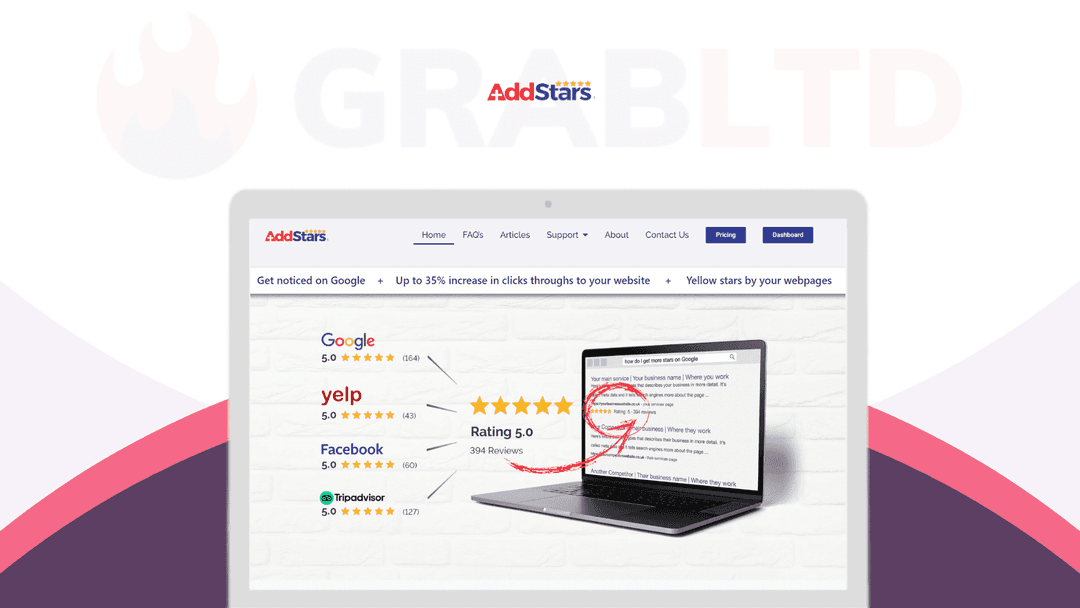
Collect reviews from other platforms and show them as star ratings in Google search results.
AddStars at a glance
- Platform
- Web, WordPress
- Support
- Support through the dashboard, live chat or email.
- Note
- The license covers 2 websites. The page marks the deal as expired.
Our take
Is AddStars worth buying?
Based on the DealMirror listing, this is a two-site review aggregation tool aimed at showing stars in Google results. The page marks the deal as expired, and its review platform count is dated to 2023. Confirm availability and current platform coverage before relying on it.
Good fit if
- You have reviews on several platforms.
- You want stars in Google results with little upkeep.
- You want a white-label option for clients.
Skip it if
- You want reviews displayed on your own site.
- You need a tool to request or manage reviews.
Which AddStars plan do you need?
Prices in USD, excluding tax.
| AddStars | |
|---|---|
| Websites | 2 |
| White label | Dashboard and assets |
| Review platforms | 29 at time of listing |
Before you buy: DealMirror's terms and extra costs
- Refund. DealMirror lists a 30-day money-back guarantee, or 60 days for Prime members.
- Redeem. Redeem within 60 days of purchase.
- Support. Support through the dashboard, live chat or email.
- Platform. WordPress plugin, or paste a code into any site. The listing says it works on all website types.
- Note. The license covers 2 websites. The page marks the deal as expired.
What is AddStars?
AddStars collects your reviews from other platforms and shows them as star ratings in Google's organic search results. It is not a review platform or a review management service, and it does not show reviews on your own site. The deal covers two websites, with a white-label dashboard and a reseller option. DealMirror marks this deal as expired.
What AddStars says it does
- Shows reviews from other platforms in Google organic search results
- Pulls reviews from 29 platforms, with a stated goal of 100 more by the end of 2023 (AddStars's figure)
- No upkeep once installed (AddStars's figure)
- White-label dashboard, reseller option and affiliate program
Why AddStars
Reviews spread over several sites are easy to miss in search. AddStars gathers them and aims to show the stars in Google results. It does not guarantee Google will display them, and it is no longer on sale at the source.
How does AddStars work?
Redeem your code
Buy on DealMirror and redeem within 60 days, if the deal returns.
Add your review profiles
Connect the review platforms you use.
Install the code
Use the WordPress plugin or paste your code into the site header or footer.
Let it run
The vendor describes it as fire and forget.
Then it handles:
- Collecting reviews from other platforms
- Showing star ratings in Google search
- White-label dashboards for clients
- Reselling to clients
- Auto indexing
Who is AddStars for?
Built for
- Local businesses with reviews on several platforms
- Agencies that want to resell the service
- Owners who want a low-maintenance setup
Not for
- Anyone who wants reviews displayed on their own website
- Businesses wanting a review request or management tool
What is included in AddStars?
Reviews in search
- Review aggregation 29 platforms per the page
- Auto indexing
- Works on all website types
Agency tools
- White-label dashboard
- White-label assets emails, blogs, graphics
- Reseller dashboard and affiliate program
Video review
We have not reviewed AddStars on video yet.
Get notifiedBuyer reviews
No reviews yet. Bought AddStars? Add it to your workspace and share what it replaced.
Add to your workspaceAddStars questions
What does AddStars do?
It collects your reviews from other websites and aims to display them in Google's organic search results.
Does it show reviews on my website?
No. The listing says it does not show reviews on your own site and is not a review platform or management service.
How many websites are covered?
Two websites, one license per site. You can use both or give one to a client.
Is the deal still available?
DealMirror marks it Expired at the time of checking.
How do I install it?
Use the WordPress plugin or paste your unique code into the site's header or footer.
Often compared with
These are other tools in the same space, not deals on GrabLTD.
- Trustpilot
- Grade.us
- BirdEye
- Podium
- NiceJob
Sources
Checked . Prices and terms on this page come from: