

Sales & CRM · Lifetime deal
Agently
Rank incoming work, delegate tasks, and approve outside actions.
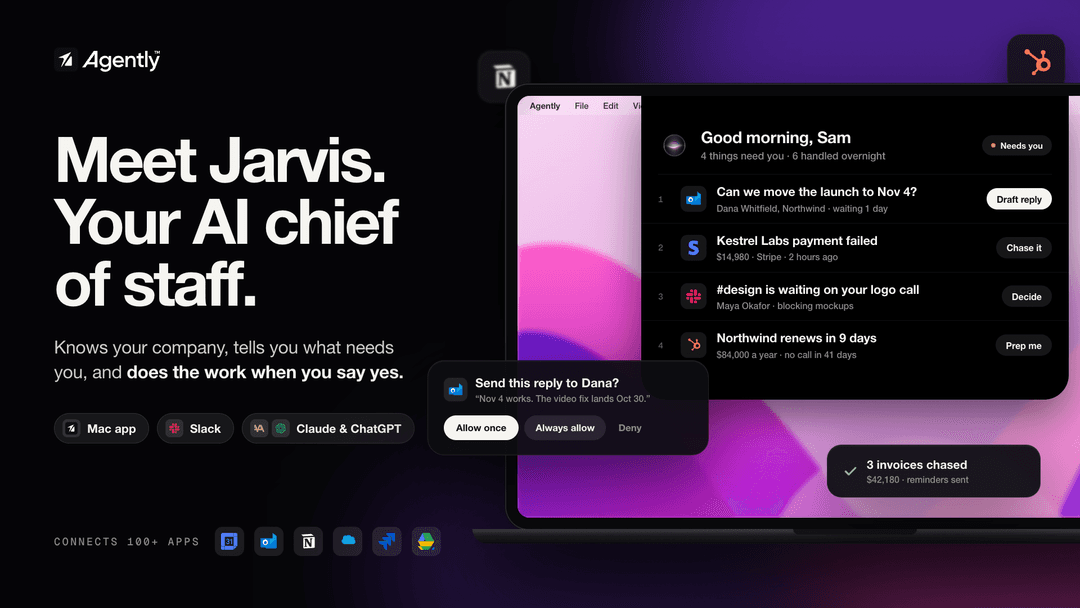
Agently at a glance
- Platform
- Mac
- Note
- Lifetime access to Agently.
- Upgrades
- All future plan updates are included.
- Upgrades
- Upgrade or downgrade between four license tiers.
- Note
- No codes or stacking; select one license tier.
Which Agently plan do you need?
Prices in USD, excluding tax.
| Tier 1 | Tier 2 | Tier 3 | Tier 4 | |
|---|---|---|---|---|
| One-time price | $69 | $159 | $249 | $489 |
| Regular price (AppSumo) | ||||
| You save | $130 | $240 | $350 | $510 |
| Includes | 1,000 One-time credits; 1 Users; 1 Workspaces; 1 GB Storage; 3 Connected apps; Manual Sync | 3,000 One-time credits; 1 Users; 1 Workspaces; 4 GB Storage; 7 Connected apps; Auto Sync; BYOK (unlimited credits) | 6,000 One-time credits; 5 Users; 2 Workspaces; 10 GB Storage; Unlimited Connected apps; Auto Sync; BYOK (unlimited credits); Agent teams; Voice mode | 10,000 One-time credits; 10 Users; Unlimited Workspaces; 20 GB Storage; Unlimited Connected apps; Auto Sync; BYOK (unlimited credits); Agent teams; Voice mode; White-label pages |
Before you buy: AppSumo's terms and extra costs
- Note. Lifetime access to Agently.
- Upgrades. All future plan updates are included.
- Redeem. Activate the license within 60 days of purchase.
- Upgrades. Upgrade or downgrade between four license tiers.
- Note. No codes or stacking; select one license tier.
What is Agently?
Agently is an AI chief of staff that organizes work across business apps and takes action on a Mac. It ranks items needing attention, drafts responses, creates documents and updates, and routes outside actions through approval.
What Agently says it does
- Connects to more than 100 tools, including Slack, Notion, Stripe, HubSpot, GitHub, and Gmail. (Agently's figure)
- Jarvis learns the company on day one. (Agently's figure)
- Built for founders and small teams that want to run more work without hiring more people.
- Combines pending work into one ranked list.
- Filters newsletters, bots, and calendar replies while keeping hidden items visible.
- Learns priority order when items are dragged and reordered.
- Draft replies use company context, and only the Send action sends them.
- Creates linked documents, live pages, diagrams, and routines; routines skip runs when nothing changed.
- Builds a temporal knowledge graph of the company called the Brain.
- Shows sources for every answer.
- Routes outside actions through approval and records each action.
Why Agently
Work requests can be scattered across Slack, Outlook, calendars, CRM, and tickets. Agently brings them into one ranked list, filters routine noise, and performs requested actions with company context while keeping outside actions subject to review.
How does Agently work?
Connect company context
Connect business apps, the company website, files, Notion, Confluence, Dropbox, and Google Drive.
Build the attention list
Jarvis combines requests from Slack, Outlook, Linear, Jira, the calendar, and pending approvals into one ranked list.
Filter and reorder
Newsletters, bots, and calendar replies are hidden but stay viewable. Dragged items teach Jarvis the preferred order.
Delegate the work
Send work in chat or Slack, or say "Hey Jarvis" from any app. Jarvis uses connected apps step by step while the user watches.
Review and approve
Review drafts and finished outputs. Outside actions use Allow once, Always, or Deny, and every run is recorded.
Then it handles:
- Ranks pending work
- Filters newsletters, bots, and replies
- Drafts context-aware replies
- Runs tasks across connected apps
- Creates linked documents, pages, and diagrams
- Updates approved email, CRM, ticket, and calendar actions
- Maintains separate client workspaces
Who is Agently for?
Built for
- Founders and small teams.
- Sales and operations teams.
- Customer success teams.
- Marketing and research teams.
Not for
- People who need a desktop client on platforms other than Mac.
- People who need emails or messages sent without an approval gate.
What is included in Agently?
Priority management
- Attention ranking Combines messages, approvals, calendar items, and support work.
- Noise filtering Hides newsletters, bots, and replies while keeping hidden items visible.
- Priority learning Learns preferred order when items are dragged and reordered.
- Reply drafting Drafts using company context; the user retains final send control.
Mac assistant
- Notch interface Shows answers, briefs, and approvals in the Mac notch.
- Visible app use Uses connected apps step by step while the user watches.
- Work handoff Accepts requests through chat or Slack.
- Wake phrase Activates with "Hey Jarvis" from any app.
Company knowledge
- Knowledge sources Adds company websites, PDFs, Word documents, spreadsheets, and connected drives.
- Company brain Learns the user's role, customers, writing style, and colleagues.
- Temporal graph Builds a temporal knowledge graph called the Brain.
- Answer sources Shows sources for every answer.
Completed work
- Linked outputs Creates documents, live pages, and diagrams shared by link.
- Routines Repeats set routines and skips them when nothing changed.
- Client separation Provides a separate brain and app connections for each client workspace.
Approvals and records
- Approval coverage Routes email, Slack, CRM, ticket, and calendar actions through approval.
- Permission choices Offers Allow once, Always, and Deny choices.
- Action receipts Records what ran, when, and who requested each action.
Video review
We have not reviewed Agently on video yet.
Get notifiedBuyer reviews
No reviews yet. Bought Agently? Add it to your workspace and share what it replaced.
Add to your workspaceAgently questions
What does Agently do?
Agently combines signals from Slack, Outlook, Linear, Jira, email, calendars, and pending approvals into one ranked daily list. Its Jarvis agent can plan and perform tasks such as drafting documents, updating CRM records, replying to tickets, sending email, and creating live pages or diagrams. It works across more than 100 tools and on the Mac.
Who is Agently for?
Agently is built for founders and small teams that want to handle more sales, operations, customer success, marketing, and research work without expanding headcount. Tiers 3 and 4 support multiple users, workspaces, agent teams, and voice mode; Tiers 1 and 2 are limited to one user and one workspace.
Does Jarvis take actions without approval?
You set guardrails for what needs approval versus what may run autonomously, while emails, Slack messages, CRM updates, and calendar changes use one approval gate. Choices are Allow once, Always, or Deny. Every action is logged with what ran, when, and who requested it.
What do the four tiers cost and include?
Listed prices and limits are: Tier 1—$69: 1 user, 1 workspace, 1 GB storage, 3 connected apps, manual sync, 1,000 one-time credits. Tier 2—$159: 1 user, 1 workspace, 4 GB, 7 apps, auto sync, BYOK with unlimited credits, 3,000 one-time credits. Tier 3—$249: 5 users, 2 workspaces, 10 GB, unlimited apps, agent teams, voice mode, 6,000 credits. Tier 4—$489: 10 users, unlimited workspaces, 20 GB, agent teams, voice mode, white-label pages, 10,000 credits.
What happens after purchase?
Activate the license within 60 days of purchase. It includes lifetime access to Agently and all future plan updates, with the ability to upgrade or downgrade among the four license tiers. The deal uses no codes and does not allow stacking; choose one plan. No refund policy or separate redemption process is specified.
Are there extra costs or credit limits?
No additional fees or add-on prices are listed. Credit access is included: Tier 1 has 1,000 one-time credits, while Tiers 2, 3, and 4 include BYOK with unlimited credits. Tier 1 has manual sync; Tiers 2–4 have auto sync. Connected-app, storage, user, and workspace limits still apply by tier.