

AI Tools · Lifetime deal
Aon Pro Studio
From topic to finished MP4 in one desktop workflow
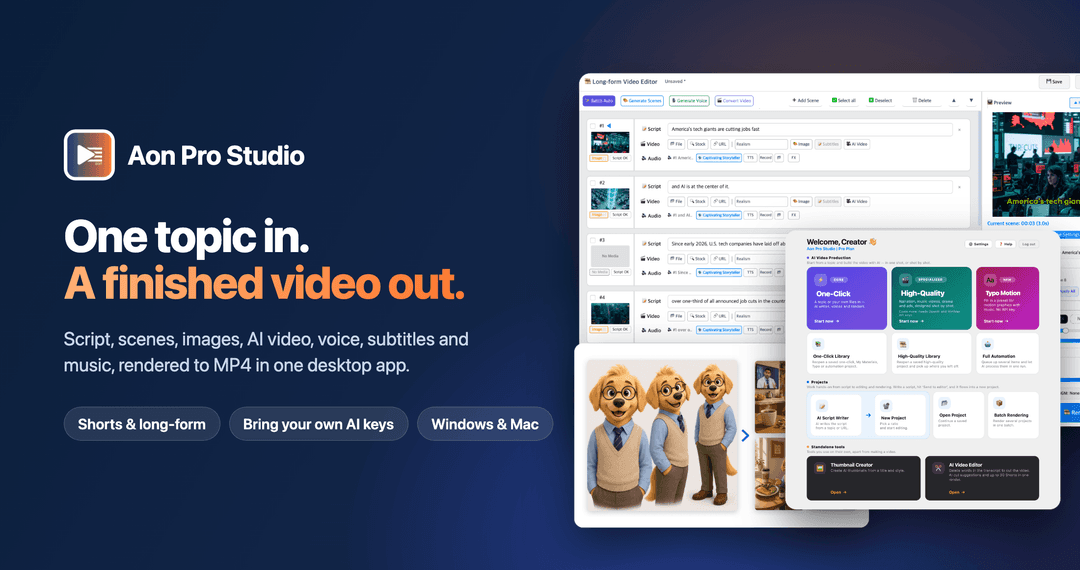
Aon Pro Studio at a glance
- Platform
- Windows 10/11 (64-bit), Apple Silicon Mac (M1 or later, macOS 14 or later)
Which Aon Pro Studio plan do you need?
Prices in USD, excluding tax.
| Pro Plan – Lifetime Deal | |
|---|---|
| One-time price | $59 |
| Regular price (Dealify) | |
| You save | $40 |
| Includes | Lifetime access to Aon Pro Studio Pro; All future updates; 1 computer; Unlimited projects, renders and automation runs (AI usage is billed by your own provider accounts); High-quality production mode : Narrated Story, Music Video, Story Drama and Advertising, where you design every scene; All 51 Typo Motion Graphics presets , chart and icon presets included, plus Narrated Typo Longform; All three longform modes - one-click, persona, and motion graphics - at 10, 15, or 20 scenes; 3, 4, 6, or 8 scenes per Short; Full automation mode - Shorts and longform, unlimited queue; News links, YouTube analysis, and book quotes in the AI Script Writer; The Automation and High-Quality Libraries , to reopen and continue saved projects; Bring your own API keys: an OpenAI key is required; MiniMax, ElevenLabs and Typecast are optional; Supported AI providers and models may change over time as providers update or retire them; we keep the app working with current models; Windows 10/11 (64-bit) or Apple Silicon Mac (M1 or later, macOS 14 or later); 30-day Money Back Guarantee; You must redeem your code(s) within 60 days of purchase |
Before you buy: Dealify's terms and extra costs
- Refund. 30-day Money Back Guarantee
- Redeem. You must redeem your code(s) within 60 days of purchase
What is Aon Pro Studio?
Aon Pro Studio is a desktop app for turning a topic, URL, or book quote into an AI video. It generates scripts, scenes, images, video clips, voiceovers, subtitles, and music; maintains visual consistency; renders an MP4; and can publish directly to YouTube.
What Aon Pro Studio says it does
- Create complete videos from script through final MP4 in one application.
- Maintain characters, locations, outfits, and products across scenes.
- Queue topics, news URLs, YouTube URLs, or book quotes for batch rendering.
- Extract AI-generated highlights and edit existing footage at the word level.
- Upload finished videos directly to YouTube.
- Generate voiceovers with OpenAI, MiniMax, ElevenLabs, and Typecast.
- Use your own AI provider API keys for connected services.
- Typo Motion presets can be used without an API key.
- Projects, renders, and automation runs are unlimited.
- Create professional-looking videos faster.
- Reduce time spent switching between tools.
- The app offers four production modes: narrated stories, music videos, story dramas, and advertisements. (Aon Pro Studio's figure)
Why Aon Pro Studio
AI video production can require separate tools for scripting, visuals, audio, editing, and publishing. Aon Pro Studio combines those tasks in one desktop workflow, adds batch production, and supports visual consistency for characters, locations, outfits, and products.
How does Aon Pro Studio work?
Choose a topic and mode
Enter a topic and select Narrated Story, Music Video, Story Drama, or Advertising.
Generate the script and scenes
The app writes the script, divides it into scenes, and prepares it for visual production.
Create visuals and audio
Create images, AI video clips, voiceovers, subtitles, and background music with connected providers.
Maintain visual consistency
Apply character, location, and product sheets to maintain continuity across scenes.
Render and publish
Combine the assets, render the MP4, and upload it to YouTube. Full Automation can also batch-render queued inputs.
Then it handles:
- Turn topics, URLs, and quotes into video projects
- Generate scripts and scene breakdowns
- Create images, AI clips, voiceovers, subtitles, and music
- Keep characters, locations, outfits, and products consistent
- Queue and batch-render multiple videos
- Extract highlights from existing footage
- Edit footage with word-based editing
- Render MP4s and publish to YouTube
Who is Aon Pro Studio for?
Built for
- Faceless YouTube, TikTok, and Shorts creators
- Content marketers and small agencies
- Solo creators and small businesses
- Storytellers and series creators
- Creators who want direct control over provider usage
Not for
- Users whose devices are not Windows 10/11 (64-bit) or Apple Silicon Macs running macOS 14 or later
- Users without an OpenAI API key
- Users who need AI video clips or High-Quality modes without a MiniMax API key
- People who need to use the app on more than one computer
What is included in Aon Pro Studio?
End-to-end production
- Script and scene generation Turn a topic or source into scripted scenes.
- Image and clip generation Create images and AI video clips.
- Voice and text output Generate voiceovers and subtitles.
- Music production Add background music.
- MP4 rendering Render production assets into a finished MP4.
Visual consistency
- Character sheets Keep faces and outfits consistent across scenes.
- Location sheets Maintain environments across scenes.
- Product sheets Keep product details consistent across scenes.
Production modes
- Narrated Story Create story-driven videos with narration and visuals.
- Music Video Produce AI-generated music video projects.
- Story Drama Build multi-episode series with speaking characters.
- Advertising Create product-focused video advertisements.
- Longform scene options Choose one-click, persona, or motion-graphics workflows at 10, 15, or 20 scenes.
- Short scene options Select 3, 4, 6, or 8 scenes for a Short.
Automation and editing
- Full Automation Queue topics, news URLs, YouTube URLs, and book quotes.
- Batch rendering Process multiple queued videos in batches.
- Unlimited production Create unlimited projects, renders, and automation runs.
- AI highlight extraction Extract AI-generated highlights from existing footage.
- Word-based editing Edit existing footage at the word level.
- Typo Motion Use 51 ready-made motion-graphics presets without an API key.
Voice and publishing
- Voice provider choice Generate voices with OpenAI, MiniMax, ElevenLabs, or Typecast.
- Direct YouTube uploads Upload finished videos to your YouTube channel.
- Update notices Receive update notices on the app dashboard.
Setup and compatibility
- Bring your own API keys Use your own AI provider API keys.
- OpenAI requirement An OpenAI API key is required.
- MiniMax requirement MiniMax is required for AI clips and High-Quality modes.
- Provider compatibility Supported providers and models may change as providers update or retire them.
Video review
We have not reviewed Aon Pro Studio on video yet.
Get notifiedBuyer reviews
No reviews yet. Bought Aon Pro Studio? Add it to your workspace and share what it replaced.
Add to your workspaceAon Pro Studio questions
What does Aon Pro Studio do?
Aon Pro Studio is a desktop app that turns a topic into a finished MP4. It generates scripts, scenes, images, AI video clips, voiceovers, subtitles, and background music in one workflow. It also supports batch rendering, existing-footage editing, AI highlight extraction, visual consistency sheets, and direct YouTube uploads.
Who is Aon Pro Studio designed for?
It is designed for faceless YouTube, TikTok, and Shorts creators; content marketers and small agencies; solo creators and small businesses; and storytellers producing recurring characters, music videos, or multi-episode dramas. Its automation tools are also suited to creating multiple videos across campaigns, clients, or channels.
What is included in the lifetime plan?
The Pro Plan – Lifetime Deal is $59, with a regular price of $99. It includes lifetime access, all future updates, use on 1 computer, unlimited projects, renders, and automation runs, all four production modes, longform and Shorts options, 51 Typo Motion Graphics presets, chart and icon presets, and AI Script Writer sources.
What are the system and AI provider requirements?
Aon Pro Studio supports Windows 10/11 (64-bit) and Apple Silicon Macs running macOS 14 or later. An OpenAI API key is required. A MiniMax API key is required for AI video clips and the High-Quality modes. ElevenLabs and Typecast are optional. Typo Motion Graphics presets require no API key.
What happens after purchase, and can I get a refund?
After purchase, redeem the code within 60 days. The Pro Plan includes lifetime access and all future updates. The purchase is covered by a 30-day Money Back Guarantee.
Are there additional usage costs or monthly fees?
There are no monthly platform fees or platform credit charges. You bring your own AI provider keys and pay providers directly at their rates for AI usage. Unlimited projects, renders, and automation runs do not include unlimited provider usage, and supported providers or models may change as providers update or retire them.