

Productivity · Lifetime deal
Billbooks
Send invoices, collect payments, and keep business records organized
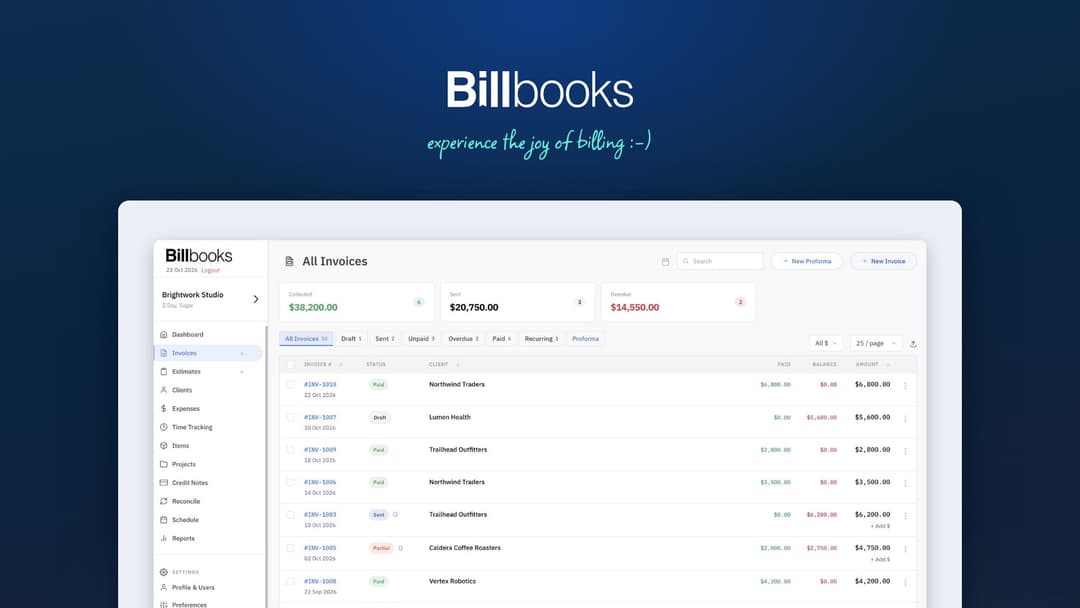
Billbooks at a glance
- Platform
- Web, iOS, Android
- Note
- Lifetime access to Billbooks
- Upgrades
- All future plan updates
- Note
- Stack up to 2 codes
Which Billbooks plan do you need?
Prices in USD, excluding tax.
| Basic | Standard | |
|---|---|---|
| One-time price | $59 | $118 |
| Regular price (AppSumo) | ||
| You save | $36.40 | $72.80 |
| Includes | 2 Users; 100 Clients; 650 Items; 50 Projects; Unlimited Invoices & estimates | 5 Users; 500 Clients; 1,000 Items; 500 Projects; Unlimited Invoices & estimates |
Before you buy: AppSumo's terms and extra costs
- Note. Lifetime access to Billbooks
- Redeem. Redeem your code within 60 days of purchase
- Upgrades. All future plan updates
- Note. Stack up to 2 codes
What is Billbooks?
Billbooks is invoicing and quoting software for freelancers, agencies, and small businesses. It creates digitally signed invoices and quotes, sends them by email, WhatsApp, or QR code, accepts online payments, tracks client activity, and organizes items, expenses, projects, time, and reports.
What Billbooks says it does
- Digitally signed invoices and quotes can be sent in seconds.
- Pay Now links and reminders help clients pay faster.
- Alerts show when a client opens or pays an invoice.
- Accepted quotes can become invoices in one click. (Billbooks's figure)
- Automatic reminders chase overdue invoices.
- The iOS and Android apps sync instantly with the web app.
Why Billbooks
Getting paid can require chasing invoices and keeping client, project, and expense records organized. Billbooks sends signed invoices and quotes, tracks opens and payments, reminds clients about overdue invoices, and brings items, expenses, projects, time, and reports together.
How does Billbooks work?
Create and send
Create an invoice or quote, add your logo and tax rules, sign it digitally, and send it by email, WhatsApp, or QR code.
Accept payment
Add a Pay Now link so clients can pay through Stripe, PayPal, Braintree, Authorize.Net, or ACH.
Track and follow up
See alerts when a client opens or pays. Automatic reminders chase overdue invoices.
Bill recurring work
Schedule recurring invoices for repeat clients. Convert an accepted quote into an invoice in one click.
Organize and report
Track items, stock, expenses, project time, and bank matches. Review profit and loss, sales, tax, and outstanding balances.
Then it handles:
- Create and send invoices and quotes
- Accept online payments
- Chase overdue invoices
- Track items and stock
- Record expenses and receipts
- Organize projects and time
- Reconcile bank transactions
- Monitor sales, tax, and balances
Who is Billbooks for?
Built for
- Freelancers who send invoices and quotes
- Agencies that bill clients by project
- Small businesses that manage clients, stock, and expenses
Not for
- People who need a native Windows desktop application
- People who need a native macOS desktop application
What is included in Billbooks?
Invoicing and payment collection
- Signed invoices and quotes Send digitally signed invoices and quotes by email, WhatsApp, or QR code.
- Pay Now links Include a Pay Now link on every invoice for faster payment.
- Online payments Accept Stripe, PayPal, Braintree, Authorize.Net, and ACH payments.
- Open and payment alerts Receive alerts when clients open invoices or make payments.
- Automatic reminders Chase overdue invoices with automatic payment reminders.
- Recurring billing Schedule recurring invoices for repeat clients.
- Quote conversion Turn accepted quotes into invoices with one click.
Items, expenses, and banking
- Catalog and stock Track goods, services, SKUs, and stock levels.
- Expense tracking Record billable and recurring expenses with uploaded receipts.
- Bank reconciliation Match bank statement lines with invoices and expenses.
- Item sales reports Identify best sellers and dead stock with item sales reports.
Projects, time, and reports
- Project records Group invoices, quotes, expenses, and time by project.
- Time tracking Turn unbilled project hours into invoice lines.
- Financial summaries Review profit and loss, sales, and tax summaries.
- Outstanding balances Export reports showing what clients still owe.
Business access and billing
- Live business view See sales, expenses, and amounts owed in one live view.
- Mobile invoicing Create invoices from iOS and Android apps synced with the web app.
- Flexible billing Issue multi-currency and multilingual invoices with custom taxes and discounts.
- Zapier connection Connect other business tools through Zapier.
Video review
We have not reviewed Billbooks on video yet.
Get notifiedBuyer reviews
No reviews yet. Bought Billbooks? Add it to your workspace and share what it replaced.
Add to your workspaceBillbooks questions
What does Billbooks do?
Billbooks creates and sends digitally signed invoices and quotes by email, WhatsApp, or QR code. Clients can pay through a Pay Now link using Stripe, PayPal, Braintree, Authorize.Net, or ACH. It also tracks items, expenses, projects, time, recurring invoices, and overdue payments, with reports for profit and loss, sales, tax, and outstanding balances.
Who is Billbooks designed for?
It is built for freelancers, agencies, and small businesses that want invoicing and quoting without using complex accounting software. It supports mobile invoicing, multi-currency and multilingual invoices, custom taxes and discounts, and Zapier integrations.
What are the limits of the Basic and Standard plans?
Basic includes 2 users, 100 clients, 650 items, 50 projects, and unlimited invoices and estimates. Standard includes 5 users, 500 clients, 1,000 items, 500 projects, and unlimited invoices and estimates. Both plans include every core feature; Standard has higher usage limits.
What happens after purchase?
Your purchase includes lifetime access to Billbooks and all future plan updates. You must redeem your code within 60 days of purchase. You can stack up to 2 codes.
Are there extra costs for either plan?
The listed plan prices are $59 for Basic and $118 for Standard. No additional subscription, service, or payment-processing fees are specified in the listing.