

Video & Audio · Lifetime deal
CaptionBolt
Style captions and finish short videos in one workflow
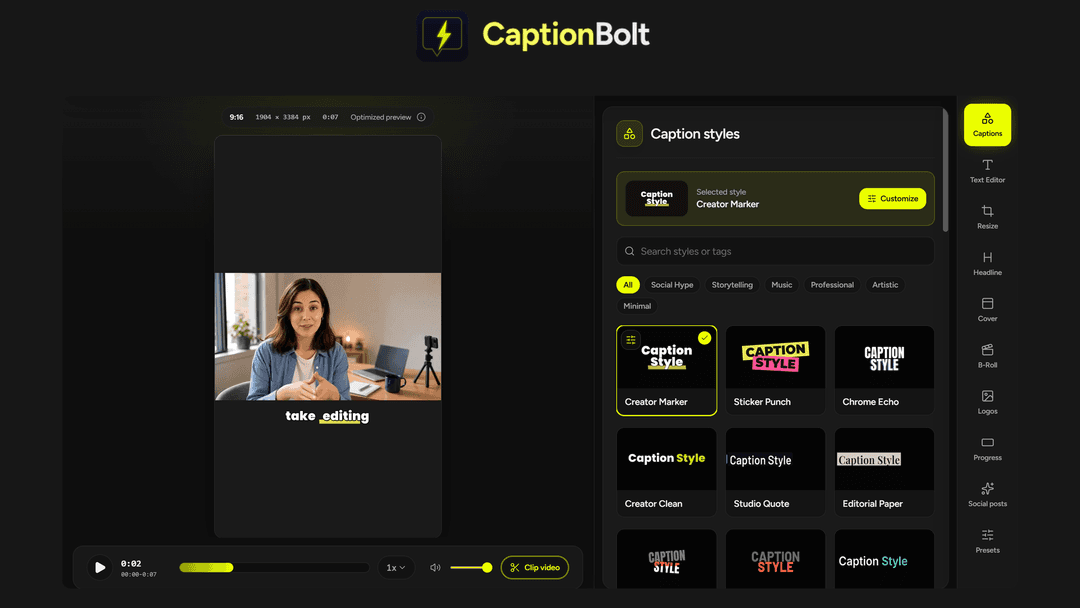
CaptionBolt at a glance
- Platform
- TikTok, Instagram Reels, YouTube Shorts, Pexels, Zoom
- Note
- Lifetime access to CaptionBolt
- Note
- All future plan updates
- Upgrades
- Ability to upgrade or downgrade between 3 license tiers
- Note
- No codes, no stacking—just choose the plan that is right for you
Which CaptionBolt plan do you need?
Prices in USD, excluding tax.
| Tier 1 (Starter) | Tier 2 (Pro) | Tier 3 (Max) | |
|---|---|---|---|
| One-time price | $39 | $129 | $229 |
| Regular price (AppSumo) | |||
| You save | $429 | $1,419 | $2,519 |
| Includes | 60 Processing minutes / month; 5 min Max video length; 500MB Upload size limit; 1 Concurrent jobs; Standard Processing priority; MP4, TXT Exports | 400 Processing minutes / month; 10 min Max video length; 1GB Upload size limit; 2 Concurrent jobs; Standard Processing priority; MP4, SRT, ASS, TXT Exports | 1,200 Processing minutes / month; 20 min Max video length; 3GB Upload size limit; 3 Concurrent jobs; High Processing priority; MP4, SRT, ASS, VTT, TXT Exports; REST API & webhook; MCP server for AI agents |
Before you buy: AppSumo's terms and extra costs
- Note. Lifetime access to CaptionBolt
- Note. All future plan updates
- Redeem. You must activate your license within 60 days of purchase
- Upgrades. Ability to upgrade or downgrade between 3 license tiers
- Note. No codes, no stacking—just choose the plan that is right for you
What is CaptionBolt?
CaptionBolt is an AI captioning and video editing workspace for short videos. It generates captions from speech, supports visual styling and text corrections, and combines resizing, B-Roll, covers, branding, exports, and social post drafts.
What CaptionBolt says it does
- Add AI captions to short videos.
- Apply AI captions in 338 styles instantly, then review the words instead of adjusting timing. (CaptionBolt's figure)
- Transcribe speech and time every line.
- Customize fonts, colors, motion, and highlighted words.
- Fix names and terms in Text Editor without changing the audio.
- Review every caption segment to see where the speaker and captions land.
- Switch to 9:16, 1:1, 4:5, or 16:9 and fit the shot with a crop, blurred background, or solid color. (CaptionBolt's figure)
- Download MP4s in up to 4K with no watermarks. (CaptionBolt's figure)
- Export TXT transcripts and SRT, ASS, or VTT subtitle files by tier.
- Choose from 24 editable cover designs and edit the opening text. (CaptionBolt's figure)
- Add B-Roll from suggestions, Pexels, or your own uploads, then adjust its timing.
- Keep branding consistent with a logo, progress bar, or saved preset.
Why CaptionBolt
Short videos need captions, timing, formatting, branding, and post copy. CaptionBolt brings those tasks into one caption-first workspace. It generates and times captions, lets users correct text without changing audio, and keeps video finishing and post drafting together.
How does CaptionBolt work?
Upload footage
Upload talking-head footage, demos, interviews, course clips, or Zoom recordings.
Generate and style captions
Transcribe speech, time each line, and choose from 338 caption styles.
Review and correct
Preview each caption segment and fix names or terms without changing the audio.
Finish the video
Resize, fit the shot, trim, add B-Roll, create a cover, and apply branding.
Export and draft posts
Export video, transcript, or subtitle files, then draft and edit social copy.
Then it handles:
- Generating captions from speech
- Styling and correcting caption text
- Previewing caption placement
- Resizing and fitting videos
- Adding B-Roll, covers, and branding
- Exporting videos, transcripts, and subtitles
- Drafting and editing social posts
Who is CaptionBolt for?
Built for
- Short-video creators and teams
- Teams producing talking-head footage, demos, interviews, or course clips
- Users working with Zoom recordings
- Teams preparing posts for TikTok, Instagram Reels, or YouTube Shorts
Not for
- Users exceeding their tier's processing minutes, video length, upload size, or concurrent-job limits
- Tier 1 users needing SRT or ASS subtitle exports
- Tier 1 or Tier 2 users needing VTT subtitle exports
- Tier 1 or Tier 2 users needing REST API, webhook, or MCP server access
What is included in CaptionBolt?
Captions and automation
- Generate styled captions Create captions from speech and choose from 338 styles.
- Customize appearance Adjust fonts, colors, motion, and highlighted words.
- Correct caption text Fix names and terms without changing the audio.
- Automate captioning Tier 3 supports REST API, webhooks, and an MCP server.
Preview, format, and export
- Preview caption placement Review each caption segment against the speaker's position.
- Choose aspect ratio Switch among 9:16, 1:1, 4:5, and 16:9.
- Fit the shot Use a crop, blurred background, or solid color.
- Trim footage Trim video clips before export.
- Export MP4 Download watermark-free MP4 files in up to 4K.
- Export transcripts TXT exports are available on every tier.
- Export subtitles SRT and ASS need Tier 2; VTT needs Tier 3.
Covers, B-Roll, and branding
- Create a cover Choose from 24 editable designs and edit the opening text.
- Add B-Roll Use suggestions, Pexels, or your own uploads.
- Apply branding Add a logo, progress bar, or saved preset.
Social post drafts
- Draft social posts Draft TikTok, Instagram Reels, and YouTube Shorts copy.
- Match a writing style Choose a style so drafts match the intended voice.
- Edit post details Edit wording, hashtags, YouTube titles, and descriptions.
- Copy post text Copy finished text for pasting into a social post.
Video review
We have not reviewed CaptionBolt on video yet.
Get notifiedBuyer reviews
No reviews yet. Bought CaptionBolt? Add it to your workspace and share what it replaced.
Add to your workspaceCaptionBolt questions
What does CaptionBolt do?
CaptionBolt transcribes speech in a video, times each line, and applies editable AI caption styles, including font, color, motion, and highlighted-word controls. It also resizes and trims footage, adds B-Roll, covers, logos, progress bars, and saved presets, then drafts posts for TikTok, Instagram Reels, and YouTube Shorts from the transcript.
What kinds of videos is CaptionBolt for?
It is intended for talking-head footage, demos, interviews, course clips, and Zoom recordings. The caption-first workflow turns source footage into a finished post, with formats for TikTok, Instagram Reels, and YouTube Shorts.
What are the limits for each plan?
Tier 1 (Starter) costs $39 and includes 60 processing minutes/month, a 5-minute maximum video, 500MB uploads, 1 concurrent job, standard priority, and MP4/TXT exports. Tier 2 (Pro) costs $129 with 400 minutes/month, 10-minute videos, 1GB uploads, 2 jobs, standard priority, and SRT/ASS exports. Tier 3 (Max) costs $229 with 1,200 minutes/month, 20-minute videos, 3GB uploads, 3 jobs, and high priority. No add-on fees are listed.
What can I export, and is automation included?
Every plan can download MP4s in up to 4K with no watermarks and export a TXT transcript. Tier 2 and above also export SRT and ASS subtitles; Tier 3 adds VTT. Tier 3 also includes a REST API, webhook, and MCP server for AI agents. Captions, resizing, covers, B-Roll, branding, and social post drafts are available on every plan.
What happens after I purchase a license?
You must activate your license within 60 days of purchase. The purchase includes lifetime access to CaptionBolt and all future plan updates. You can upgrade or downgrade between the three license tiers. There are no codes or stacking; the listing says to choose the plan that is right for you.