

AI Tools · Lifetime deal
Clipzen
Clipzen turns long videos into viral clips. Unlimited clipping with no subscription.
Clipzen at a glance
- Platform
- Windows, MacOs
- Upgrades
- All future Clipzen updates and upgrades are included at no additional cost. Pay once, use forever.
- Support
- Need help? Contact us at support@clipzen.net. We're happy to help with installation, activation, and technical issues.
Which Clipzen plan do you need?
Prices in USD, excluding tax.
| Clipzen Lifetime License | |
|---|---|
| One-time price | $79 |
| Regular price (Clipzen) | |
| You save | $61 |
Before you buy: Clipzen's terms and extra costs
- Upgrades. All future Clipzen updates and upgrades are included at no additional cost. Pay once, use forever.
- Support. Need help? Contact us at support@clipzen.net. We're happy to help with installation, activation, and technical issues.
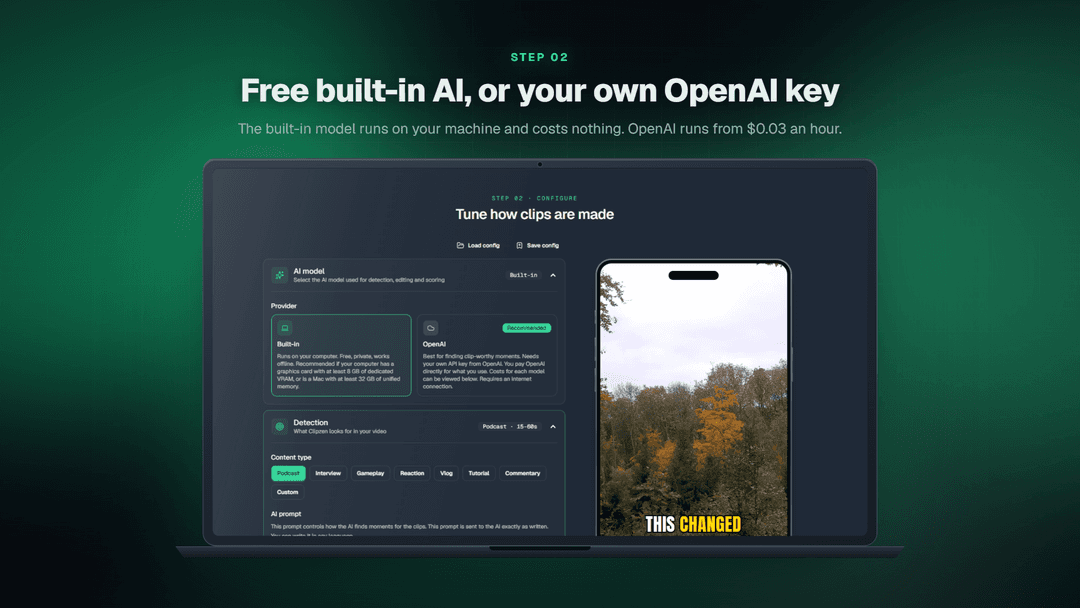
- AI usage cost. Clipzen has no subscription fees, usage limits, or metered charges. The built-in AI model is included. If you optionally use OpenAI through your own API key, you'll pay OpenAI directly based on your usage. Clipzen charges no additional fees.
- Platform. Available for Windows 10/11 (64-bit) and macOS 11 or later on Apple Silicon (M1 or newer). Intel-based Macs are not supported. The built-in AI model requires 16 GB RAM and a dedicated GPU with at least 8 GB VRAM on Windows, or 16 GB unified memory on Apple Silicon Macs.
What is Clipzen?
Clipzen is a one-payment desktop app that turns long videos into short vertical ones. It transcribes the recording, picks the moments worth posting, and edits each into a finished short (follows the active speaker, cuts the filler, adds word-synced subtitles, b-roll and background music). The built-in AI runs on your own machine and is completely free. You can also plug in an OpenAI key instead, from about $0.03 per hour of video.
What Clipzen says it does
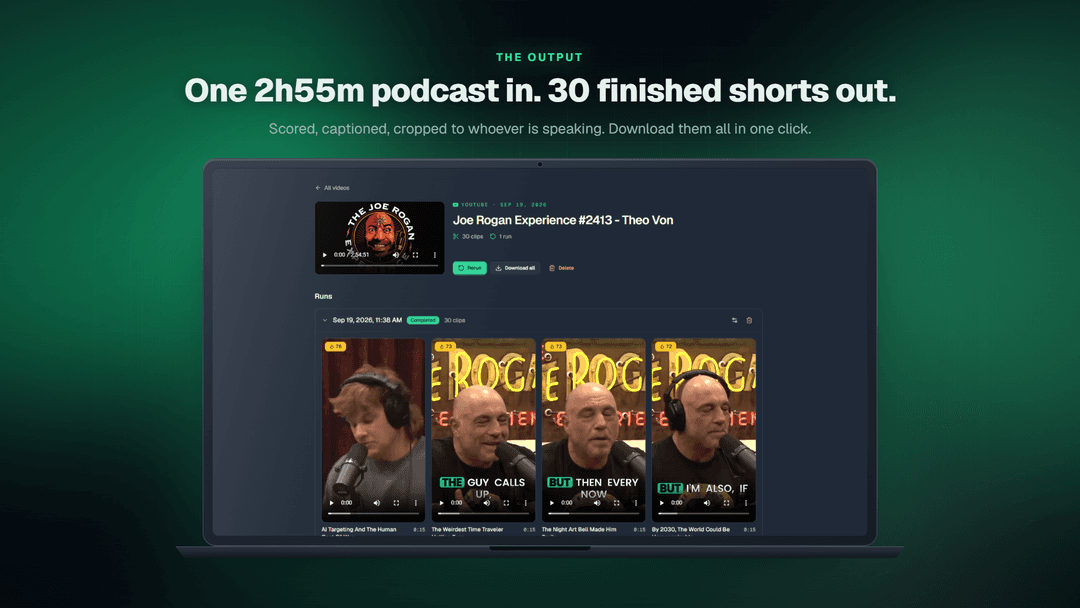
- Automatically find the most engaging moments in podcasts, interviews, streams, and other long-form videos. Get multiple ready-to-post clips from a single recording.
- Let AI analyze your video's transcript, identify standout moments, and rank clips by their potential to engage viewers.
- Generate synchronized captions and automatically keep the active speaker in frame. Customize caption styles and export clips in vertical, square, or landscape formats.
- Fine-tune your clips without switching between applications. Edit captions, remove unwanted words, add music, B-roll, text, and visual effects.
- Process videos directly on your computer. Your video and audio never leave your device, and you can work offline after activation.
- Pay once and get unlimited videos, unlimited clips, and every future upgrade. No subscriptions, credits, usage limits, or recurring fees.
Why Clipzen
Hey everyone! I'm Aurel, the founder of Clipzen.
Honestly, this isn't an original idea. There are already plenty of clipping tools out there. The thing I couldn't find was one that runs on my own computer with a one time payment. I hate subscriptions :))
The cloud based ones felt overpriced for what they actually do, while also limiting how much you can use them.
Clipzen works the other way around. It runs on your machine, so there's no limit to how much content you can repurpose. You pay once, and that's it.
How does Clipzen work?
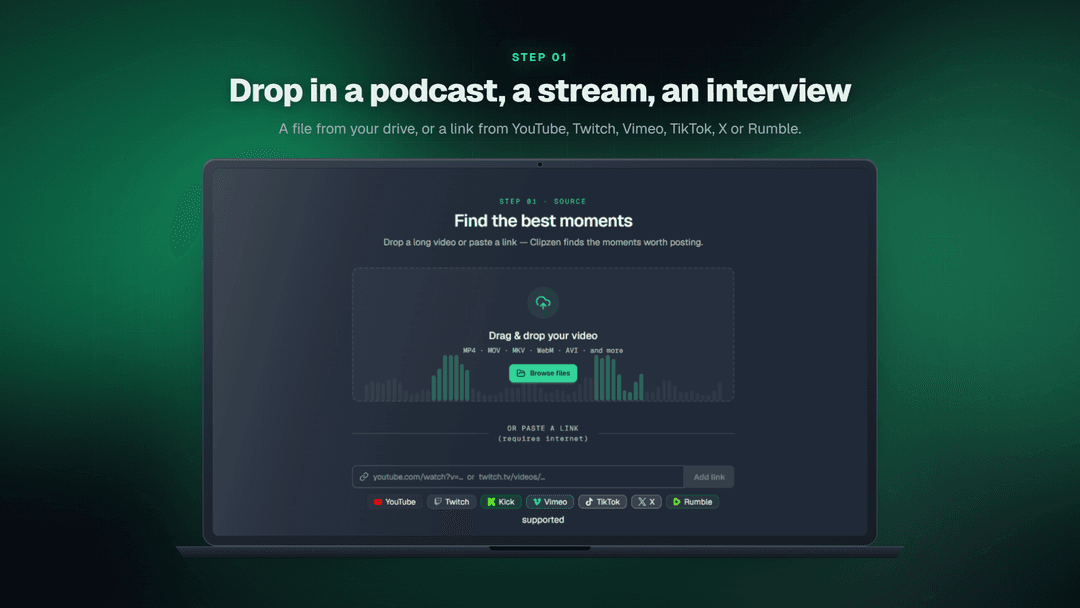
Step 1: Add Your Video
Paste a link from YouTube, Twitch, or other supported platforms, or upload a video directly from your computer.
Step 2: Let AI Find the Best Moments
Clipzen transcribes your video, identifies speakers, and analyzes the content to find and rank the most engaging moments worth sharing.
Step 3: Generate Your Clips
Automatically reframe videos around the active speaker, add synchronized captions, and generate multiple short clips in your preferred format.
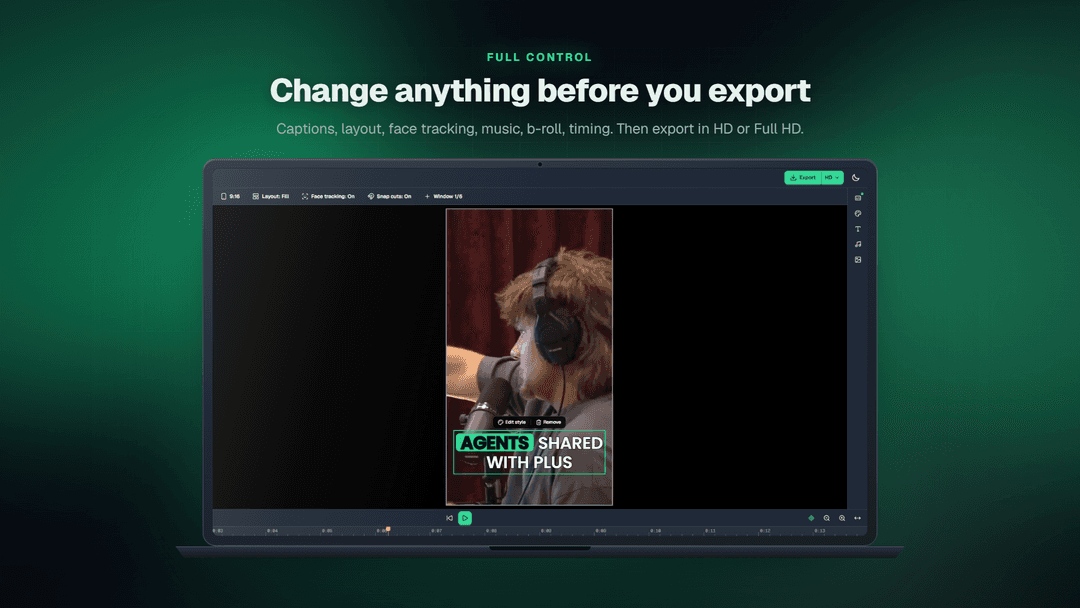
Step 4: Fine-Tune Your Clips
Use the built-in editor to adjust captions, remove unwanted words, add music, B-roll, text, and visual effects.
Step 5: Export and Share
Export your finished clips in 1080p MP4, ready to publish on TikTok, YouTube Shorts, Instagram Reels, and other platforms.
Who is Clipzen for?
Built for
- Content Creators & YouTubers — Turn long videos into short clips for YouTube Shorts, TikTok, and Instagram Reels without spending hours editing.
- Podcasters & Interviewers — Turn full podcast episodes and interviews into short videos featuring the most interesting moments.
- Streamers & Gamers — Find the best moments from long livestreams and turn them into clips worth sharing.
- Social Media Managers — Quickly create multiple social media videos from existing recordings without spending hours editing.
- Video Editors & Freelancers — Save time finding good moments, adding captions, and editing videos for clients.
- Budget-Conscious Creators — Avoid expensive subscriptions and monthly limits. Pay once and enjoy unlimited clipping.
What is included in Clipzen?
1. AI Clip Finder
- Automatically find the best moments in long videos.
- Analyze podcasts, interviews, streams, and other recordings.
- Generate multiple short clips from a single video.
- Rank detected moments to help you choose the best clips.
2. Customizable Clip Generation
- Choose your preferred AI model for clip generation.
- Customize clip length, aspect ratio, and other generation settings.
- Automatically generate captions and reframe videos around the active speaker.
- Generate clips in formats suitable for TikTok, Instagram Reels, and YouTube Shorts.
3. Built-In Video Editor
- Fine-tune generated clips without switching applications.
- Edit captions, remove unwanted words, and customize their appearance.
- Add music, B-roll, text, and visual effects.
- Make final adjustments before exporting.
4. Unlimited Clipping, One-Time Payment
- No subscriptions, monthly credits, or usage limits.
- All future Clipzen updates and upgrades are included.
- Built-in AI model with optional OpenAI integration.
- Process videos locally on your computer, keeping your files private.
Video review
We have not reviewed Clipzen on video yet.
Get notifiedBuyer reviews
No reviews yet. Bought Clipzen? Add it to your workspace and share what it replaced.
Add to your workspaceClipzen questions
Is it really a one-time payment?
Yes! You pay a one-time fee for your license, and all future Clipzen upgrades are included. No subscriptions, no hidden fees, and no usage limits. Clipzen comes with a built-in AI model. Alternatively, you can choose to offload the more demanding AI processing to OpenAI. In that case, you pay OpenAI directly based on the model you choose and your usage. Learn more about OpenAI pricing: https://clipzen.net/#openai-pricing
What does it cost to run?
Nothing, with the built-in AI model. It runs on your computer. If you prefer OpenAI's models, you add your own API key and pay OpenAI directly, typically a few cents per hour of video. Clipzen shows the estimate before you run and takes no cut.
Does my video get uploaded anywhere?
No. Transcription, speaker detection, face tracking and rendering all happen on your machine. With the built-in model, not even the transcript leaves. If you choose OpenAI, only the transcript text is sent, using your own API key.
Which computers does it run on?
Apple Silicon Macs (M1 or later) on macOS 11 or later, and 64-bit Windows 10 or 11. Intel Macs are not supported, and there is no Linux version for now.
How powerful does my computer need to be?
For the built-in model we recommend an Apple Silicon Mac with 32 GB of memory, or a Windows PC with 32 GB of RAM and a GPU with 12 GB of VRAM. The minimum is an Apple Silicon Mac with 16 GB of memory, or a PC with 16 GB of RAM and a dedicated graphics card with at least 8 GB of VRAM. The first run downloads about 8 GB of models, so keep 10 GB free.
Can I use it on more than one computer?
One at a time. Entering your licence key on a second computer moves the licence there in one click.
Does it work offline?
Yes. Once it's activated, Clipzen works without an internet connection. It just needs to go online now and then to confirm your licence, and a quick connection is all it takes. Your clips stay on your disk the whole time.
Where can I pull videos from?
Paste links from YouTube, Twitch, Kick, Vimeo, TikTok, X, Rumble and many other sites, or drop in a file from your disk: MP4, MOV, MKV, WebM, AVI and more.
What if it's not for me?
You get a full refund within 14 days of buying. No reason needed. The refund needs to be submitted from https://grabltd.com/
Often compared with
These are other tools in the same space, not deals on GrabLTD.
- OpusClip
- Descript
- Vizard
- quso.ai
- Riverside