

AI Tools · Lifetime deal
CueCraft Studio
Browser voice-recording studio with a built-in processing chain, teleprompter and remote sessions.
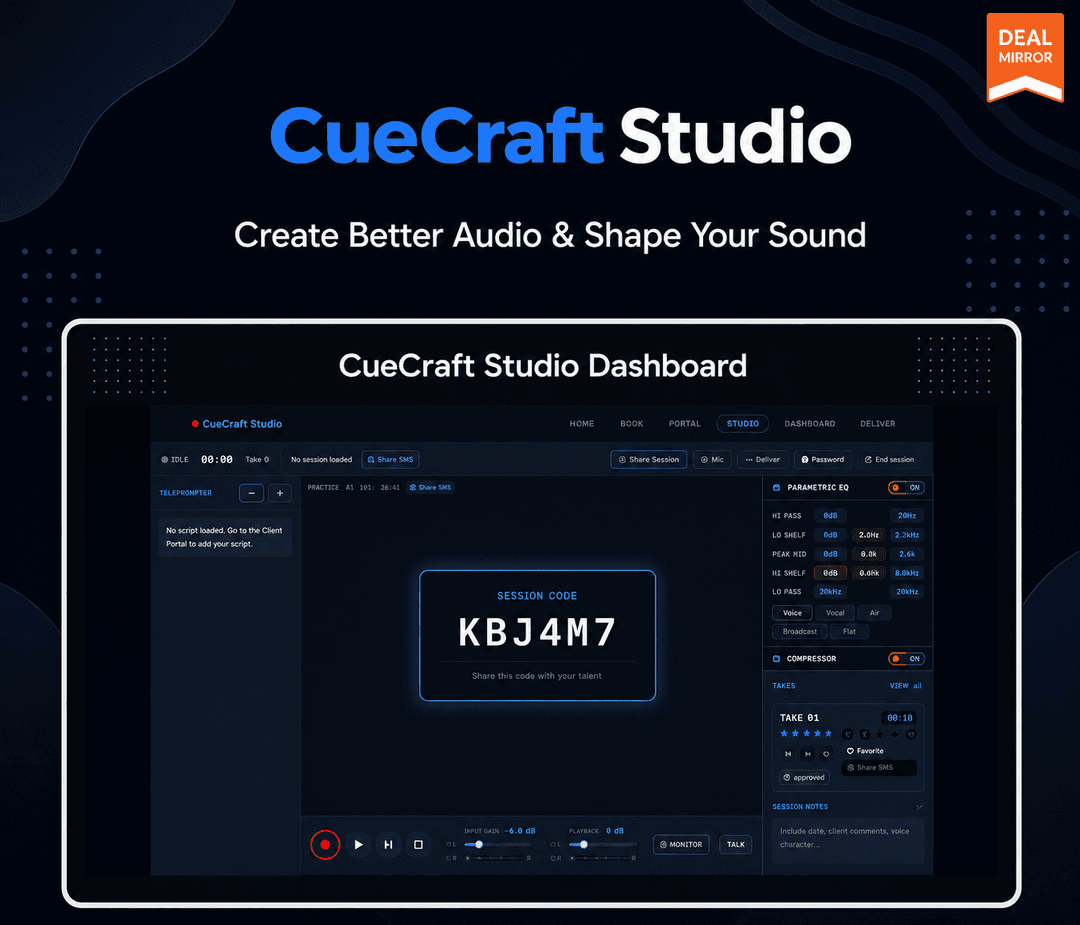
CueCraft Studio at a glance
- Platform
- Web
- Support
- Email support is included.
- Upgrades
- All features and future updates are included, with no renewal. The deal covers one studio deployment.
- Updates
- All future updates
Our take
Is CueCraft Studio worth buying?
Based on the DealMirror listing, this is a one-deployment lifetime license for a browser recording studio with remote sessions and a built-in processing chain. The AI features are roadmap only. The page countdown reads zero, so confirm the deal is still open.
Good fit if
- You direct remote voice talent and want sessions in the browser.
- You want a processing chain running while you record.
- You want to white-label a recording page for clients.
Skip it if
- You need to run the engineer view on a phone or tablet.
- You need AI noise reduction or auto-leveling now.
Which CueCraft Studio plan do you need?
Prices in USD, excluding tax.
| Lifetime deal | |
|---|---|
| One-time price | $49 |
| Regular price (DealMirror) | |
| You save | $100 |
| Studio deployments | 1 |
| Takes | Unlimited |
| Export formats | WAV, MP3 |
| Updates | All future updates |
Before you buy: DealMirror's terms and extra costs
- Refund. 30-day refund for regular DealMirror buyers, 60 days for Prime members, per the DealMirror listing.
- Redeem. Redeem your code within 60 days of purchase.
- Support. Email support is included.
- Upgrades. All features and future updates are included, with no renewal. The deal covers one studio deployment.
- Platform. Single HTML file in desktop Chrome, Edge, Firefox or Safari. Live remote sessions need internet.
What is CueCraft Studio?
CueCraft Studio is a browser-based recording booth delivered as a single HTML file. Audio goes through a parametric EQ, compressor, de-esser, noise gate and loudness meter by default. An engineer can run a live teleprompter and invite talent to remote sessions with a 6-digit code. It can be white-labeled by editing config values. The deal is one studio deployment.
What CueCraft Studio says it does
- Five-band parametric EQ, compressor, de-esser, noise gate and LUFS metering
- Six mic emulation profiles
- Export as 48kHz 24-bit WAV or 192kbps MP3
- No installation and no server needed
Why CueCraft Studio
Most browser recorders leave cleanup for later. CueCraft applies a processing chain while you record and handles remote talent sessions in the browser. The engineer view needs a desktop browser, and AI noise reduction and leveling are roadmap items, not shipped.
How does CueCraft Studio work?
Redeem the code
Buy through DealMirror and redeem your code within 60 days.
Open the HTML file
Open it in desktop Chrome, Edge, Firefox or Safari.
Record takes
Record with the processing chain already running.
Direct the session
Use the teleprompter and invite talent with a 6-digit code.
Review and export
Rate, approve or edit takes, then export WAV or MP3.
Then it handles:
- Recording voice takes in the browser
- Live remote sessions with talent
- Teleprompter control by the engineer
- EQ, compression and loudness metering
- Rating and approving takes
- White-labeled studios
Who is CueCraft Studio for?
Built for
- Voiceover engineers directing remote talent
- Podcasters and creators who want a ready processing chain
- Studios that want a white-labeled recording page
Not for
- Anyone who needs the engineer view on mobile, which is unsupported
- Buyers who need AI noise reduction today (v2.0 roadmap)
- Anyone who needs more than one studio deployment
What is included in CueCraft Studio?
Recording and processing
- 5-band parametric EQ
- Compressor, de-esser and noise gate
- LUFS metering
- Mic emulation profiles six, such as SM7B and U87
Sessions
- Live engineer to talent sessions 6-digit code, peer-to-peer
- Talkback
- Live teleprompter
- Unlimited takes
Output and branding
- WAV and MP3 export 48kHz 24-bit WAV, 192kbps MP3
- White labeling 12 config values
- User guide PDF
Video review
We have not reviewed CueCraft Studio on video yet.
Get notifiedBuyer reviews
No reviews yet. Bought CueCraft Studio? Add it to your workspace and share what it replaced.
Add to your workspaceCueCraft Studio questions
What is CueCraft Studio?
A browser recording studio in one HTML file, with a default processing chain, a teleprompter and live sessions with remote talent.
Do I need to install anything?
No. It runs from a single HTML file with no server. Recording and processing work offline; only live remote sessions need internet.
Which browsers work?
The engineer studio runs in desktop Chrome, Edge, Firefox or Safari. Mobile is unsupported for the engineer, but talent can join from any modern browser.
What can I export?
48kHz 24-bit WAV or 192kbps MP3.
Is it white-label?
Yes. You edit 12 config values to brand it.
What is the refund policy?
DealMirror lists a 30-day refund for regular buyers and 60 days for Prime members. Redeem within 60 days of purchase.
Often compared with
These are other tools in the same space, not deals on GrabLTD.
- Riverside
- Zencastr
- SquadCast
- Source-Connect
- Audacity
Sources
Checked . Prices and terms on this page come from: