

Productivity · Lifetime deal
Documentation.AI
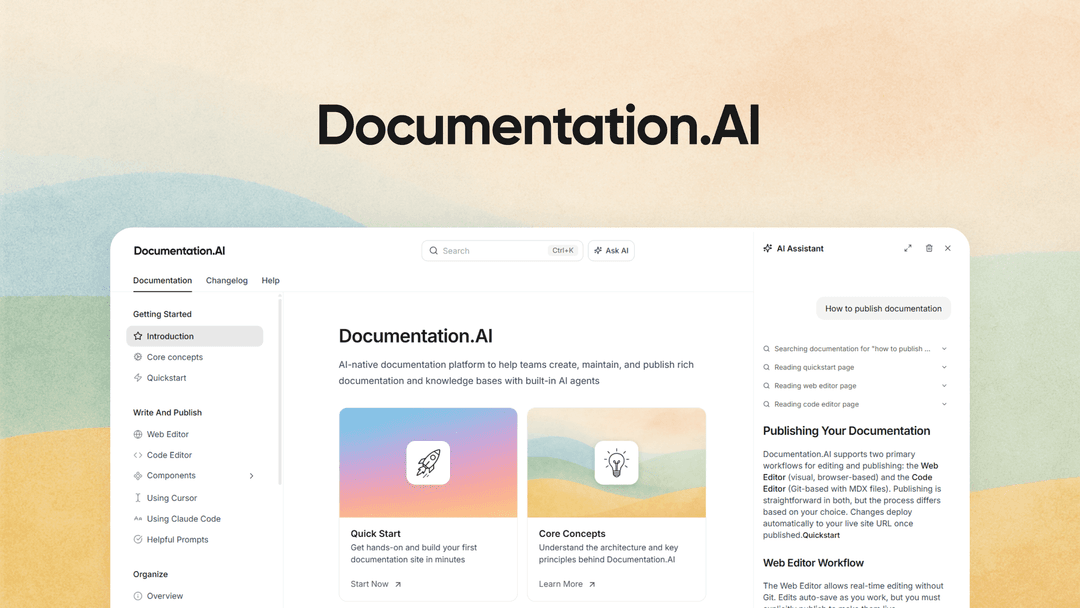
Your docs now have two audiences: the person reading the page and the AI model answering questions about your product. Documentation.AI publishes one set of pages for both, with a cited assistant on the page, an auto-built llms.txt and an MCP server for the models.
Which Documentation.AI plan do you need?
Prices in USD, excluding tax.
| Lifetime deal | |
|---|---|
| One-time price | $69 |
| Regular price (AppSumo) | |
| You save | $279 |
What is Documentation.AI?
Documentation.AI hosts your product docs, API reference and help center, then makes the same pages readable by AI assistants. You write in a visual editor or in MDX, readers get fast pages with an assistant that answers from your content and cites the page it used, and models get an llms.txt file and an MCP server to pull from.
What Documentation.AI actually does
It covers the whole docs loop: writing, publishing, answering questions and finding out which pages are failing people.
- Publish docs, API references and help centers under your own theme and colors - Answer reader questions inside the docs with cited sources - Import an OpenAPI spec to generate organized reference pages and code samples - Offer an interactive API playground for testing endpoints and parameters - Generate copy-ready request examples in multiple languages - Track page views, search terms and drop-offs - Collect feedback from readers on every page - Auto-generate llms.txt as a single source for AI assistants
The features that matter
The headline feature is the assistant, but the part worth paying for is what sits behind it. Assistant analytics show you the questions people asked that your docs could not answer well. That turns the chat box from a support gimmick into a list of pages you still need to write, which is more useful than another search bar.
For API products, the OpenAPI import does the dull work. Point it at your spec and it builds the reference section, generates snippets in several languages and adds a playground where developers can tweak parameters and fire test requests without leaving the page. The vendor says the docs refresh automatically from the spec, so the reference stops drifting away from the actual API every time an endpoint changes.
The AI-readiness pieces are where Documentation.AI is clearly aiming its pitch. Pages are structured around headings, code blocks and parameters so they split cleanly into chunks for retrieval, an llms.txt file is generated for you, and every tier includes a Reader MCP server. If a growing share of your users ask Claude or ChatGPT how your product works before they ever open your docs, this is the layer that decides whether those answers are right.
Writers are not left out. Every tier lists a visual web editor next to an MDX code editor with live preview, bidirectional Git sync, reusable snippets, real-time collaboration and more than 30 components. Teams that keep docs in a repo can keep doing that, while support staff edit the same pages in the browser.
Who it's built for
This is for software companies whose docs carry real weight in the sale: SaaS teams with a public API, developer tools that live or die on their quickstart, and support teams that want the help center to absorb tickets instead of generating them. A solo maker with a ten-page FAQ will be paying for machinery they never touch.
It also suits teams currently stitching docs together from a static site generator, a separate search widget and a hand-maintained API reference. Those three jobs collapse into one hosted tool here, with a custom domain or a custom subpath so the docs still sit on your own site.
The deal
License Tier 1 is $69 (was $348) for 5 editor seats, 5,000 AI credits per month, 2 doc sites, unlimited pages and readers, and 5 GB of storage. Tier 2 at $149 (was $948) doubles the seats and credits and adds password-protected docs, branches and preview deployments, role-based permissions, advanced analytics, PDF export, the embeddable assistant widget and the REST API. Tier 3 is $269 (was $1448) with 20 seats, 20,000 credits and 4 doc sites, and Tier 4 is $549 (was $2748) with unlimited seats, 40,000 credits, 10 doc sites and white glove migration.
Tier 2 is the one most teams should buy. Preview deployments and the embeddable widget are the features that make docs feel like part of the product, and they are not in Tier 1. Check how far 5,000 or 10,000 monthly AI credits go against your reader traffic before you commit, because the listing does not say what a single answer costs.
Video review
We have not reviewed Documentation.AI on video yet.
Get notifiedBuyer reviews
No reviews yet. Bought Documentation.AI? Add it to your workspace and share what it replaced.
Add to your workspace