

Storage & Files · Lifetime deal
EncryptPro Personal Plan for Windows
Local AES-256 file encryption for Windows, with PGP sharing and no cloud.
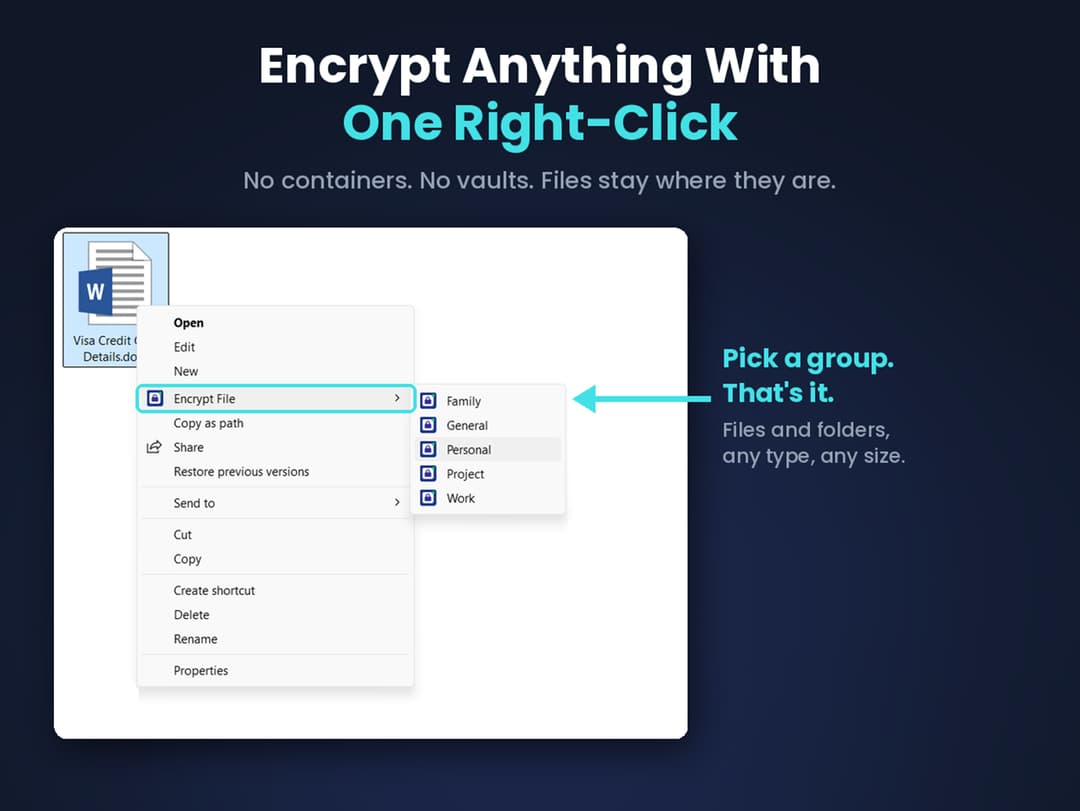
EncryptPro Personal Plan for Windows at a glance
- Platform
- Windows
- Upgrades
- Free lifetime updates are included. The listed version is 2.0.1.
- Updates
- Free for life
Our take
Is EncryptPro Personal Plan for Windows worth buying?
Based on the StackSocial listing, EncryptPro is a Windows-only local encryption tool with no cloud component, covering up to 3 devices. Sharing is limited to PGP connections. The page price is a few cents above the stored tier, and the vendor site is not listed.
Good fit if
- You want files encrypted on your own Windows PC.
- You do not want any cloud sync for sensitive files.
- You share with a small, fixed set of people.
Skip it if
- You need Mac, mobile or cloud support.
- You need to share with many people at once.
Which EncryptPro Personal Plan for Windows plan do you need?
Prices in USD, excluding tax.
| Personal Plan for Windows | |
|---|---|
| One-time price | $39.99 |
| Regular price (StackSocial) | |
| You save | $99.01 |
| Active devices | 3 |
| Security groups | 5 |
| PGP connections | 10 (2 members each) |
| Platform | Windows 10 and 11, 64-bit |
| Updates | Free for life |
Before you buy: StackSocial's terms and extra costs
- Refund. Unredeemed licenses can be returned for store credit within 30 days of purchase. After redemption all sales are final.
- Redeem. Redeem within 30 days of purchase. Available to new and existing users.
- Upgrades. Free lifetime updates are included. The listed version is 2.0.1.
- Platform. Windows 10 and 11, 64-bit only, with 2 GB RAM and 200 MB free disk space. Up to 3 active devices.
What is EncryptPro Personal Plan for Windows?
EncryptPro encrypts files and folders on Windows with AES-256, directly from the right-click menu in Explorer. It uses a zero-knowledge design where data stays on your device, with no cloud storage or sync. You can share through small PGP connections, use five security groups with their own passwords, and securely delete originals. The Personal plan covers up to 3 active devices.
What EncryptPro Personal Plan for Windows says it does
- AES-256 encryption with a zero-knowledge design, no cloud storage or sync
- A 10.6 GB file encrypted in 35 seconds on a standard machine (EncryptPro Personal Plan for Windows's figure)
- 5 security groups and up to 10 one-to-one PGP connections
- Viewer Only Mode keeps encrypted files readable without a subscription
Why EncryptPro Personal Plan for Windows
Most encryption tools depend on a server or a shared password. EncryptPro keeps files and keys on your machine and integrates with Explorer. It is Windows 10 and 11 only, 64-bit, and sharing is limited to its PGP connections.
How does EncryptPro Personal Plan for Windows work?
Redeem the code
Buy on StackSocial and redeem within 30 days of purchase.
Install on Windows
Install the 64-bit app on Windows 10 or 11.
Encrypt from Explorer
Right-click a file or folder to encrypt it.
Set up groups
Create security groups with their own passwords.
Share by PGP
Share with approved people through PGP connections.
Then it handles:
- Encrypting files and folders with AES-256
- Securely deleting original files
- Sharing through PGP connections
- Keeping encrypted files on USB drives
- Working offline
- Revoking a member's access with key rotation
Who is EncryptPro Personal Plan for Windows for?
Built for
- Windows users who want local file encryption
- People who prefer no cloud storage for sensitive files
- Small groups sharing files through PGP
Not for
- Mac, Linux or mobile users
- Anyone who needs cloud sync or cloud storage
- Users on 32-bit Windows
What is included in EncryptPro Personal Plan for Windows?
Encryption
- AES-256 encryption zero-knowledge, on device
- Secure delete multi-pass overwrite
- Streaming decryption large files open quickly
Sharing and access
- PGP connections up to 10, 2 members each
- Security groups 5, each with its own password
- Upgrade Lock key rotation
- Viewer Only Mode
Windows integration
- Right-click menu
- Browsable encrypted folders
- Custom Explorer icons
- Portable and offline
Video review
We have not reviewed EncryptPro Personal Plan for Windows on video yet.
Get notifiedBuyer reviews
No reviews yet. Bought EncryptPro Personal Plan for Windows? Add it to your workspace and share what it replaced.
Add to your workspaceEncryptPro Personal Plan for Windows questions
What is EncryptPro?
A Windows file encryption tool that applies AES-256 from the Explorer right-click menu, with data kept on your device.
How many devices can I use?
Up to 3 active devices per license, per the listing.
How does sharing work?
Through PGP connections: up to 10 one-to-one shares with 2 members each. There is no cloud sync.
Can I open files without a subscription?
Viewer Only Mode lets you keep opening your encrypted files without a subscription.
What is the refund policy?
Unredeemed licenses can be returned for store credit within 30 days. Once redeemed, sales are final.
Which Windows versions are supported?
Windows 10 and 11, 64-bit only. An internet connection is needed to install.
Often compared with
These are other tools in the same space, not deals on GrabLTD.
- VeraCrypt
- AxCrypt
- Cryptomator
- BitLocker
- Boxcryptor
Sources
Checked . Prices and terms on this page come from: