

AI Tools · Lifetime deal
Keyshift AI
Type keyshift plus an instruction in any app on Mac or Windows and get AI text in place.
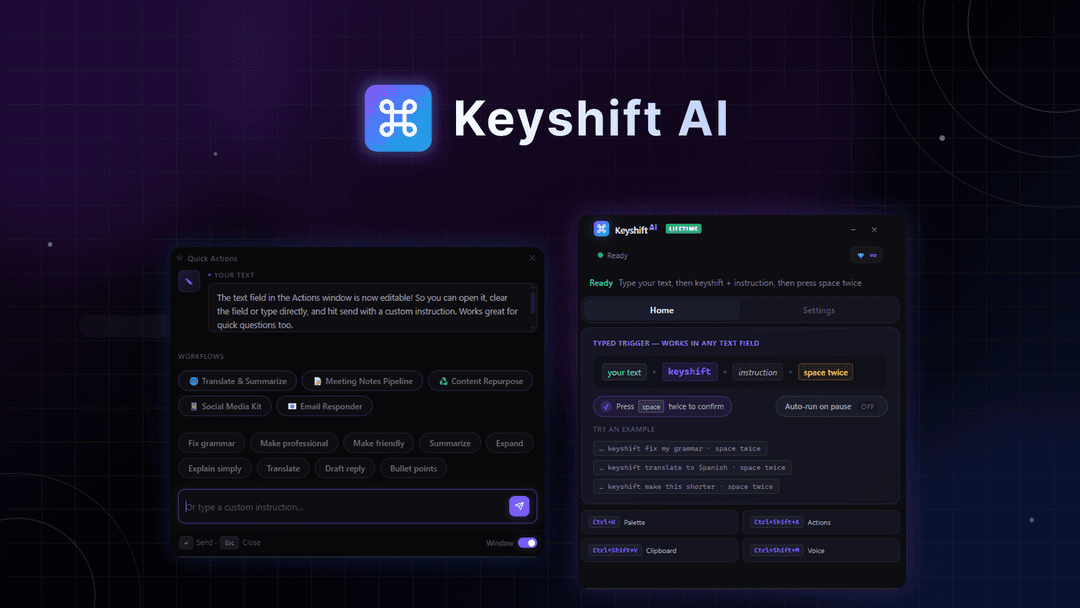
Keyshift AI at a glance
- Platform
- Windows, Mac
- Upgrades
- No codes and no stacking. You can upgrade while the deal is live and downgrade within 60 days.
- Support
- The founder is expected to respond within 24 hours.
Our take
Is Keyshift AI worth buying?
Based on the AppSumo listing, Keyshift AI is a desktop text assistant with five tiers by monthly credits. Our single tier maps to the entry tier, which appears to rely on your own API key. The vendor is a small bootstrapped company.
Good fit if
- You write in many apps and want AI in place.
- You are comfortable using your own API key.
- You want a lifetime alternative to AI writing subscriptions.
Skip it if
- You want included credits without an API key.
- You use Linux or mobile only.
- You may not activate within 60 days.
Which Keyshift AI plan do you need?
Prices in USD, excluding tax.
| License Tier 1 | License Tier 2 | License Tier 3 | License Tier 4 | License Tier 5 | |
|---|---|---|---|---|---|
| One-time price | $19 | $69 | $129 | $239 | $499 |
| Regular price (AppSumo) | |||||
| You save | $51 | $70 | $151 | $321 | $621 |
| Monthly credits | 0 (own API key) | Not stated | Not stated | Not stated | Not stated |
| Own API key | Works, 0 credits | Not stated | Not stated | Not stated | Not stated |
| Platform | Windows, macOS | Not stated | Not stated | Not stated | Not stated |
Before you buy: AppSumo's terms and extra costs
- Refund. Refundable up to 60 days, per the AppSumo listing.
- Redeem. Activate your license within 60 days of purchase.
- Upgrades. No codes and no stacking. You can upgrade while the deal is live and downgrade within 60 days.
- AI usage cost. Using your own API key costs 0 credits on every tier, but your AI provider bills you. Credits reset monthly.
- Support. The founder is expected to respond within 24 hours.
- Platform. Desktop app for Windows and macOS.
What is Keyshift AI?
Keyshift AI is a desktop text assistant for Windows and macOS. In any text field, such as Slack, Gmail or Notion, you type 'keyshift' plus an instruction and the result appears in place. It also offers quick actions, voice input, a command palette, workflows and support for several AI providers. The deal is sold through AppSumo as five tiers that differ by monthly credits.
What Keyshift AI says it does
- Works in any app, such as Slack, Gmail, Notion and Discord
- Connects to OpenAI, Claude, Gemini and OpenRouter with your own API key at zero credits
- Voice input, screenshot-to-text and live translate
- Can work offline with local or self-hosted models
Why Keyshift AI
It removes the copy and paste loop between your writing app and a chat window. The entry tier has no monthly credits, so it works with your own API key, and credits on higher tiers reset monthly.
How does Keyshift AI work?
Activate the license
Buy on AppSumo and activate within 60 days.
Install the app
Install the desktop app on Windows or macOS.
Connect a model
Add your own API key or use monthly credits.
Trigger it
Type keyshift plus an instruction in any text field.
Review and insert
Preview the result before it replaces your text.
Then it handles:
- Rewriting and editing text in place
- Translating text
- Drafting replies and emails
- Voice dictated instructions
- Multi-step workflows
- Reading text from screenshots
Who is Keyshift AI for?
Built for
- People who write in many apps all day
- Users who already have AI API keys
- Teams who want a lifetime alternative to AI writing subscriptions
Not for
- Linux or mobile users
- Buyers who want no API setup on the entry tier
- Anyone who cannot activate within 60 days
What is included in Keyshift AI?
Everywhere writing
- In-place replies type keyshift plus an instruction
- Quick actions
- Command palette
- Clipboard AI
Input and models
- Voice input
- Screenshot-to-text
- Multiple AI providers OpenAI, Claude, Gemini, OpenRouter
- Local model support works offline
Custom behavior
- AI workflows
- Custom prompts, modes and actions
- Live translate
Video review
We have not reviewed Keyshift AI on video yet.
Get notifiedBuyer reviews
No reviews yet. Bought Keyshift AI? Add it to your workspace and share what it replaced.
Add to your workspaceKeyshift AI questions
What is Keyshift AI?
A desktop assistant that runs AI actions inside any text field on Windows or Mac.
Do I need my own API key?
Using your own key costs zero credits on every tier. The entry tier appears to have no monthly credits, so it relies on your key.
How do the tiers differ?
By monthly credits: none, 1,000, 2,000, 4,000 or 8,000, per the listing. Higher tiers get Pro plan updates.
Can it work offline?
The listing says it can use local or self-hosted models.
What is the refund policy?
Refundable up to 60 days. Activate within 60 days of purchase.
Can I stack codes?
No. The listing says no codes and no stacking.
Often compared with
These are other tools in the same space, not deals on GrabLTD.
- TextExpander
- Raycast AI
- Grammarly
- Magical
- Wispr Flow
Sources
Checked . Prices and terms on this page come from: