

AI Tools · Lifetime deal
Luminar Web & Mobile Bundle
Browser-based AI photo editing across web and mobile
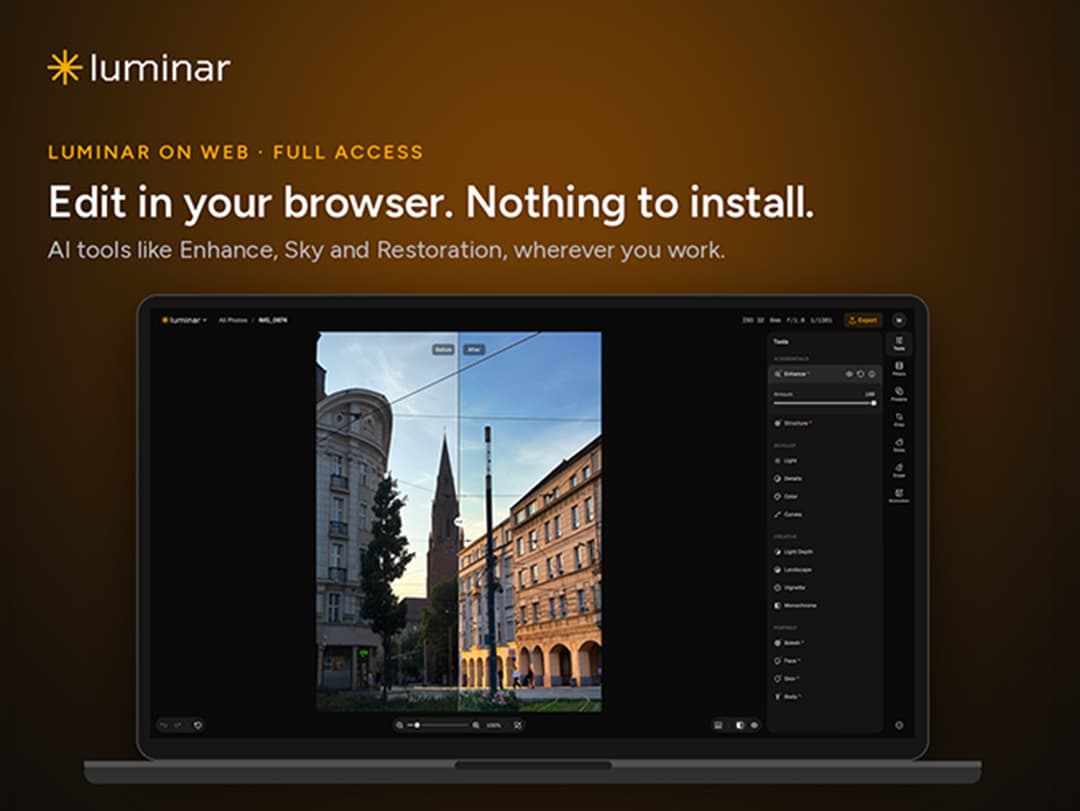
Luminar Web & Mobile Bundle at a glance
- Platform
- Web, Windows, macOS, Linux, Chrome, Edge, Firefox, Safari, iPhone, iPad, iOS, iPadOS
Which Luminar Web & Mobile Bundle plan do you need?
Prices in USD, excluding tax.
| Lifetime | |
|---|---|
| One-time price | $59 |
What is Luminar Web & Mobile Bundle?
Luminar is a browser-based photo editor with AI tools, RAW support, cloud storage, and cross-device editing. The bundle includes lifetime Web Full Access, a lifetime Luminar for Mobile license, and a guided mobile editing course with practice files.
What Luminar Web & Mobile Bundle says it does
- Luminar Web Full Access provides the complete AI editing toolkit in a desktop browser.
- AI edits are unlimited, with no credit system or hidden limits.
- Enhance AI improves color, light, and detail in one step. (Luminar Web & Mobile Bundle's figure)
- Sky AI replaces dull or overcast skies.
- Structure AI brings out texture and detail without affecting faces.
- Bokeh AI adds a realistic background blur.
- Portrait tools refine facial features, retouch skin naturally, and adjust body shape.
- Erase removes unwanted objects from photos.
- Light Depth adjusts lighting based on the depth of the scene.
- RAW files can be edited directly in the browser.
- Cloud sync carries work between Web and Mobile.
- A Skylum account can be used on unlimited devices.
Why Luminar Web & Mobile Bundle
It provides a browser-based way to adjust, style, and retouch photos without installing desktop software. Cloud sync, mobile access, and a structured course support editing across devices.
How does Luminar Web & Mobile Bundle work?
Redeem and sign in
Redeem the code within 30 days, then sign in with a Skylum account.
Open in a browser
Launch Luminar Web in a supported desktop browser without installing software.
Import and edit
Import photos, including RAW files, then use manual and AI editing tools.
Continue across devices
Store files in cloud storage and continue work between Web and Luminar for Mobile.
Learn and export
Follow the mobile course, practice with RAW files, and export completed edits.
Then it handles:
- Improve color, light, and detail
- Replace dull or overcast skies
- Bring out texture without changing faces
- Add realistic background blur
- Retouch facial features, skin, and body shape
- Remove unwanted objects
- Adjust light by scene depth
- Edit RAW files and sync work
Who is Luminar Web & Mobile Bundle for?
Built for
- Photo editors seeking browser-based editing without desktop installation
- Portrait and landscape photographers
- Mobile photo editors who want guided workflow lessons
- New Skylum users seeking lifetime web and mobile access
Not for
- Existing Luminar users, because the bundle is for new users only
- People who require Luminar Desktop, which needs a separate license
- People who require Skylum generative AI tools, which are not included
What is included in Luminar Web & Mobile Bundle?
AI editing tools
- Enhance AI Improve color, light, and detail together.
- Sky AI Replace dull or overcast skies.
- Structure AI Reveal texture and detail without affecting faces.
- Bokeh AI Add a realistic background blur.
- Face AI Refine facial features in portraits.
- Skin AI Retouch skin naturally.
- Body AI Adjust body shape in portraits.
- Erase Remove unwanted objects from photos.
- Light Depth Adjust light using the scene's depth.
Creative controls and formats
- Presets and Filters Access the full presets and filters library.
- Unlimited AI Edits Use AI edits without credits or hidden limits.
- RAW Support Edit RAW files directly in the browser.
- Basic Adjustments Adjust light, contrast, curves, color, saturation, landscape, and vignette.
- Exporting Export images for any format.
Web, mobile, and cloud
- Browser Access Run the full web editor without installation.
- Mobile License Use Luminar for Mobile with a lifetime license.
- Cloud Storage Access files across Web and Mobile.
- Cross-Device Editing Continue work between Web and Mobile.
- Unlimited Devices Sign in with one Skylum account on unlimited devices.
Mobile editing course
- Structured Lessons Follow setup, adjustment, styling, AI, editing, and export lessons.
- Practice Files Edit along with included RAW practice files.
- Full Session Review a complete start-to-finish editing session.
- Online Materials Stream lessons and download course materials.
- Instructor Guidance Learn from photographer and filmmaker Nikolaj Green.
Video review
We have not reviewed Luminar Web & Mobile Bundle on video yet.
Get notifiedBuyer reviews
No reviews yet. Bought Luminar Web & Mobile Bundle? Add it to your workspace and share what it replaced.
Add to your workspaceLuminar Web & Mobile Bundle questions
What does the $59 Lifetime plan include?
The $59 Lifetime plan includes lifetime Luminar Web Full Access, a lifetime Luminar for Mobile license, and The Essential Guide video course. The course has six lessons totaling about 50 minutes, downloadable materials, 10 RAW practice files, and a full editing session. The software includes unlimited AI edits, full RAW support, presets and filters, cloud sync, and cross-device editing. There is no subscription.
Who can buy the bundle, and how many devices are supported?
The offer is available only to new users. It supports photo editors who want browser-based editing on a computer and mobile editing on a phone or tablet. One Skylum account can sign in on any number of devices, with work synced across Web and Mobile.
How does Full Access differ from the free Web Only plan?
Skylum’s free Web Only plan is limited to basic tools, 100MB of cloud storage, and standard-quality exports at 1280px. Full Access includes Enhance, Sky, Structure, Bokeh, Face, Skin, Body, Erase, and Light Depth AI tools; the full presets and filters library; RAW support; and unlimited AI edits with no credit system or hidden limits.
What devices and system requirements are supported?
Luminar Web needs a desktop browser and internet access. Use Chrome, Edge or Firefox on Windows, Safari or Chrome on macOS, or a browser on Linux; the viewport must be at least 760 pixels wide. No installation is needed. Mobile compatibility includes iPhone and iPad with iOS or iPadOS 17 or later, Android 11 or higher with 4GB+ RAM, and ChromeOS through Android Runtime.
What happens after purchase, and how do I redeem the code?
Redeem the code within 30 days of purchase. The purchase provides lifetime access to Luminar Web Full Access and the included mobile license, with updates included. The course streams online and includes downloadable materials. There is no subscription.
What is not included, and are there extra costs?
Luminar Desktop and Skylum’s generative AI tools are not included. A separate Luminar Desktop license is required to move edits into the desktop app. On phones and tablets, use the included Luminar for Mobile license in the Luminar for Mobile app; the app must be installed and activated.
Often compared with
These are other tools in the same space, not deals on GrabLTD.
- Skylum Web Only