

AI Tools · Lifetime deal
MagicCanvas
Create, edit, and organize images, videos, and audio in one workspace
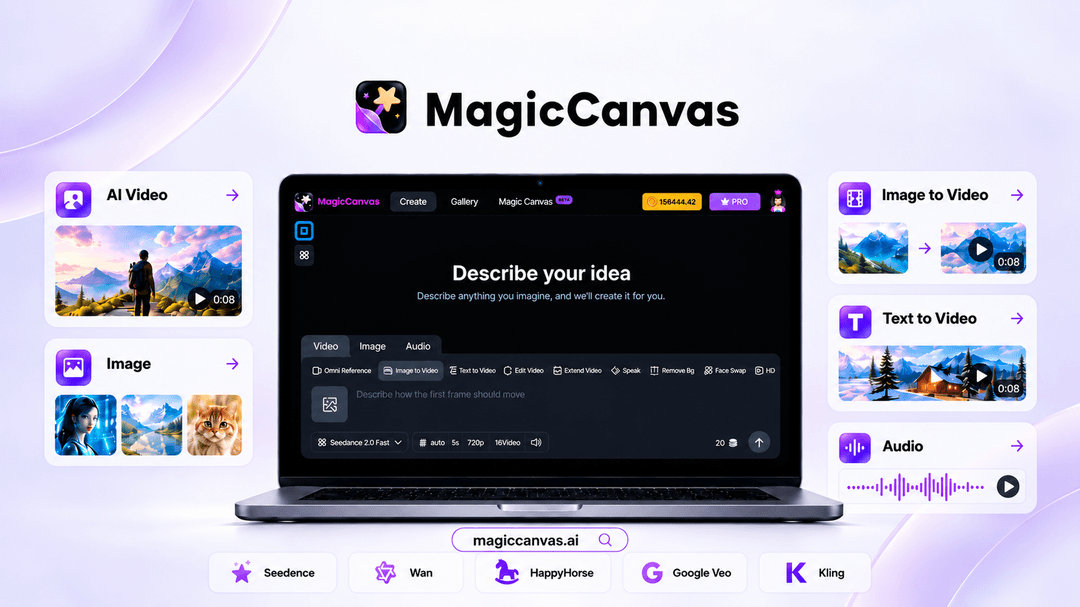
MagicCanvas at a glance
- Platform
- Web
- Note
- Lifetime access to MagicCanvas.
- Note
- All future plan updates are included.
- Upgrades
- Upgrade or downgrade between 4 license tiers.
- Note
- No codes and no stacking; choose one license tier.
Which MagicCanvas plan do you need?
Prices in USD, excluding tax.
| License Tier 1 (Premium) | License Tier 2 (Premium) | License Tier 3 (Premium) | License Tier 4 (Premium) | |
|---|---|---|---|---|
| One-time price | $49 | $189 | $389 | $689 |
| Regular price (AppSumo) | ||||
| You save | $150 | $310 | $610 | $1,210 |
| Includes | 125 Credits per month | 440 Credits per month | 900 Credits per month | 1,600 Credits per month; MovieStudio Access |
Before you buy: AppSumo's terms and extra costs
- Note. Lifetime access to MagicCanvas.
- Note. All future plan updates are included.
- Redeem. Activate the license within 60 days of purchase.
- Upgrades. Upgrade or downgrade between 4 license tiers.
- Note. No codes and no stacking; choose one license tier.
What is MagicCanvas?
MagicCanvas is a browser-based AI platform for generating and editing images, videos, and audio. It brings multiple integrated models and creative tools into one workspace, with prompt-based creation, asset management, commercial use rights, and reusable node-based workflows.
What MagicCanvas says it does
- Access 16+ integrated AI models for images, video, and audio, including Google Veo, Seedance, and Wan. (MagicCanvas's figure)
- Access 30+ creative tools for images, videos, and audio in one workspace. (MagicCanvas's figure)
- Create professional-quality content faster without juggling multiple AI platforms or subscriptions.
- Switch models anytime to find the best result for each creative task.
- Work in the browser with no downloads or installs required.
- Turn text and images into videos, or start with ready-made video templates.
- Animate and transform footage with motion transfer, style transform, face swap, lip sync, background removal, and video extension.
- Create voiceovers, music, and other audio without leaving the platform.
- Explore specialized AI tools for storyboards, outfit try-ons, self-portraits, character redesigns, and interior staging.
- Refine photos with simple prompts using Smart Up, AI Replace, Magic Eraser, AI Expansion, and Background Replace.
- Upscale images to HD to sharpen visuals for any channel.
- Keep every generation organized with built-in asset management and version history.
Why MagicCanvas
It reduces the need to juggle separate AI platforms and subscriptions by placing generation, editing, and organization in one browser workspace. Reusable pipelines also turn repeated multi-step tasks into a one-click process.
How does MagicCanvas work?
Choose a model and input
Select an integrated model, then enter a prompt or add an image.
Generate the media
Create images, video, or audio, or begin with a ready-made video template.
Edit and refine
Apply video transforms, audio tools, prompt-based photo edits, and HD upscaling.
Build a reusable workflow
Connect prompts, references, and AI tools on the node-based canvas, or start from a template.
Organize and reuse assets
Keep generations organized with asset management and version history.
Then it handles:
- Generating image, video, and audio content
- Converting text and images into video
- Editing and animating footage
- Creating voiceovers and music
- Removing or replacing backgrounds and objects
- Refining and upscaling images
- Organizing assets and versions
- Chaining tools into reusable workflows
Who is MagicCanvas for?
Built for
- Creators producing images, videos, or audio.
- People who want multiple AI models and editing tools in one browser workspace.
- Users who repeat multi-step image and video edits.
- Creators who need commercial use rights for generated assets.
Not for
- People who require downloaded or installed software.
- Buyers who cannot activate their license within 60 days.
What is included in MagicCanvas?
Creation models and tools
- Integrated AI models Create with Google Veo, Seedance, Wan, and other integrated AI models.
- Prompt-based creation Turn text and images into videos, or start with ready-made templates.
- Specialized creative tools Create storyboards, outfit try-ons, self-portraits, character redesigns, and interior staging.
- Browser workspace Work in the browser without downloads or installs.
Video and audio
- Video transformations Animate and transform footage with motion transfer, style transform, and face swap.
- Audio creation Create voiceovers, music, and other audio within the platform.
- Video utilities Apply lip sync, background removal, and video extension.
Image editing and assets
- Prompt-based image edits Refine photos with Smart Up, AI Replace, and Magic Eraser.
- Expansion and upscaling Expand images, replace backgrounds, and upscale visuals to HD.
- Asset management Keep generations organized with built-in asset management and version history.
- Commercial use Use created assets commercially with commercial use rights included.
Workflow design
- Node-based pipelines Connect prompts, references, and AI tools into reusable workflows.
- Workflow templates Start from templates instead of building every pipeline from scratch.
- Design exploration Iterate on design concepts with AI-powered design exploration.
- Copilot assistance Get help from the Copilot assistant while moving from idea to content.
Video review
We have not reviewed MagicCanvas on video yet.
Get notifiedBuyer reviews
No reviews yet. Bought MagicCanvas? Add it to your workspace and share what it replaced.
Add to your workspaceMagicCanvas questions
What does MagicCanvas do?
MagicCanvas is a browser-based AI creation and editing platform for generating images, videos, and audio. It combines 16+ AI models and 30+ tools, including text-to-video, image-to-video, lip sync, face swap, background removal, image upscaling, voiceovers, and music creation. It also supports reusable, node-based workflows and requires no downloads or installs.
Who is MagicCanvas for?
It is for users who want to create or edit visual and audio content without switching between multiple AI platforms. It supports prompt-based creation, photo and video editing, reusable production workflows, and asset organization with version history.
What do the license tiers include?
License Tier 1 (Premium) is 49 USD for 125 Credits per month. Tier 2 is 189 USD for 440 Credits per month. Tier 3 is 389 USD for 900 Credits per month. Tier 4 is 689 USD for 1,600 Credits per month and includes MovieStudio Access.
Can I use MagicCanvas creations commercially?
Yes. Commercial use rights are included for creations made with MagicCanvas.
What happens after purchase, and can I change plans?
Purchases include lifetime access to MagicCanvas and all future plan updates. You must activate the license within 60 days of purchase. You can upgrade or downgrade between the four license tiers. There are no codes to stack; you select one plan.