

Design · Lifetime deal
Nero Motion Tracker
AI video tracker with Segment, Face and Zone modes for blurring, masking and pinning text to subjects.
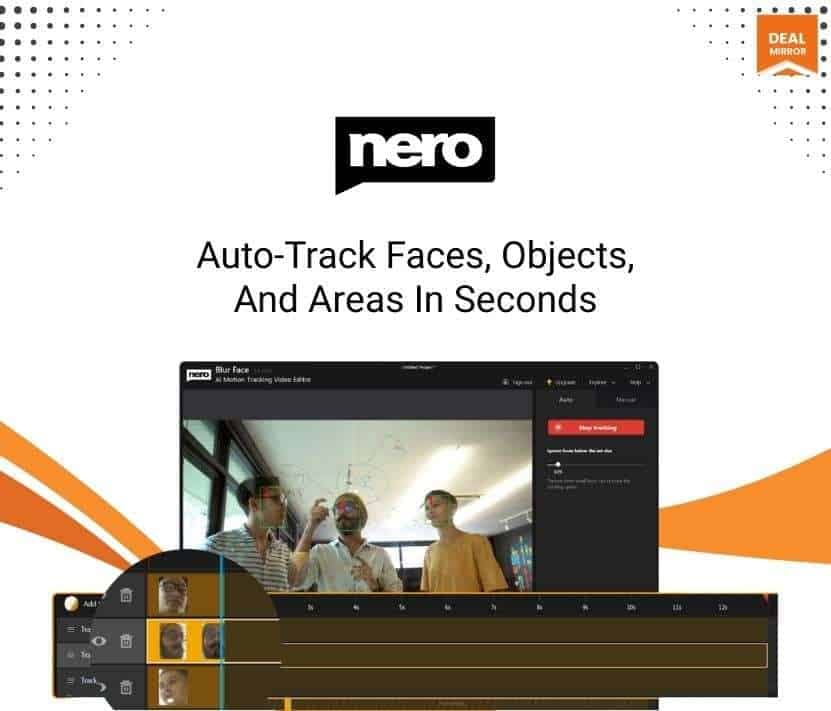
Nero Motion Tracker at a glance
- Platform
- Windows
- Support
- Email support at the address Nero lists on the page.
- Note
- The number of PCs covered is not stated. Stacking is not mentioned.
Our take
Is Nero Motion Tracker worth buying?
Based on the DealMirror listing, this is a single-purpose tracking and privacy tool with a one-time price. It complements an editor rather than replacing one, and it leans on an NVIDIA GPU. Confirm the PC limit with the seller, since the page does not state one.
Good fit if
- You blur faces or plates in street footage often.
- You want to pin text to moving subjects without keyframes.
- You have an NVIDIA GPU.
Skip it if
- You need a complete editor.
- You work on Mac.
- You have only integrated graphics.
Which Nero Motion Tracker plan do you need?
Prices in USD, excluding tax.
| 2026 | |
|---|---|
| One-time price | $49.99 |
| Regular price (DealMirror) | |
| You save | $20 |
| Tracking modes | 3 (Segment, Face, Zone) |
| Effects | Blur, mosaic, text, graphics |
| Export | MP4 |
| GPU | NVIDIA 6 GB VRAM recommended |
| PCs covered | Not stated |
Before you buy: DealMirror's terms and extra costs
- Refund. 30-day money-back guarantee through DealMirror. The page says Prime members get 60 days.
- Redeem. Redeem your code within 60 days of purchase.
- Support. Email support at the address Nero lists on the page.
- Platform. Windows. NVIDIA GPU with at least 6 GB VRAM recommended for Segment tracking. AMD uses DirectML and may fail, with a software tracking fallback in settings.
- Note. The number of PCs covered is not stated. Stacking is not mentioned.
What is Nero Motion Tracker?
Nero Motion Tracker is a Windows app that tracks moving subjects in video with AI. It has three modes: Segment for pixel-accurate objects, Face for automatic face blur or mosaic, and Zone for covering a fixed area such as a license plate. You can pin text, graphics or effects to the tracked subject without manual keyframing and export MP4.
What Nero Motion Tracker says it does
- Three tracking modes: Segment, Face and Zone
- Pins text, clip art or effects to moving subjects without manual keyframing
- NVIDIA GPU acceleration for faster tracking
- High-quality MP4 export
Why Nero Motion Tracker
It does one slow editing job quickly: following a subject so blur or labels stay attached. It is a utility, not a full editor. Performance depends on the GPU, and the page says AMD and Intel graphics can be slow or unreliable.
How does Nero Motion Tracker work?
Redeem the code
Redeem the DealMirror code within 60 days of purchase.
Upload a clip
Load your video into the app.
Pick a mode
Choose Segment, Face or Zone tracking.
Apply an effect
Add blur, mosaic, text or graphics to the tracked subject.
Export
Save the result as an MP4.
Then it handles:
- Tracking moving objects
- Blurring faces automatically
- Hiding license plates
- Pinning text to a subject
- Adding effects without keyframes
- Exporting MP4 video
Who is Nero Motion Tracker for?
Built for
- Vloggers and creators filming in public
- Educators and reviewers who annotate moving subjects
- Marketing teams adding branded overlays
Not for
- Anyone who needs a full video editor with timeline and audio
- Mac users (the page describes a Windows app)
- Users without a capable GPU (NVIDIA with 6 GB VRAM is recommended)
What is included in Nero Motion Tracker?
Tracking modes
- Segment mode pixel-accurate object tracking
- Face mode automatic face blur or mosaic
- Zone mode covers a defined area quickly
Effects and output
- Pinned text, clip art and effects
- NVIDIA acceleration
- Upload, track, export workflow
- MP4 export
Video review
We have not reviewed Nero Motion Tracker on video yet.
Get notifiedBuyer reviews
No reviews yet. Bought Nero Motion Tracker? Add it to your workspace and share what it replaced.
Add to your workspaceNero Motion Tracker questions
What does Nero Motion Tracker do?
It tracks moving objects, faces and zones in video with AI, then applies blur, mosaic, text or graphics to them.
What are the tracking modes?
Segment for objects, Face for faces and Zone for a fixed rectangular area.
What GPU do I need?
NVIDIA with at least 6 GB VRAM is recommended. AMD can have driver issues and Intel graphics can be slow.
What is the output format?
High-quality MP4.
How many PCs does the license cover?
The listing does not say.
What is the refund policy?
30 days through DealMirror, or 60 days for Prime members.
Often compared with
These are other tools in the same space, not deals on GrabLTD.
- Filmora
- Kapwing
- DaVinci Resolve
- Adobe After Effects
- Motion Array
Sources
Checked . Prices and terms on this page come from: