

Productivity · Lifetime deal
Notepik AI Meetings Assistant
Turn meetings into searchable decisions and clear next steps
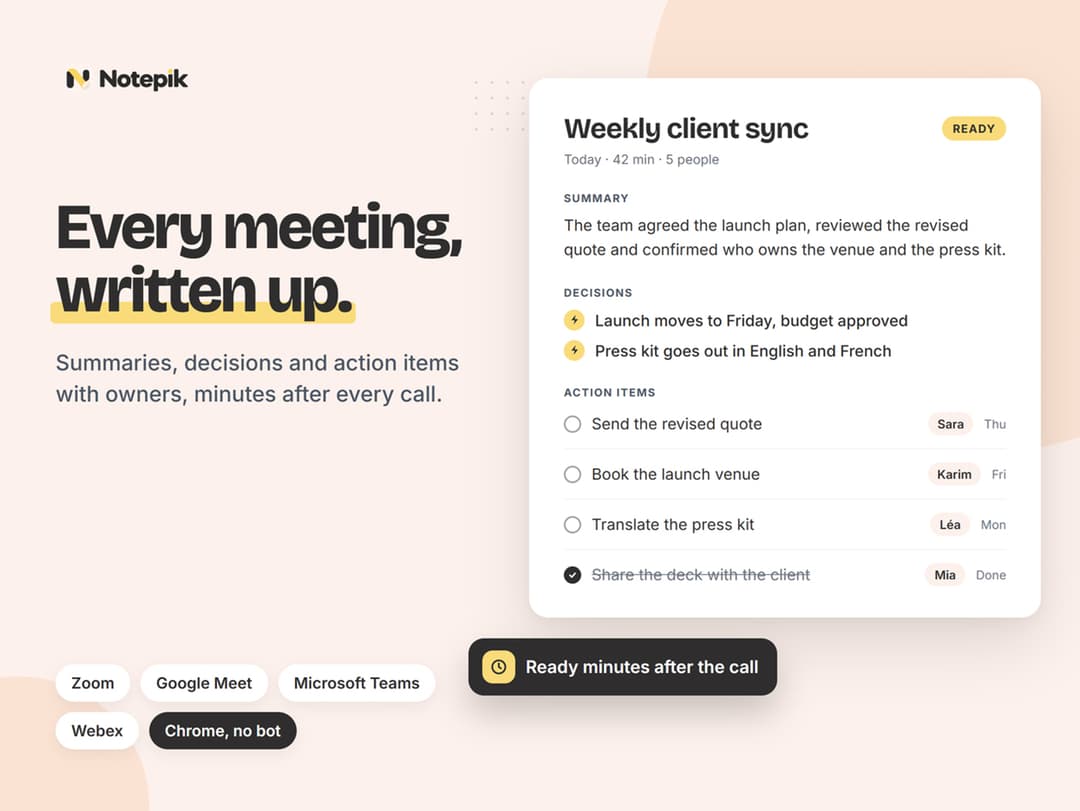
Notepik AI Meetings Assistant at a glance
- Platform
- Web, Chrome, Zoom, Google Meet, Microsoft Teams, Webex, Windows, macOS, Linux, ChromeOS, iOS, Android
- Note
- Each code works once and cannot be stacked or combined with other promotions.
- Note
- Existing Notepik users may redeem on a workspace not already covered by this access.
- Note
- Access lasts for life.
- Note
- No separate app is installed, and there is no mobile app, desktop app, or live captions.
Which Notepik AI Meetings Assistant plan do you need?
Prices in USD, excluding tax.
| Lifetime | |
|---|---|
| One-time price | $49 |
Before you buy: StackSocial's terms and extra costs
- Redeem. Redeem the code within 30 days of purchase.
- Redeem. Redeem by March 10, 2027 at 07:59 PST.
- Redeem. One code activates one workspace with up to 3 seats. The workspace owner redeems it.
- Note. Each code works once and cannot be stacked or combined with other promotions.
- Note. Existing Notepik users may redeem on a workspace not already covered by this access.
- Note. Access lasts for life.
- Usage cost. Each workspace includes 5 meeting hours per month and up to 3 seats. Unused hours do not roll over.
- Usage cost. After the monthly allowance is used, processing pauses until next month. No overage charge applies, and nothing is deleted.
- Platform. Runs in modern browsers on Windows, macOS, Linux, ChromeOS, iOS, and Android.
- Platform. The Chrome extension requires desktop Google Chrome. An internet connection is required.
- Platform. Supported meeting services are Zoom, Google Meet, Microsoft Teams, and Webex.
- Note. No separate app is installed, and there is no mobile app, desktop app, or live captions.
What is Notepik AI Meetings Assistant?
Notepik is a browser-based meeting assistant that records supported calls or processes uploaded recordings and creates transcripts, summaries, decision logs, and action items. A visible bot can join calls, while a Chrome extension can record a meeting without a bot. Teams can search past meetings, cite source moments, and send next steps to work tools.
What Notepik AI Meetings Assistant says it does
- Summaries support more than 40 languages and are written in the language spoken. (Notepik AI Meetings Assistant's figure)
- Uploaded audio or video files can be up to 2GB each. (Notepik AI Meetings Assistant's figure)
- One workspace includes up to 3 seats. (Notepik AI Meetings Assistant's figure)
- The workspace includes 5 meeting hours each month, described as enough for about 5-10 meetings. (Notepik AI Meetings Assistant's figure)
- Unused portions of the 5 monthly meeting hours do not roll over. (Notepik AI Meetings Assistant's figure)
- After 5 monthly hours are used, processing pauses until next month; no overage charge applies and nothing is deleted. (Notepik AI Meetings Assistant's figure)
- There is no device limit; sign in from any computer or phone browser.
- A visible bot can join Zoom, Google Meet, Microsoft Teams, and Webex calls.
- The Chrome extension can record a call in the browser tab without a bot.
- Each action item includes a suggested owner and due date.
- The decision log captures key decisions from calls in one place.
- Answers across past meetings cite the exact moment when something was said.
Why Notepik AI Meetings Assistant
Meeting follow-up depends on clear notes, decisions, and next steps. Notepik turns calls into summaries and a decision log, then suggests owners and due dates for action items. A shared searchable library and cited answers help teams find earlier discussions without relying on one person’s notes.
How does Notepik AI Meetings Assistant work?
Capture the meeting
Join with a bot, sync a calendar, record a Chrome tab, or upload an existing recording.
Process the call
Notepik creates a transcript, summary, decision log, and action items with suggested owners and due dates.
Tailor the output
Choose a template for sales calls, standups, or hiring interviews and use summaries in the spoken language.
Route and revisit
Send action items to work tools, search the shared library, or ask cited questions across past meetings.
Share the notes
Share write-ups by link, with or without transcripts, and export them to Markdown or PDF.
Then it handles:
- Record supported online meetings
- Upload existing call recordings
- Summarize calls in the spoken language
- Capture decisions and next steps
- Suggest action-item owners and due dates
- Search past meeting discussions
- Send action items to work tools
- Share and export meeting notes
Who is Notepik AI Meetings Assistant for?
Built for
- Teams that need shared, searchable meeting notes and decision history.
- People who want summaries, action items, and suggested owners from calls.
- Workspaces using Zoom, Google Meet, Microsoft Teams, or Webex.
- Desktop Chrome users who prefer recording without adding a bot.
Not for
- Users who need live captions during calls.
- Users who need native mobile or desktop apps.
- Clinical, legally privileged, or HR disciplinary conversations; no HIPAA agreement, SOC 2, or ISO 27001 certification.
- Teams needing more than 5 meeting-processing hours monthly or more than 3 seats.
- Automatic bot use on meeting services outside Zoom, Google Meet, Microsoft Teams, and Webex.
What is included in Notepik AI Meetings Assistant?
Meeting capture
- Auto-Join Meeting Bot A visible bot joins supported meeting calls.
- Calendar Sync Connect Google or Microsoft calendars so the bot joins calls.
- Chrome Extension Record a desktop Chrome tab without adding a bot.
- Recording Uploads Upload existing audio or video files up to 2GB each.
- Web App No separate installation is needed for browser access.
Meeting outputs
- Action Items With Owners Each next step includes a suggested owner and due date.
- Decision Log Key decisions from calls are collected in one place.
- Multilingual Summaries Summaries use the spoken language across more than 40 languages.
- Custom Summary Templates Tailor write-ups for sales, standups, and hiring interviews.
Workflow connections
- Work-Tool Integrations Send action items to Slack, Asana, Trello, ClickUp, and HubSpot.
- Webhook Connections Send action items to Zapier, Make, and n8n through webhooks.
Recall and teamwork
- Ask With Citations Ask questions across past meetings for answers with exact citations.
- Shared Team Library All 3 seats share one searchable meeting library.
Sharing and export
- Share by Link Share write-ups by link with or without the transcript.
- Export Export write-ups to Markdown or PDF.
Video review
We have not reviewed Notepik AI Meetings Assistant on video yet.
Get notifiedBuyer reviews
No reviews yet. Bought Notepik AI Meetings Assistant? Add it to your workspace and share what it replaced.
Add to your workspaceNotepik AI Meetings Assistant questions
What does Notepik do?
Notepik is an AI meeting assistant that turns recorded calls into summaries, a decision log, and action items with suggested owners and due dates. It can join Zoom, Google Meet, Microsoft Teams, and Webex through a visible bot, record via a Chrome extension, or process uploaded audio/video. Teams can search past meetings, use cited answers, apply custom templates, and send action items to supported work tools.
Who is the Lifetime plan for?
The plan is for small teams sharing one workspace. One code supports up to 3 seats, and all members share a searchable meeting library. It works in modern browsers on Windows, macOS, Linux, ChromeOS, iOS, and Android, with no device limit or separate app installation. It is not suitable for clinical, legally privileged, or HR disciplinary conversations because Notepik has no HIPAA agreement, SOC 2, or ISO 27001 certification.
What are the meeting and upload limits?
Each workspace includes 5 hours of meetings per month. Unused hours do not roll over. Once the monthly allowance is used, new processing pauses until the following month; there is no overage charge, and existing content is not deleted. Uploaded audio or video files can be up to 2GB each.
What happens after purchasing the $49 Lifetime plan?
The Lifetime plan costs $49 and has no recurring fees. After purchase, redeem the code within 30 days. The workspace owner uses the one-time code to activate one workspace with up to 3 seats. The code cannot be stacked on the same workspace or combined with other promotions. Updates are included.
Which platforms and devices are supported?
Notepik supports Zoom, Google Meet, Microsoft Teams, and Webex. A visible bot can join from a link or a connected Google/Microsoft calendar. Desktop Google Chrome is required for the extension, which records the browser tab without a bot. The extension does not announce itself, so participants must be told before recording. There is no mobile app, desktop app, or live captions during calls.