

Email · Lifetime deal
NudgeForMe
Find and revive important email conversations
NudgeForMe at a glance
- Platform
- Gmail, Outlook, Yahoo, iCloud, GoDaddy, IMAP
- Note
- Lifetime access to NudgeForMe
- Note
- All future plan updates
- Upgrades
- Ability to upgrade or downgrade between 5 license tiers
- Note
- GDPR compliant
Which NudgeForMe plan do you need?
Prices in USD, excluding tax.
| Plan 1 | Plan 2 | Plan 3 | Plan 4 | Plan 5 | |
|---|---|---|---|---|---|
| One-time price | $49 | $109 | $179 | $299 | $589 |
| Regular price (AppSumo) | |||||
| You save | $179 | $359 | $1,009 | $2,089 | $4,199 |
| Includes | 1 Connected mailboxes; 1 Client/business workspaces; 1 Team members; Gmail & Outlook Email providers; 3 months Historical lookback for missed opportunities; 250 Follow-up drafts per month; Up to 3 Follow-ups per opportunity | 3 Connected mailboxes; 1 Client/business workspaces; 1 Team members; All providers Email providers; 6 months Historical lookback for missed opportunities; 1,000 Follow-up drafts per month; Up to 5 Follow-ups per opportunity; Custom writing instructions | 6 Connected mailboxes; 3 Client/business workspaces; 3 Team members; All providers Email providers; 1 year Historical lookback for missed opportunities; 3,000 Follow-up drafts per month; Until reply Follow-ups per opportunity; Custom writing instructions; Optional automatic sending; Timezone-aware send windows; Include previous attachments | 15 Connected mailboxes; 5 Client/business workspaces; 5 Team members; All providers Email providers; 2 years Historical lookback for missed opportunities; 5,000 Follow-up drafts per month; Until reply Follow-ups per opportunity; Custom writing instructions; Optional automatic sending; Timezone-aware send windows; Include previous attachments; Research & Draft (supported enrichment providers) | 50 Connected mailboxes; Unlimited Client/business workspaces; Unlimited Team members; All providers Email providers; 4 years Historical lookback for missed opportunities; 12,000 Follow-up drafts per month; Until reply Follow-ups per opportunity; Custom writing instructions; Optional automatic sending; Timezone-aware send windows; Include previous attachments; Research & Draft (supported enrichment providers) |
Before you buy: AppSumo's terms and extra costs
- Note. Lifetime access to NudgeForMe
- Note. All future plan updates
- Redeem. You must activate your license within 60 days of purchase
- Upgrades. Ability to upgrade or downgrade between 5 license tiers
- Redeem. No codes, no stacking; just choose the plan that is right for you
- Note. GDPR compliant
What is NudgeForMe?
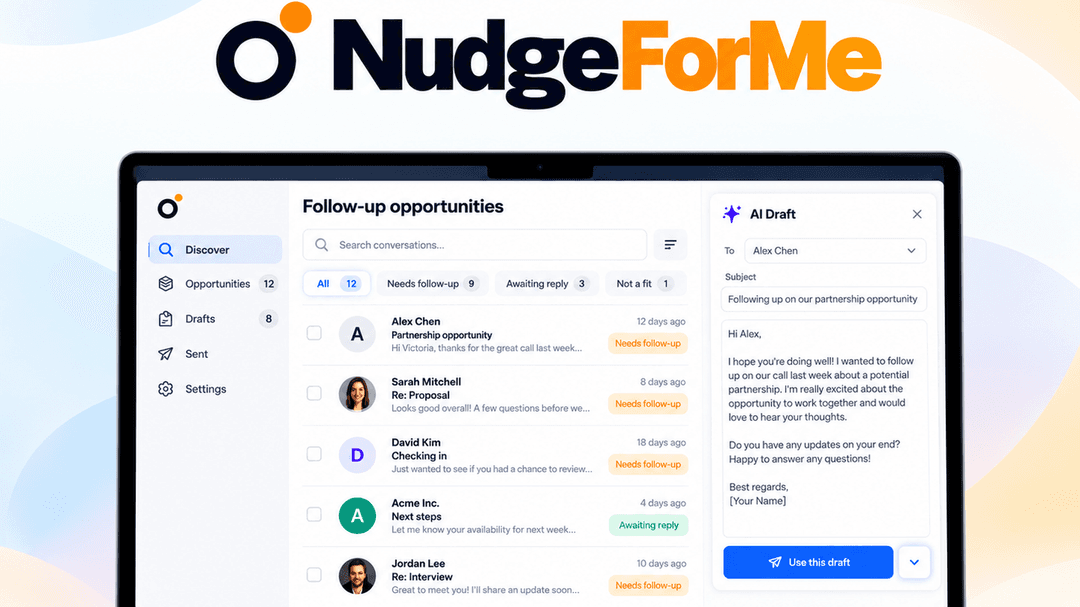
NudgeForMe is an AI email follow-up assistant that finds important conversations that went quiet, filters out noise, and drafts contextual follow-ups inside connected mailboxes. It supports multi-step sequences, approval before sending, and automatic stopping when a recipient replies, bounces, or is out of office.
What NudgeForMe says it does
- Uses AI to surface important sent conversations that went quiet and still need a response.
- Reads thread context, rather than silence alone, to decide whether a reply was expected.
- Filters completed threads, FYIs, newsletters, and chats that do not need another nudge.
- Drafts follow-ups using the original thread context and conversation language.
- Can add research from Apollo, Cleanlist, Tavily, and web search to drafts.
- Creates native mailbox drafts that can be reviewed, edited, sent, or dismissed.
- Keeps draft mode on by default so nothing sends without approval.
- Supports optional automatic follow-ups with timezone-aware send windows.
- Stops sequences when a recipient replies, bounces, or is out of office.
- Supports client workspaces, multiple mailboxes, and adding teammates.
Why NudgeForMe
Important proposals, client requests, deals, and other conversations can remain unanswered in a busy inbox. NudgeForMe reads thread context to identify conversations that still need a response, removes newsletters and other noise, and prepares a follow-up for review.
How does NudgeForMe work?
Connect a mailbox
Connect Gmail or Outlook. Additional Yahoo, iCloud, GoDaddy, and IMAP support is also available.
Find conversations that need attention
NudgeForMe scans sent threads, reads their context, and filters out completed conversations, FYIs, newsletters, and chats.
Create a contextual draft
It prepares a follow-up in the original conversation’s language and adds fresh research when available.
Review the follow-up
Review, edit, send, or dismiss each native draft. Previously dismissed opportunities can be restored.
Set the follow-up sequence
Choose draft approval or optional automatic sending, set send windows, and use contact controls. Sequences stop on replies, bounces, or out-of-office responses.
Then it handles:
- Find stalled sent conversations
- Filter newsletter and FYI noise
- Draft contextual follow-ups
- Revive quiet deals and partnerships
- Track client and approval conversations
- Move onboarding and support threads forward
- Track hiring and recruiting candidates
Who is NudgeForMe for?
Built for
- Founders and salespeople
- Customer success and support teams
- Recruiters and hiring teams
- Agencies and consultants
Not for
- Users outside the stated email-provider options
- People looking to nudge completed threads, FYIs, newsletters, or chats that do not need another nudge
What is included in NudgeForMe?
Stalled thread detection
- Sent-thread scanning Scans sent conversations for important threads that still need a response.
- Noise filtering Filters completed threads, FYIs, newsletters, and chats without follow-up needs.
- Opportunity restoration Restores previously dismissed opportunities at any time.
Context-aware follow-up drafts
- Thread-context drafts Drafts follow-ups using the original thread context and language.
- Research enrichment Can add Apollo, Cleanlist, Tavily, and web research to drafts.
- Custom instructions Applies custom writing instructions to match the intended voice.
- Previous attachments Includes previous thread attachments in follow-up drafts.
- Native mailbox drafts Creates native drafts for review, editing, sending, or dismissal.
Sending and stop controls
- Approval-first drafting Keeps draft mode on by default for approval before sending.
- Automatic sequences Supports automatic follow-ups within timezone-aware sending windows.
- Automatic stops Stops sequences after replies, bounces, or out-of-office responses.
- Contact controls Applies contact and domain allow and block lists.
Conversation coverage
- Business relationships Revives quiet deals and partnerships.
- Client workflows Advances client, approval, onboarding, and support conversations.
- Hiring workflows Tracks hiring and recruiting threads without losing candidates.
Mailbox and workspace management
- Multiple email providers Connects Gmail and Outlook, plus supported Yahoo, iCloud, GoDaddy, and IMAP.
- Client workspaces Separates clients into workspaces across multiple connected mailboxes.
- Team access Adds teammates to manage mailboxes and client workspaces.
Video review
We have not reviewed NudgeForMe on video yet.
Get notifiedBuyer reviews
No reviews yet. Bought NudgeForMe? Add it to your workspace and share what it replaced.
Add to your workspaceNudgeForMe questions
What does NudgeForMe do?
NudgeForMe connects to your mailbox, scans sent conversations to identify important threads that still need a response, and filters out newsletters, FYIs, chats, and completed threads. It drafts follow-ups using the original thread’s context and conversation language. Draft mode is on by default, so you can review, edit, send, or dismiss drafts inside Gmail or Outlook. Sequences stop automatically after a reply, bounce, or out-of-office response.
Who is NudgeForMe for?
It is made for founders, salespeople, customer success teams, recruiters, and agencies. Client/business workspaces, multiple connected mailboxes, and team members can be used to manage conversations across clients, deals, hiring, approvals, onboarding, and support.
What are the plan prices and account limits?
Plan 1 ($49) supports 1 mailbox, 1 workspace, and 1 member; Plan 2 ($109), 3 mailboxes, 1 workspace, and 1 member; Plan 3 ($179), 6 mailboxes, 3 workspaces, and 3 members; Plan 4 ($299), 15 mailboxes, 5 workspaces, and 5 members; Plan 5 ($589), 50 mailboxes with unlimited workspaces and members. Plan 1 supports Gmail and Outlook; Plans 2-5 support all providers, including Yahoo, iCloud, GoDaddy, and IMAP.
How many follow-up drafts and historical lookback does each plan include?
Plan 1 ($49) includes 250 follow-up drafts per month, up to 3 follow-ups per opportunity, and 3 months of historical lookback. Plan 2 ($109) includes 1,000 drafts monthly, up to 5 follow-ups, and 6 months of lookback. Plan 3 ($179) includes 3,000 drafts monthly, follow-ups until reply, and 1 year of lookback. Plan 4 ($299) includes 5,000 monthly drafts, follow-ups until reply, and 2 years of lookback. Plan 5 ($589) includes 12,000 monthly drafts, follow-ups until reply, and 4 years of lookback.
Does it send follow-ups automatically?
Draft mode is on by default, so nothing sends without your approval. Plan 3 and above add optional automatic sending with timezone-aware send windows. Custom writing instructions are included from Plan 2 onward. Plan 3 and above can include previous attachments automatically. Research & Draft using supported providers such as Apollo, Cleanlist, and Tavily is included in Plans 4 and 5.
What happens after purchase?
Each purchase includes lifetime access to NudgeForMe, all future plan updates, and the ability to upgrade or downgrade between the five license tiers. You must activate the license within 60 days of purchase. No codes are required, and licenses cannot be stacked; you choose one plan.