

WordPress · Lifetime deal
One Accessibility
WordPress accessibility toolbar that runs natively, not as an overlay script.
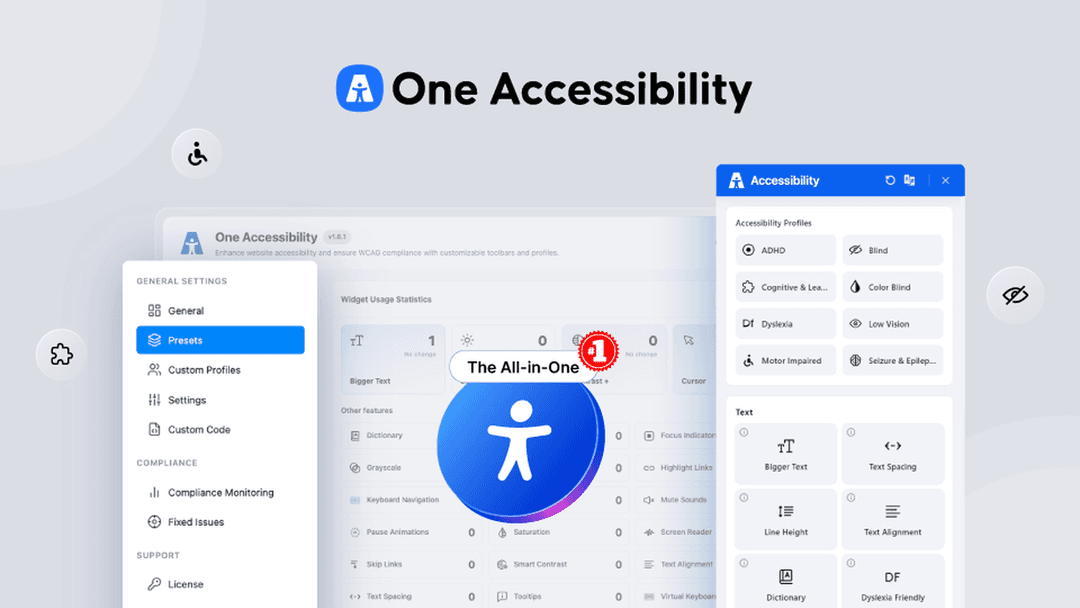
One Accessibility at a glance
- Platform
- WordPress, Elementor, Gutenberg, WooCommerce
- Note
- Lifetime access to One Accessibility
- Note
- All future plan updates included
- Upgrades
- Upgrade or downgrade between 4 license tiers
Which One Accessibility plan do you need?
Prices in USD, excluding tax.
| Personal | Business | Business | Agency | |
|---|---|---|---|---|
| One-time price | $49 | $129 | $279 | $399 |
| Regular price (AppSumo) | ||||
| You save | $90 | $220 | $320 | $900 |
| Includes | 1 Websites | 5 Websites | 50 Websites | 1,000 Websites; White label branding removal |
Before you buy: AppSumo's terms and extra costs
- Note. Lifetime access to One Accessibility
- Note. All future plan updates included
- Redeem. Activate your license within 60 days of purchase
- Upgrades. Upgrade or downgrade between 4 license tiers
- Redeem. No codes or stacking, just choose the plan that fits
What is One Accessibility?
One Accessibility is a WordPress plugin that adds a full accessibility toolbar to any site. It offers 50+ tools including contrast controls, text resizing, keyboard navigation, text-to-speech, and dyslexia-friendly fonts. The plugin runs natively inside WordPress rather than as an external overlay script, and works with Elementor, Gutenberg, and WooCommerce.
What One Accessibility says it does
- Launches an on-brand accessibility widget in 5 minutes (One Accessibility's figure)
- Keeps page speed and Core Web Vitals intact (One Accessibility's figure)
- Includes 50+ accessibility tools in one toolbar (One Accessibility's figure)
- Offers 7 ready-made disability profiles (One Accessibility's figure)
- Supports WCAG 2.0, 2.1, and 2.2 AA guidelines
- Supports ADA Title III, Section 508, AODA, and the European Accessibility Act
- Uses an AI-driven accessibility checker
- Does not use external overlay scripts or cloud dependencies
- Stores visitor usage stats in your own WordPress database
Why One Accessibility
WordPress site owners often need to support WCAG and ADA guidelines without slowing their site or relying on external overlay scripts that visitors block. Accessibility audits or demand letters can arrive without warning. One Accessibility runs natively inside WordPress, flags issues before an audit, and generates a compliance statement in one click.
How does One Accessibility work?
Install the WordPress plugin
Add One Accessibility to your WordPress site and activate it from your dashboard.
Customize the toolbar
Use the drag-and-drop editor to match the icon, size, position, colors, and layout to your brand, then preview in real time.
Pick or build profiles
Choose from 7 ready-made disability profiles or build custom presets with multilingual, RTL-friendly options.
Run the AI accessibility checker
Scan pages for WCAG 2.0, 2.1, and 2.2 AA issues, including images missing alt text, from the compliance dashboard.
Publish an accessibility statement
Generate ADA- and WCAG-aligned documentation in one click and publish it on your site.
Then it handles:
- Text resizing, contrast, and spacing controls
- Keyboard navigation with visible focus indicators
- Built-in text-to-speech screen reader
- Dyslexia-friendly fonts and reading modes
- Motion controls for animations
- AI compliance monitoring for WCAG issues
- One-click accessibility statement generation
- White-label branding for client work
Who is One Accessibility for?
Built for
- WordPress site owners needing WCAG and ADA compliance
- Agencies managing multiple client websites
- WooCommerce, Elementor, and Gutenberg users
- Organizations operating under ADA, AODA, or the European Accessibility Act
Not for
- Sites built outside WordPress
- Teams that specifically need an external overlay script
- Buyers who need white-label branding outside the top tier
What is included in One Accessibility?
Brand-matched toolbar
- 50+ tools in one toolbar Contrast, text size, spacing, and dyslexia-friendly fonts
- Drag-and-drop brand editor Adjust icon, size, position, colors, and layout
- Real-time preview Check the look before publishing
- Native WordPress runtime No external scripts or cloud dependencies
Visitor profiles
- 7 ready-made profiles Adapts the whole site instantly to visitor needs
- Unlimited presets Apply site-wide or to specific pages and archives
- Custom profiles SVG icons with multilingual, RTL-friendly options
- Backup and restore Clone proven setups across client sites
Navigation and reading
- Keyboard navigation Visible focus, optimized tab order, skip links
- Text-to-speech reader Built-in screen reader and reading modes
- Motion controls Pause animations to prevent discomfort
- On-screen keyboard Extra input option for keyboard users
Compliance monitoring
- AI accessibility checker Flags WCAG 2.0, 2.1, and 2.2 AA issues
- Missing alt text scanner Find and fix images without alt text
- One-click statement ADA- and WCAG-aligned documentation
- Privacy-first analytics Usage stats stored in your WordPress database
Video review
We have not reviewed One Accessibility on video yet.
Get notifiedBuyer reviews
No reviews yet. Bought One Accessibility? Add it to your workspace and share what it replaced.
Add to your workspaceOne Accessibility questions
What does One Accessibility do?
One Accessibility is a WordPress plugin that adds an on-brand toolbar with 50+ tools, including contrast and text controls, dyslexia-friendly fonts, keyboard navigation, text-to-speech, reading modes, and motion controls. It also includes an AI checker for WCAG 2.0, 2.1, and 2.2 AA issues, missing-alt detection, compliance monitoring, and an accessibility statement generator. It runs natively in WordPress without an external overlay script or cloud dependency.
Who is One Accessibility for?
It is for WordPress site owners serving visitors with varied accessibility needs. The plugin supports WCAG 2.2 AA and ADA guidelines and provides seven ready-made disability profiles, plus custom profiles. It works with Elementor, Gutenberg, and WooCommerce. Presets can be applied site-wide or to selected pages, posts, and archives.
How many websites does each plan cover, and what do they cost?
Personal is $49, regular $139, for 1 website. Business is $129, regular $349, for 5 websites; or $279, regular $599, for 50 websites. Agency is $399, regular $1299, for 1,000 websites and includes white-label branding removal. Each purchase includes lifetime access and all future plan updates.
What happens after purchase?
The license must be activated within 60 days of purchase. It includes lifetime access and all future plan updates. Buyers can upgrade or downgrade between the four license tiers. No codes or stacking are required; the selected tier determines the website allowance.