

Productivity · Lifetime deal
QUFO
Connect customer workflows, approvals, jobs, and payments in one workspace
Which QUFO plan do you need?
Prices in USD, excluding tax.
| Plan A – Lifetime Subscription | Plan B – Lifetime Subscription | |
|---|---|---|
| One-time price | $59 | $99 |
| Regular price (Dealify) | ||
| You save | $118 | $198 |
| Includes | Lifetime access to QUFO's core workflow; 150 quotation credits per month; 1,000 customer emails/month; Up to 10 team members; 5 GB storage; 30-day Money Back Guarantee; You must redeem your code(s) within 60 days of purchase | Lifetime access to QUFO's core workflow; 500 quotation credits per month; 2,500 customer emails/month; Up to 25 team members; 15 GB storage; 30-day Money Back Guarantee; You must redeem your code(s) within 60 days of purchase |
Before you buy: Dealify's terms and extra costs
- Refund. 30-day Money Back Guarantee.
- Redeem. You must redeem your code(s) within 60 days of purchase.
What is QUFO?
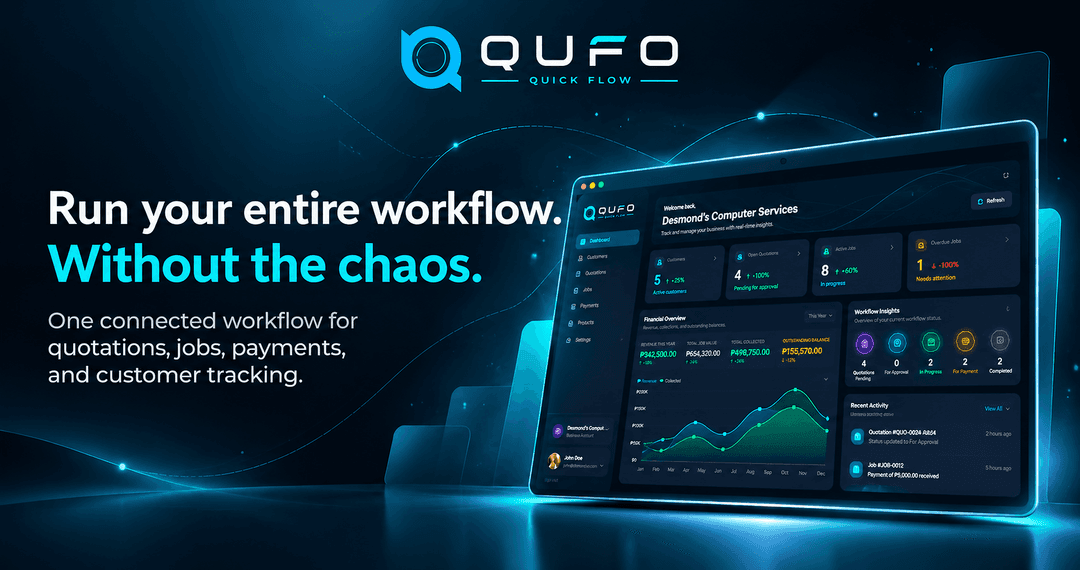
QUFO is a connected workspace for service and production businesses. It organizes customer records, quotations, approvals, jobs, production progress, payments, balances, and reporting from first contact through completed work.
What QUFO says it does
- One connected workspace manages customers, quotations, approvals, jobs, payments, and reporting.
- Moving approved quotations into job workflows reduces manual data entry.
- Secure quotation links support faster customer approvals without customer accounts.
- Job tracking provides clearer visibility into priorities, due dates, and production progress.
- Payment tracking records deposits and partial payments and tracks remaining balances.
- Customer tracking links reduce repetitive status follow-ups.
- A central dashboard shows active work, outstanding balances, payment activity, and performance.
- Automatic progress updates keep customer-facing job statuses current as production changes.
Why QUFO
It replaces scattered spreadsheets, messages, and disconnected records with one workflow for quoting, approvals, job management, customer updates, and payment tracking.
How does QUFO work?
Capture customers
Store contact details, company information, customer records, and transaction history in one central workspace.
Create and send quotations
Prepare quotations with items, quantities, discounts, taxes, notes, and terms, then send them to customers.
Collect approvals
Customers use a secure link to review, approve, or request changes without registering.
Manage production
Convert approved quotations into jobs and track status, priorities, due dates, and production progress.
Complete and report
Record payments, send tracking links and progress updates, and review active work and business performance from the dashboard.
Then it handles:
- Organize customer records
- Build and send quotations
- Collect online approvals
- Convert quotations into jobs
- Track production progress
- Record payments and balances
- Share customer tracking links
- Monitor work and performance
Who is QUFO for?
Built for
- Small and growing service and production businesses that regularly quote, produce, deliver, and collect payments
- Printing shops
- Signage and fabrication shops
- Customized product businesses
- Small contractors and service businesses moving beyond spreadsheets
What is included in QUFO?
Customer management
- Customer profiles Keeps customer profiles, company information, contact records, and transaction history accessible.
- Central records Organizes customer details and transaction history in one central workspace.
Quotations and approvals
- Quotation builder Creates quotations with items, quantities, discounts, taxes, notes, and terms.
- Quotation management Imports, previews, duplicates, sends, and manages quotations from one place.
- Online approvals Lets customers review, approve, or request changes through secure links.
- Account-free access Customers can act on quotations without creating a QUFO account.
Jobs and production
- Quote-to-job conversion Converts approved quotations directly into jobs without re-entering information.
- Production tracking Tracks status, priorities, due dates, and progress as work advances.
- Job visibility Keeps active work and completion status visible in one workspace.
Customer updates
- Tracking links Lets customers check order status through secure links without logging in.
- Progress updates Updates customer-facing statuses as the team advances production work.
- Customer messages Shares relevant customer updates while keeping internal notes private.
Payment tracking
- Payment records Records deposits, partial payments, and full payments.
- Balance tracking Monitors outstanding balances throughout the job lifecycle.
Business oversight
- Central dashboard Shows active jobs, payment activity, balances, and business performance together.
- Reporting Reviews work, payment activity, and overall business performance.
Video review
We have not reviewed QUFO on video yet.
Get notifiedBuyer reviews
No reviews yet. Bought QUFO? Add it to your workspace and share what it replaced.
Add to your workspaceQUFO questions
What does QUFO do?
QUFO connects customer management, quotations, online approvals, jobs, production tracking, payments, customer updates, and reporting in one workspace. Approved quotations can become jobs directly, while customers can approve quotes and track order progress through secure links without creating accounts.
Who is QUFO designed for?
QUFO is designed for small and growing service and production businesses that quote, produce, deliver, and collect payments. It suits printing and signage shops, fabricators, customized product businesses, small contractors and service businesses, and companies replacing spreadsheets or disconnected tools.
What is included in each plan?
Plan A – Lifetime Subscription costs $59 and includes lifetime access to QUFO’s core workflow, 150 quotation credits per month, 1,000 customer emails per month, up to 10 team members, and 5 GB storage. Plan B – Lifetime Subscription costs $99 and includes lifetime access, 500 quotation credits per month, 2,500 customer emails per month, up to 25 team members, and 15 GB storage.
What happens after I purchase QUFO?
Redeem your code within 60 days of purchase. Each plan provides lifetime access to QUFO’s core workflow. The purchase also includes a 30-day Money Back Guarantee.
Do customers need to create an account?
No. Customers can review, approve, or request changes to quotations and check order status through secure links without registering or creating a QUFO account.
Often compared with
These are other tools in the same space, not deals on GrabLTD.
- Spreadsheets