

Productivity · Lifetime deal
Stackby
Turn spreadsheets into a shared database with views, forms, dashboards and automations.
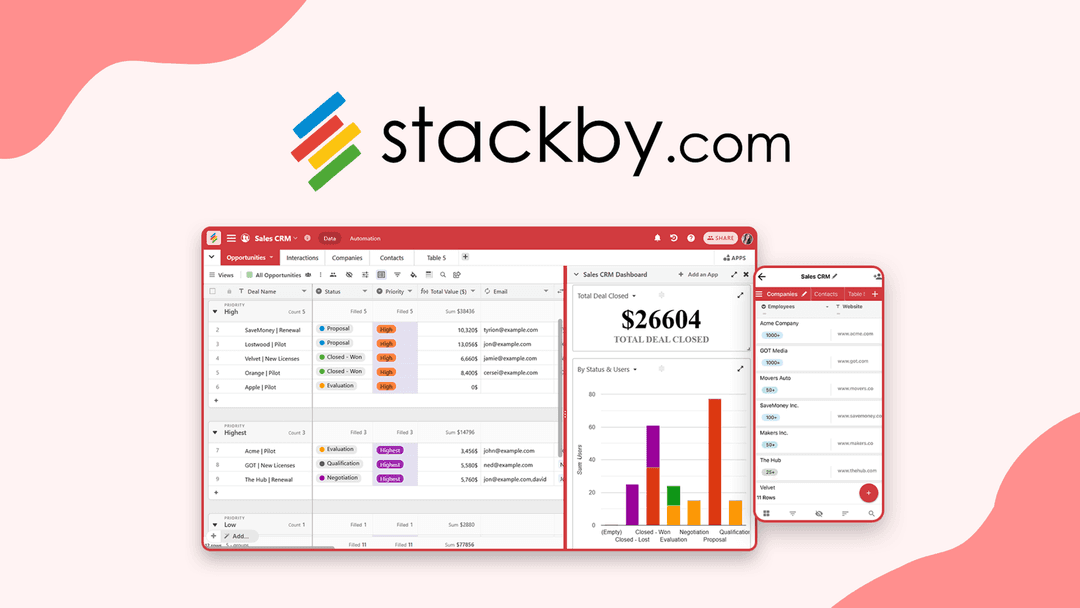
Stackby at a glance
- Platform
- Web
- Upgrades
- You can stack up to 10 codes. Previous buyers can buy more codes to raise limits. Paid one-time add-ons exist for apps, automation runs and other extras.
- Support
- The page says the team is expected to respond within 24 hours.
Our take
Is Stackby worth buying?
Based on the AppSumo listing, this is a spreadsheet-database tool sold as stackable lifetime codes. The limits on one code are modest and several items, such as automations and apps, are paid add-ons. Check which code count fits your team before you buy.
Good fit if
- You run data in spreadsheets and want linked records and views.
- You want forms and dashboards without per-seat pricing.
- You are comfortable stacking codes to reach the limits you need.
Skip it if
- You need external app users, which the page lists as not included.
- You need many internal automations without paying for add-ons.
Which Stackby plan do you need?
Prices in USD, excluding tax.
| Lifetime deal | |
|---|---|
| One-time price | $109 |
| Regular price (AppSumo) | |
| You save | $51 |
| Codes | Stack up to 10 (per the AppSumo page) |
| Users per code | 1 |
| Stacks (1 code) | 20 |
| Rows per stack (1 code) | 5,000 |
| Attachments per stack (1 code) | 4 GB |
Before you buy: AppSumo's terms and extra costs
- Refund. AppSumo lists the deal as refundable up to 30 days after purchase.
- Redeem. Codes must be redeemed within 60 days of purchase.
- Upgrades. You can stack up to 10 codes. Previous buyers can buy more codes to raise limits. Paid one-time add-ons exist for apps, automation runs and other extras.
- Support. The page says the team is expected to respond within 24 hours.
- AI usage cost. AI field agents use OpenAI, Anthropic or Gemini models. The page does not say who pays for model usage.
- Platform. Web app. The FAQ also mentions a desktop app.
What is Stackby?
Stackby turns spreadsheet-style data into a shared database with linked records, several views, forms, dashboards and automations. You can import from Google Sheets, Excel or Airtable, or start from a template. The deal is sold as lifetime codes through AppSumo, and you can stack codes to raise your limits.
What Stackby says it does
- Import from Google Sheets, Excel or Airtable, or start from 1000+ templates (Stackby's figure)
- Eight views including Kanban, List, Timeline and Calendar
- Forms, dashboards and invoice or document design built in
- Integrations with Zapier, Make, Slack, Microsoft Teams, Pabbly Connect and n8n
Why Stackby
Spreadsheets get slow and messy as rows and tabs multiply, and teams end up copying data by hand. Stackby keeps the grid layout but adds database features on top. Limits such as users, stacks and rows depend on how many codes you stack, and some add-ons are paid separately.
How does Stackby work?
Redeem your code
Buy on AppSumo and redeem the code in your Stackby account.
Bring in your data
Import a sheet or start from a template.
Shape the data
Add linked records, formulas and views.
Share and collect
Use forms and shared views with your team or customers.
Automate
Set up workflows, dashboards and messages.
Then it handles:
- Turning spreadsheets into linked databases
- Kanban, calendar and timeline views
- Collecting entries with shareable forms
- Dashboards with charts and pivot tables
- Automations and email or WhatsApp sending
- Designing invoices and quotes
- Syncing data between databases
Who is Stackby for?
Built for
- Teams outgrowing spreadsheets
- Small businesses that want a database without per-seat pricing
- Agencies tracking client work in one workspace
Not for
- Teams that need external app users, which the page lists as not included
- Anyone who needs many internal automations without buying add-ons
What is included in Stackby?
Data and views
- Import and templates Google Sheets, Excel, Airtable, 1000+ templates
- Linked records
- Multiple views Kanban, List, Timeline, Calendar and more
- Revision history 60 to 180 days by code count
Forms and dashboards
- Shareable forms
- Dashboards charts, summary boxes, pivot tables
- Invoice and document design
Automation and AI
- Workflows webhooks, forms, email, WhatsApp
- AI builder and fields OpenAI, Anthropic or Gemini
- Integrations Zapier, Make, Slack, Teams, n8n
Video review
We have not reviewed Stackby on video yet.
Get notifiedBuyer reviews
No reviews yet. Bought Stackby? Add it to your workspace and share what it replaced.
Add to your workspaceStackby questions
What is Stackby?
It is a spreadsheet-style database with linked records, views, forms, dashboards and automations. You can import existing sheets or start from a template.
Who is it for?
Teams and small businesses that have outgrown spreadsheets and want a shared database without paying per seat.
What do the codes change?
Each code adds a user and raises limits. The page lists 1 to 4 codes, from 1 user, 20 stacks and 5,000 rows per stack up to 4 users, 25 stacks and 10,000 rows per stack. Limits for 5 to 10 codes are not shown.
Can I stack codes?
Yes, up to 10 codes. Previous buyers can buy more codes to raise their limits.
What is the refund policy?
AppSumo lists the deal as refundable up to 30 days after purchase, under its We Got Your Back guarantee.
Are all features included?
Not necessarily. The page lists internal automations, apps and custom domains as 0 on the listed tiers, and sells add-ons such as Powerups, an Apps Marketplace and automation runs separately.
Often compared with
These are other tools in the same space, not deals on GrabLTD.
- Airtable
- Monday.com
- SmartSuite
- NocoDB
- Notion
Sources
Checked . Prices and terms on this page come from: