

AI Tools · Lifetime deal
SwifDoo PDF
PDF suite with editing, OCR, e-sign and AI tools on one lifetime license for 8 devices.
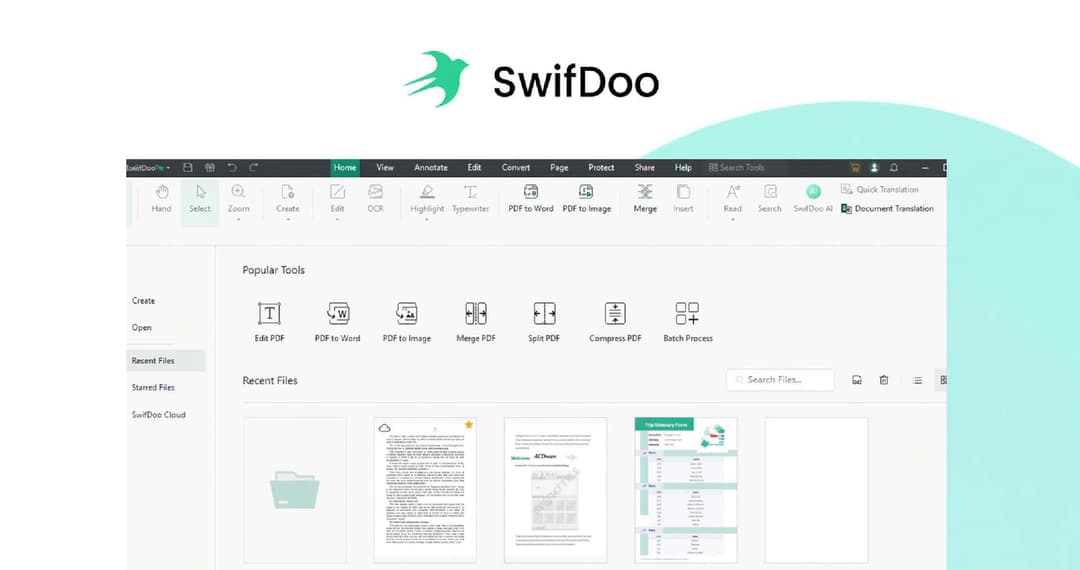
SwifDoo PDF at a glance
- Platform
- Windows, macOS, iOS, Android
- Upgrades
- Free lifetime upgrades are listed.
- Support
- Free tech support at support@swifdoo.com, with replies within 24 hours.
- Updates
- Free lifetime upgrades
- Support
- Free tech support
Our take
Is SwifDoo PDF worth buying?
Based on the Dealify listing, this is one lifetime license covering 8 devices across desktop and mobile. It suits people who want PDF editing, OCR and signing without a subscription. Check the mobile feature set, since one reviewer found the app limited.
Good fit if
- You use PDFs on several computers.
- You want OCR and e-signatures in one app.
- You want AI summaries and translation for documents.
Skip it if
- You need full editing on mobile.
- You need the web version to match desktop features.
Which SwifDoo PDF plan do you need?
Prices in USD, excluding tax.
| Lifetime Subscription Covering 8 Devices | |
|---|---|
| One-time price | $59.99 |
| Regular price (Dealify) | |
| You save | $576.01 |
| Devices | 8 |
| Platforms | Windows, Mac, iOS, Android |
| Updates | Free lifetime upgrades |
| Support | Free tech support |
Before you buy: Dealify's terms and extra costs
- Refund. Dealify lists a 30-day money-back guarantee.
- Redeem. Redeem your code within 60 days of purchase.
- Upgrades. Free lifetime upgrades are listed.
- Support. Free tech support at support@swifdoo.com, with replies within 24 hours.
- Platform. Windows, macOS, iOS and Android. Features may vary between versions.
What is SwifDoo PDF?
SwifDoo PDF is a PDF suite that covers reading, editing, conversion, OCR, signing and compression. The Dealify deal is a lifetime license that covers 8 devices and lists AI tools to summarize, translate, proofread and rewrite. Platforms listed are Windows, Mac, iOS and Android, with some mention of web access.
What SwifDoo PDF says it does
- Covers 8 devices on one lifetime license
- AI tools to summarize, translate, proofread, rewrite and chat with PDFs (SwifDoo PDF's figure)
- OCR for scanned files
- Free lifetime upgrades and tech support (SwifDoo PDF's figure)
Why SwifDoo PDF
Many PDF suites charge yearly or sell OCR and signing separately. This license bundles them for 8 devices. The page notes features vary between versions, and a reviewer said the mobile app is basically a PDF reader, so check the platform you need.
How does SwifDoo PDF work?
Redeem your code
Buy on Dealify and redeem the emailed code within 60 days.
Install
Install SwifDoo PDF on each device.
Activate
Sign in and add your license.
Work on PDFs
Edit, convert, sign or run OCR.
Then it handles:
- Reading and annotating PDFs
- Editing, merging and splitting
- Compressing files
- Converting to and from Office, image and CAD formats
- OCR on scanned files
- Forms and e-signatures
- AI summaries, translation and rewriting
Who is SwifDoo PDF for?
Built for
- People who use PDFs on several devices
- Small teams that want one license for many machines
- Users who need OCR and signing
Not for
- Anyone who needs full mobile editing, since reviews describe the mobile app as a reader
- Buyers who want a documented cash refund beyond the 30-day promise
What is included in SwifDoo PDF?
Edit and organize
- Editor and annotation
- Merge, split, compress
- Extractor
Convert and sign
- Format conversion Office, images, CAD, HTML, EPUB
- OCR
- Forms and e-signatures
- Password and permission controls
AI
- Summarize and translate
- Proofread and rewrite
- Chat with PDFs
Video review
We have not reviewed SwifDoo PDF on video yet.
Get notifiedBuyer reviews
No reviews yet. Bought SwifDoo PDF? Add it to your workspace and share what it replaced.
Add to your workspaceSwifDoo PDF questions
What is SwifDoo PDF?
A PDF suite for reading, editing, converting, OCR, signing and compressing files, with AI tools.
How many devices?
The license covers 8 devices.
Which platforms are supported?
Windows, macOS, iOS and Android. Web access is mentioned in places.
Are features the same everywhere?
No. The page says features may vary between versions.
What is the refund policy?
Dealify lists a 30-day money-back guarantee.
Does the license include updates?
Yes. Free lifetime upgrades are listed.
Often compared with
These are other tools in the same space, not deals on GrabLTD.
- Adobe Acrobat
- Nitro PDF
- Foxit PDF Editor
- PDF-XChange Editor
- ABBYY FineReader
Sources
Checked . Prices and terms on this page come from: