

Productivity · Lifetime deal
Syncupp
Bring projects, attendance, and team rewards into one workflow.
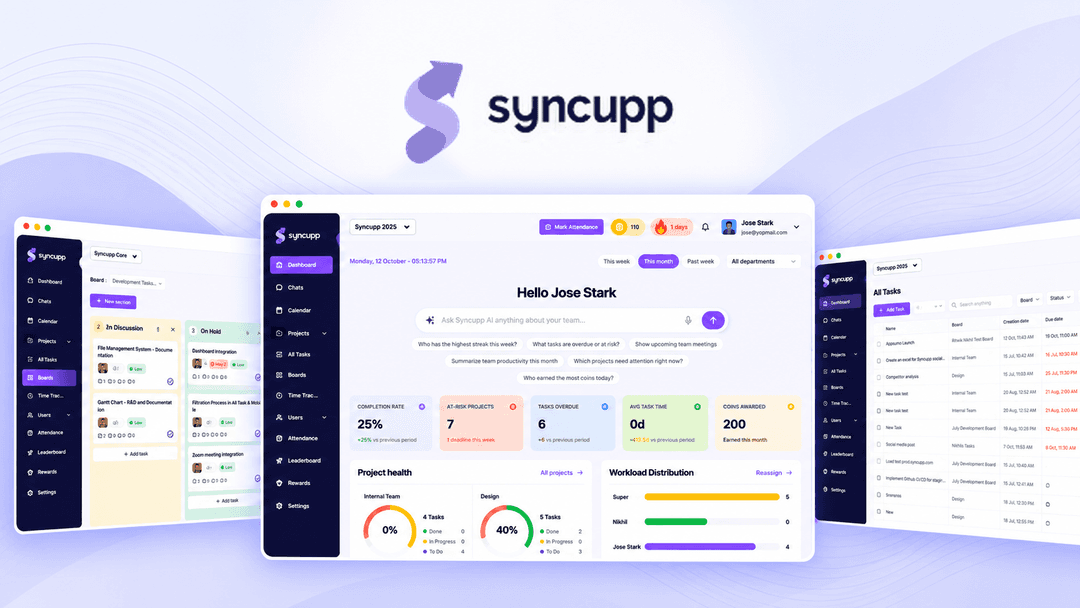
Syncupp at a glance
- Platform
- WhatsApp, Slack, Google Meet, Google Calendar, Zapier, Make, Pabbly, Claude MCP
Which Syncupp plan do you need?
Prices in USD, excluding tax.
| Tier 1 | Tier 2 | Tier 3 | Tier 4 | |
|---|---|---|---|---|
| One-time price | $49 | $99 | $199 | $379 |
| Regular price (AppSumo) | ||||
| You save | $311 | $981 | $1,229 | $2,477 |
| Includes | 300 Monthly AI credits; 2 Users; 1 Workspaces | 1,000 Monthly AI credits; 6 Users; 1 Workspaces | 2,500 Monthly AI credits; 12 Users; 2 Workspaces | 5,000 Monthly AI credits; Unlimited Users; 4 Workspaces |
What is Syncupp?
Syncupp is a project and operations workspace for planning tasks, coordinating team communication, tracking attendance and time, and running automations. It sends alerts, digests, approvals, and reminders through WhatsApp and Slack. XP, streaks, coins, and badges add gamification to work progress and team output.
What Syncupp says it does
- [object Object] (Syncupp's figure)
- [object Object] (Syncupp's figure)
- [object Object]
- [object Object]
- [object Object]
Why Syncupp
Teams have to juggle separate tools for tasks, meetings, time tracking, and attendance. Syncupp brings those workflows into a shared dashboard and uses WhatsApp and Slack for notifications, so approvals and work updates can be handled in the tools the team already uses.
How does Syncupp work?
Set up projects and work
Create projects, assign tasks, and add subtasks, dependencies, priorities, custom fields, and recurring schedules.
Choose a working view
Move between kanban, list, and calendar layouts. Use channels, direct messages, comments, and Google Meet calls synced with Google Calendar.
Route alerts and actions
Send task alerts, daily digests, and leave approvals to WhatsApp, then act by replying. Get reminders in Slack.
Connect other workflows
Link Zapier, Make, and Pabbly, or use the Claude MCP integration to bring Syncupp data into an AI workflow.
Track attendance and output
Use GPS check-ins, review attendance and leave, export payroll data, and generate billing reports from auto timesheets and completed work.
Then it handles:
- Plan projects and tasks
- Assign recurring work
- Track task time and output
- Record GPS attendance and leave
- Send alerts, digests, and approvals
- Coordinate chat, comments, and meetings
- Generate attendance and billing reports
- Run gamified team leaderboards
Who is Syncupp for?
Built for
- Agencies
- Software teams
- Sales teams
- Operations groups
- Field teams needing attendance tracking
Not for
- Buyers who cannot activate a license within 60 days
- Teams that require codes or stacked licenses
What is included in Syncupp?
Gamification and rewards
- Coins and XP Award coins and XP for logins, completed tasks, and on-time delivery.
- Custom rewards Set rewards team members can redeem for their work.
- Live leaderboard Filter the live XP leaderboard by department or time period.
- Auto-unlocking badges Unlock badges automatically as part of the gamification system.
Planning and collaboration
- Flexible views Switch between kanban, list, and calendar views.
- Detailed tasks Add subtasks, dependencies, priorities, and custom fields.
- Team chat Chat in channels and direct messages, and comment on tasks.
- Meetings Start Google Meet calls synced with Google Calendar.
Task flow and notifications
- Unified task list View every task across every board with attachments, comments, and activity.
- Recurring tasks Auto-assign tasks on daily, weekly, or monthly schedules.
- WhatsApp actions Send task alerts, daily digests, and leave approvals to WhatsApp.
- Reply to act Act on WhatsApp requests by replying.
- Slack reminders Get reminders in Slack.
- Automation connections Connect Zapier, Make, and Pabbly, or use Claude MCP.
Attendance, time, and reporting
- GPS check-ins Check in with one-tap GPS for field team attendance.
- Attendance records View daily attendance, late marks, half-days, and leave balances together.
- Payroll export Export attendance for payroll at the end of the month.
- Time and output Track time per task and team output.
- Billing reports Generate client-ready reports from auto timesheets and completed work.
Video review
We have not reviewed Syncupp on video yet.
Get notifiedBuyer reviews
No reviews yet. Bought Syncupp? Add it to your workspace and share what it replaced.
Add to your workspaceSyncupp questions
What does Syncupp do?
Syncupp combines project management, team chat, GPS attendance, time tracking, meetings, and automations in one dashboard. Teams can manage tasks in kanban, list, or calendar views; chat in channels and DMs; start Google Meet calls synced with Google Calendar; and receive task alerts, daily digests, leave approvals, and reports through WhatsApp or Slack.
Who is Syncupp for?
It is aimed at agencies, software teams, sales teams, and operations groups that want to consolidate tasks, meetings, attendance, and time tracking. Its one-tap GPS check-in, field attendance tracking, and WhatsApp or Slack workflows are also designed for teams that need to act on updates outside the dashboard.
What is included in each license tier?
Tier 1: $49, 2 users, 1 workspace, and 300 monthly AI credits. Tier 2: $99, 6 users, 1 workspace, and 1,000 monthly AI credits. Tier 3: $199, 12 users, 2 workspaces, and 2,500 monthly AI credits. Tier 4: $379, unlimited users, 4 workspaces, and 5,000 monthly AI credits.
How does the gamification work?
Teams give coins and XP for logins, completed tasks, and on-time delivery, building streaks, rankings, and auto-unlocking badges. Custom rewards can be set for the team to redeem. The live leaderboard can be filtered by department or time period and combines attendance, time per task, and team output.
Which integrations are available?
Syncupp sends task alerts, daily digests, and leave approvals to WhatsApp, where users can reply and act, and provides reminders in Slack. It also supports Google Meet calls synced with Google Calendar and connections to Zapier, Make, Pabbly, and the Claude MCP integration for pulling Syncupp data into AI workflows.
What happens after purchase?
Purchases include lifetime access to Syncupp and all future plan updates. The license must be activated within 60 days of purchase. Buyers can upgrade or downgrade between the four license tiers. Each purchase is for one selected plan, with no codes and no stacking.