

Marketing · Lifetime deal
TexAu
Local workflows for outreach and lead generation
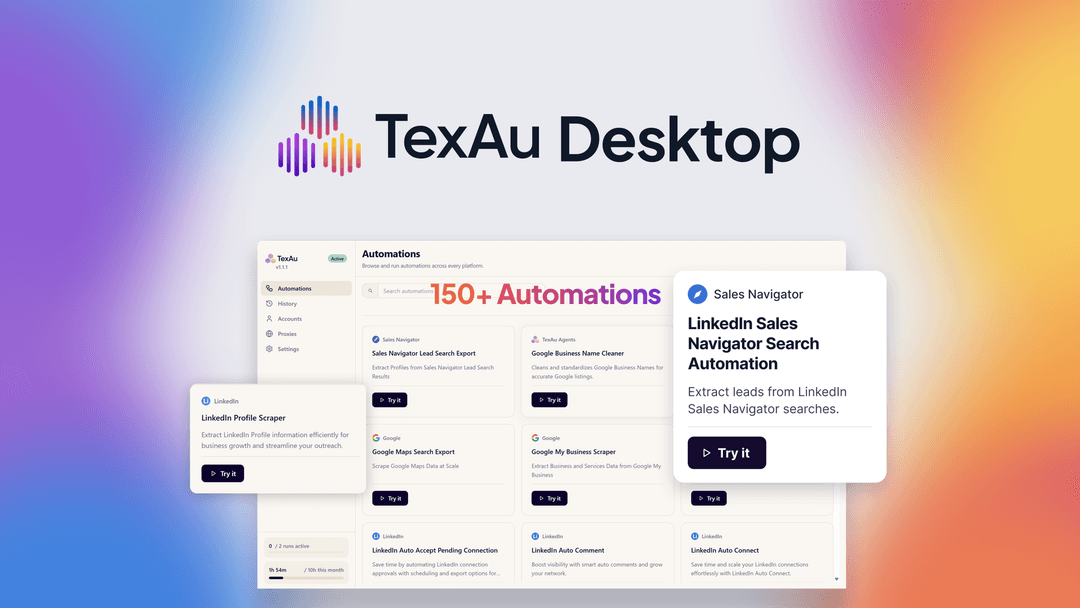
TexAu at a glance
- Platform
- LinkedIn, Sales Navigator, Google Maps, Google My Business, X, Reddit, Slack, YouTube, Chrome
- Note
- Get lifetime access to TexAu.
- Upgrades
- All future Solo and Starter plan updates are included.
- Note
- If the linked plan name changes, access transfers automatically to the new plan with all updates.
- Note
- Available only to brand-new TexAu users without previous accounts, trials, or paid plans with this partner.
- Upgrades
- Upgrades are allowed while the deal is live; downgrades are allowed only within 60 days of purchase.
Which TexAu plan do you need?
Prices in USD, excluding tax.
| License Tier 1 | License Tier 2 | License Tier 3 | License Tier 4 | License Tier 5 | |
|---|---|---|---|---|---|
| One-time price | $69 | $138 | $276 | $552 | $999 |
| Regular price (AppSumo) | |||||
| You save | $130 | $361 | $523 | $697 | $1,300 |
| Includes | 1 Machines; 1 Concurrent runs; 50 hours Runtime / month | 1 Machines; 3 Concurrent runs; 300 hours Runtime / month | 3 Machines; 6 Concurrent runs; 750 hours Runtime / month | 5 Machines; 12 Concurrent runs; Unlimited hours Runtime / month | 10 Machines; Unlimited Concurrent runs; Unlimited hours Runtime / month |
Before you buy: AppSumo's terms and extra costs
- Note. Get lifetime access to TexAu.
- Upgrades. All future Solo and Starter plan updates are included.
- Note. If the linked plan name changes, access transfers automatically to the new plan with all updates.
- Note. Available only to brand-new TexAu users without previous accounts, trials, or paid plans with this partner.
- Redeem. Activate the license within 60 days of purchase.
- Upgrades. Upgrades are allowed while the deal is live; downgrades are allowed only within 60 days of purchase.
- AI usage cost. Future AI model access may be discounted or may require a separate add-on.
What is TexAu?
TexAu is a local desktop automation app for lead generation and outreach. It provides ready-to-run workflows, automates LinkedIn connection requests, messages, and comments, collects lead data, and exports results to CSV.
What TexAu says it does
- The library includes 150+ ready-to-run automations for LinkedIn, Sales Navigator, Google Maps, X, Reddit, Slack, YouTube, and more. (TexAu's figure)
- LinkedIn connection requests, messages, and comments can be automated without doing them one by one.
- Employee data can be pulled from any LinkedIn company page to build contact lists.
- Google My Business listings can be scraped by location or business type.
- A run can be previewed, with successful, failed, and skipped rows visible afterward.
- Results can be exported as CSV, and past automations can be rerun.
- Every automation runs 100% locally, so data never leaves the computer. (TexAu's figure)
- Unlimited accounts can be connected with proxy support.
- Browser sessions can be paired with the desktop app without API credentials.
Why TexAu
Manual prospecting can involve sending LinkedIn connection requests, messages, and comments one by one. TexAu uses ready-made automations for outreach, data extraction, and business research, with lead-data previews, run-status details, and CSV exports.
How does TexAu work?
Connect browser sessions
Pair browser sessions with the desktop app through the TexAu Chrome extension, without API credentials.
Choose an automation
Search or filter a library of 150+ ready-to-run automations for outreach, data extraction, or business research.
Prepare rows
Paste a single input or import a CSV to run an automation across many rows.
Preview and run
Review exactly what data the automation will return before starting the run.
Review results
Inspect successful, failed, and skipped rows, then export CSV results or rerun previous automations.
Then it handles:
- Automate LinkedIn outreach
- Build contact lists from company pages
- Scrape local business listings
- Clean company and business names
- Run automations from CSV inputs
- Track row-level run outcomes
- Export and reuse results
Who is TexAu for?
Built for
- Agencies managing outreach for multiple clients
- LinkedIn outreach teams
- Local lead generation and business research teams
- Teams that want automation data to stay on their own machines
Not for
- People with any previous TexAu account
- People who have used a TexAu trial or paid plan with this partner
What is included in TexAu?
Automation library
- Ready-made workflows Choose from 150+ automations for outreach, extraction, and business research.
- Library filters Filter by platform or search the automation library.
- LinkedIn outreach Automate connection requests, messages, and comments.
- Data cleanup Clean inconsistent company and business names.
Lead collection
- Flexible inputs Paste one input or import a CSV for row-based runs.
- Employee data Pull employee data from any LinkedIn company page.
- Local listings Scrape Google My Business listings by location or business type.
- Output preview Preview the exact data before starting a run.
Run management
- Row status View successful, failed, and skipped rows for each run.
- CSV export Export results as CSV for use in existing tools.
- Run history Rerun past automations from run history.
Local setup
- Chrome pairing Pair browser sessions with the desktop app through Chrome.
- Credential-free setup Connect browser sessions without entering API credentials.
- Multiple accounts Connect unlimited accounts with proxy support.
- Local execution Run automations locally so data stays on your computer.
Video review
We have not reviewed TexAu on video yet.
Get notifiedBuyer reviews
No reviews yet. Bought TexAu? Add it to your workspace and share what it replaced.
Add to your workspaceTexAu questions
What does TexAu do?
TexAu is a desktop automation app for lead generation and outreach. It provides 150+ ready-to-run automations for LinkedIn, including Sales Navigator, Google Maps, X, Reddit, Slack, YouTube, and more. It can automate LinkedIn connection requests, messages, and comments, extract employee and business data, preview results, track successful, failed, and skipped rows, rerun automations, and export results as CSV.
Who is TexAu for?
TexAu is suited to LinkedIn sales and outreach, local lead generation, business research, and agencies managing multiple client accounts. Browser sessions pair with the desktop app through a Chrome extension without API credentials. Users can connect unlimited accounts with proxy support, while automations run locally so data remains on the computer.
What are the plan limits and prices?
License Tier 1 ($69) includes 1 machine, 1 concurrent run, and 50 runtime hours per month. Tier 2 ($138): 1 machine, 3 concurrent runs, 300 hours monthly. Tier 3 ($276): 3 machines, 6 concurrent runs, 750 hours monthly. Tier 4 ($552): 5 machines, 12 concurrent runs, unlimited hours. Tier 5 ($999): 10 machines, unlimited concurrent runs, unlimited hours.
What happens after purchase?
The purchase includes lifetime access to TexAu and all future Solo (Tiers 1–3) and Starter (Tiers 4–5) plan updates. If the linked plan name changes, access transfers automatically to the new plan with updates. The license must be activated within 60 days. Upgrades are allowed while the deal is live, but downgrades are allowed only within 60 days of purchase.
Are there any additional costs?
Access to future AI models may be provided at a discounted rate, or access to future AI models may require an add-on. The provided plan details do not specify an add-on price.