

Design · Lifetime deal
TweakTick
Clients click your live site and comment. No account. No back-and-forth. When it’s right, they approve, confirmed by email, and you keep the proof.
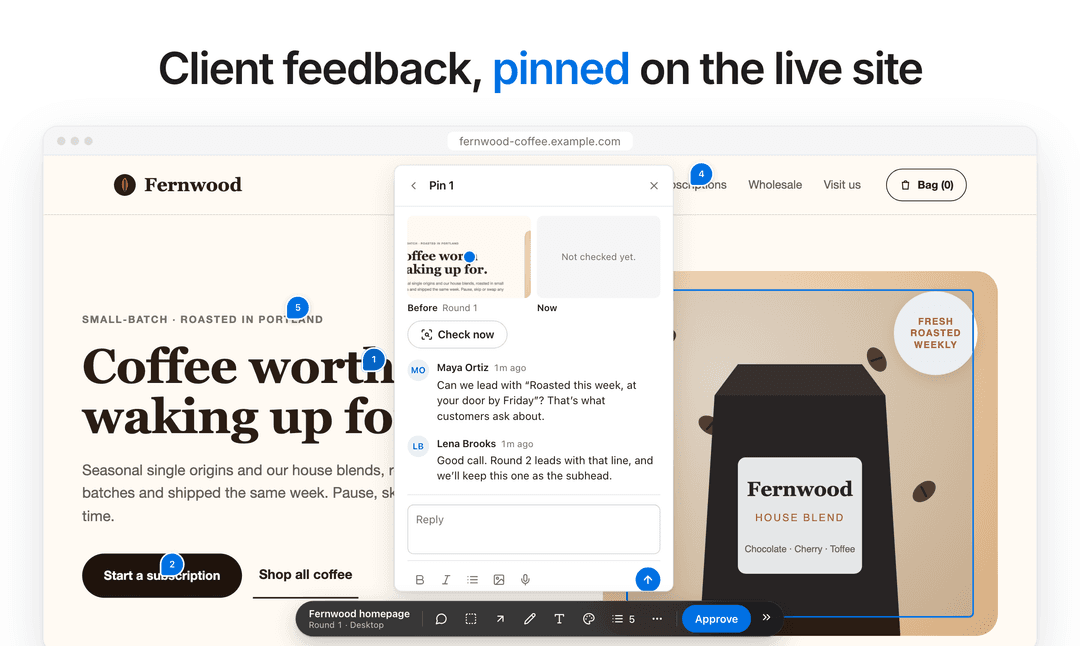
TweakTick at a glance
- Platform
- Web, Chrome extension
- Upgrades
- Every update and new feature we add to the features of your tier is included. Add-ons bought later (such as extra storage or large videos) are separate one-time purchases.
- Support
- Product support by email at support@tweaktick.com, answered by the founder.
- Note
- Founding pricing ends 31 Dec 2026, or earlier if the 100 Founding seats sell out.
Which TweakTick plan do you need?
Prices in USD, excluding tax.
| Tier 1 | Tier 2 | Tier 3 | |
|---|---|---|---|
| One-time price | $59 | $149 | $249 |
| Regular price (TweakTick) | |||
| You save | $169 | $439 | $939 |
| Users | 2 team members | 5 team members | 15 team members |
| Storage | 10 GB | 30 GB | 50 GB |
| Active projects | 25 | 100 | Unlimited |
| Client reviewers | 100 (clients never count against limits) | 300; your own branding on client pages | 1,000; your own branding on client pages |
Before you buy: TweakTick's terms and extra costs
- Redeem. Redeem your code at app.tweaktick.com/redeem within 60 days of purchase. One licence per workspace; codes don’t stack, and a workspace that already has a Founding or AppSumo licence can’t add another.
- Upgrades. Every update and new feature we add to the features of your tier is included. Add-ons bought later (such as extra storage or large videos) are separate one-time purchases.
- AI usage cost. AI review uses your own AI provider key; you pay that provider directly. TweakTick doesn’t charge for it.
- Support. Product support by email at support@tweaktick.com, answered by the founder.
- Note. Founding pricing ends 31 Dec 2026, or earlier if the 100 Founding seats sell out.
What is TweakTick?
For freelancers and small agencies. Stop chasing feedback across email, WhatsApp and screenshots: send one link for a site, image, PDF or video. Your client clicks right on it and comments, with no account and nothing to install. Each version is a round. When it’s right, your client approves, confirmed by email, and you keep the proof: who approved what, and when, with a certificate you can share.
What TweakTick says it does
- Clients comment with no account and nothing to install
- Approval confirmed by email, so you know it was the client
- Proof of who approved what, and when, with a certificate you can share
- Internal notes are removed on the server before the client page is sent
Why TweakTick
Client feedback usually arrives as screenshots in email threads and WhatsApp, and “approved” is a reply that’s hard to find later. TweakTick puts every comment on the exact spot, keeps each version as its own round, and makes the final yes a real step: the client approves, confirmed by email, and you keep who approved, the exact wording and when.
How does TweakTick work?
Create a project
Add a live website (small script, live view or screenshots), or upload images, PDFs or video.
Share one link
Your client pins comments right where they belong, with no account.
Send the next round
Fix things and send V2, V3 and so on. Compare rounds to see what changed.
Get the sign-off
The client approves, confirmed by email. You keep the proof and a certificate you can share.
Who is TweakTick for?
Built for
- Web designers and agencies handing over websites who want clients to pin fixes on the live pages
- Freelance designers sending logo, banner or brochure rounds as images or PDFs
- Video editors who want comments at the exact second
- Small studios that need proof of who approved what, and when
Not for
- Teams looking for an internal bug tracker for their own code
- Clients who can’t receive email (approval uses an emailed code)
Video review
We have not reviewed TweakTick on video yet.
Get notifiedBuyer reviews
No reviews yet. Bought TweakTick? Add it to your workspace and share what it replaced.
Add to your workspaceTweakTick questions
Do my clients need an account?
No. They open your link, pin comments and approve, confirmed by email. No account, no password, nothing to install. Clients never count against your limits.
What can my clients review?
Live websites (through a small script, live view or screenshots at desktop, tablet and phone widths), images, PDFs, video and YouTube links. A Chrome extension and a bookmarklet cover sites that block scripts.
How do I activate my licence?
Go to app.tweaktick.com/redeem and enter your code. Create your account or sign in, confirm, and the licence is added to your workspace. You’ll see it under Settings → Billing.
I already have a TweakTick account. Can I add the code to it?
Yes. Sign in and redeem the code at app.tweaktick.com/redeem. You need to be the workspace owner. A workspace that already has a Founding or AppSumo licence can’t add a second one.
How does AI review work?
It’s off by default. A workspace owner adds their own key from an AI provider they choose (for example Anthropic, OpenAI, Google or OpenRouter) and pays that provider directly. TweakTick doesn’t charge for it.