

Productivity · Lifetime deal
Veritask
Organize tasks, coordinate teams, and review completed work
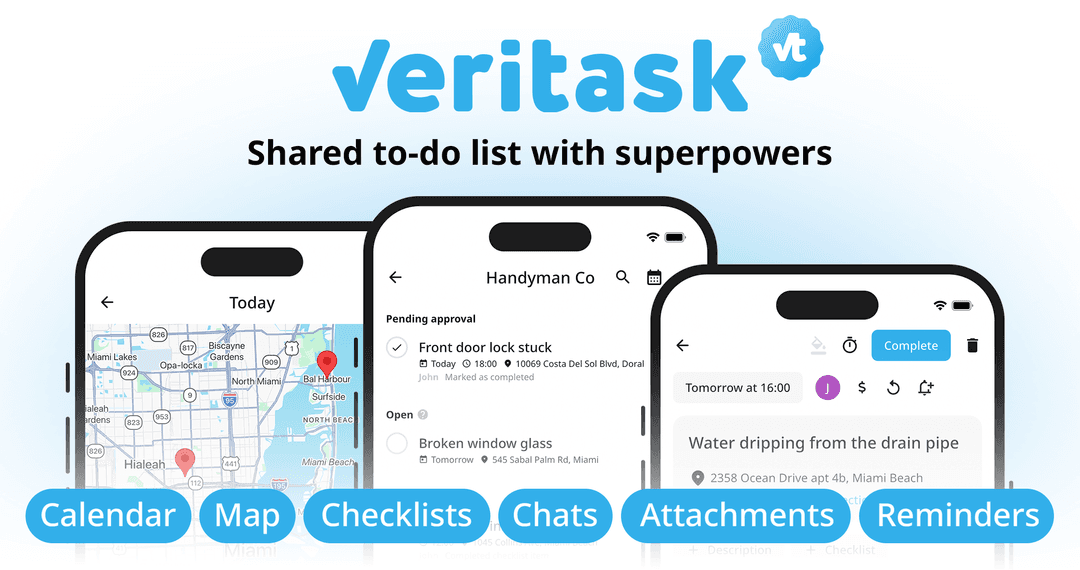
Veritask at a glance
- Platform
- iOS, Android, Windows, Linux, macOS, Web browsers
Which Veritask plan do you need?
Prices in USD, excluding tax.
| Lifetime Access | |
|---|---|
| One-time price | $59 |
| Regular price (Dealify) | |
| You save | $236 |
| Includes | Unlimited tasks; 100 GB storage; 500 users; Real-time sync across iOS, Android, and browser apps; Offline access; 30-day Money Back Guarantee; You must redeem your code(s) within 60 days of purchase |
Before you buy: Dealify's terms and extra costs
- Refund. 30-day Money Back Guarantee
- Redeem. Redeem your code(s) within 60 days of purchase.
What is Veritask?
Veritask is a task and work management platform for personal to-do lists, client projects, and field service operations. It organizes work in shared workspaces, coordinates assignments, records locations and working hours, and supports photos, videos, or files as completion evidence before approval.
What Veritask says it does
- Invite up to 500 team members across multiple workspaces. (Veritask's figure)
- Use the platform in 39 languages. (Veritask's figure)
- Can require photo, video, or file evidence before task approval.
- Track every task change and update with a complete activity log.
- Keep data synchronized across devices with offline access.
- Allow team members to claim available tasks themselves.
- Provides Basic, Add Tasks, and Admin permission levels.
Why Veritask
Managing tasks can make it hard to see what is happening, who is doing the work, and whether results meet expectations. Veritask brings assignments, updates, comments, files, locations, time records, and approvals into one workflow, with an activity history for completed work.
How does Veritask work?
Create and organize work
Create tasks in workspaces for clients, projects, departments, or a business. Add descriptions, addresses, deadlines, checklists, and other relevant details.
Assign or share responsibilities
Assign tasks to one or more team members, or leave them open for workspace members to claim.
Coordinate updates
Use push notifications, comments, notes, photos, videos, and files to keep everyone connected.
Submit completion evidence
Assignees mark tasks complete and provide requested photo or file evidence when required by the checklist.
Review and track results
Task creators approve or decline completions. Activity history covers updates, working hours, locations, and completed work.
Then it handles:
- Organize tasks and projects
- Coordinate team assignments
- Manage field work orders
- Require completion evidence
- Track time, locations, and updates
- Automate recurring work
- Coordinate shared household tasks
Who is Veritask for?
Built for
- Field service and maintenance businesses
- Real estate and property managers
- Construction and renovation teams
- Agencies and freelancers
- Individuals and families
Not for
- Teams requiring more than 500 members
- Users needing native apps on platforms outside iOS, Android, Windows, and macOS
What is included in Veritask?
Workspaces and team management
- Separate workspaces Organize work by client, project, department, or business.
- Team invitations Invite colleagues through personal invitations or public invitation links.
- Permission levels Choose Basic, Add Tasks, or Admin access.
- Multi-team accounts Manage multiple teams and workspaces under one account.
Proof and accountability
- Completion evidence Require live camera photos, gallery images, videos, or files.
- Checklist enforcement Prevent completion until required checklist items are fulfilled.
- Activity log Track every task change, update, comment, attachment, and report.
- Completion review Approve or decline completed tasks before archiving them.
Assignment and collaboration
- Assignments Assign tasks to one or multiple team members.
- Open task pool Leave work open for workspace members to claim.
- Task exchange Let employees choose suitable work through an internal order exchange.
- Team communication Add comments, notes, photos, videos, and files.
- Notifications Send push alerts for assignments, comments, attachments, and updates.
Planning and tracking
- Recurring tasks Schedule daily, weekly, monthly, or yearly recurring work.
- Automatic recurrence Generate the next recurring task after the current one is completed.
- Task reminders Set individual reminders before task deadlines.
- Time tracking Track time spent on individual tasks.
- Visual views Switch between List, Calendar, and Map views.
- Planning groups Sort tasks into Overdue, Today, Tomorrow, Later, and Someday.
- Search Find tasks with full-text search or by assigned member.
Field operations and mapping
- Work order details Add descriptions, addresses, GPS coordinates, deadlines, and assignees.
- Interactive maps View job locations and get directions from the map.
- Coordinate conversion Convert addresses to GPS coordinates and back again.
- Location records Record GPS locations with submitted updates and reports.
Device and data access
- Cross-platform apps Use iOS, Android, Windows, Linux, macOS, and browsers.
- Offline access Continue working without a connection.
- Cloud synchronization Keep task data synchronized across devices.
- Language support Use the platform in multiple languages.
- Archived exports Export archived tasks to CSV.
Video review
We have not reviewed Veritask on video yet.
Get notifiedBuyer reviews
No reviews yet. Bought Veritask? Add it to your workspace and share what it replaced.
Add to your workspaceVeritask questions
What does Veritask do?
Veritask is a task and work management platform for organizing projects, work orders, recurring tasks, and personal responsibilities. It supports multiple workspaces, assigned or self-claimed tasks, photo or file completion evidence, comments, notifications, location tracking, working-hour records, and completion approval or decline workflows.
Who is Veritask designed for?
Veritask suits field service and maintenance businesses, real estate and property managers, construction and renovation teams, retailers, hospitality businesses, logistics teams, field sales teams, agencies, freelancers, healthcare and home care providers, facilities managers, and individuals or families.
What are the plan’s user, task, and storage limits?
The Lifetime Access plan includes unlimited tasks, 100 GB of storage, and up to 500 users. Users can belong to separate teams and workspaces with Basic, Add Tasks, or Admin permission levels. Collaboration features are available without per-user pricing.
Where can Veritask be used?
Veritask works on iOS, Android, Windows, Linux, macOS, and in browsers. The plan includes real-time synchronization across iOS, Android, and browser apps, offline access, and automatic cloud synchronization. The platform supports 39 languages.
How does Veritask handle completion and approval?
An assignee can mark work complete and must submit requested photos or files when proof is required. The task creator can then approve or decline it. Declined tasks return to active work, while approved tasks move to the archive.
What happens after purchase, and are there per-user fees?
The Lifetime Access price is $59, with a listed regular price of $295. It includes a 30-day Money Back Guarantee. Code(s) must be redeemed within 60 days of purchase. Up to 500 users can collaborate without per-user fees.