SEO · Lifetime deal
Video To Blog
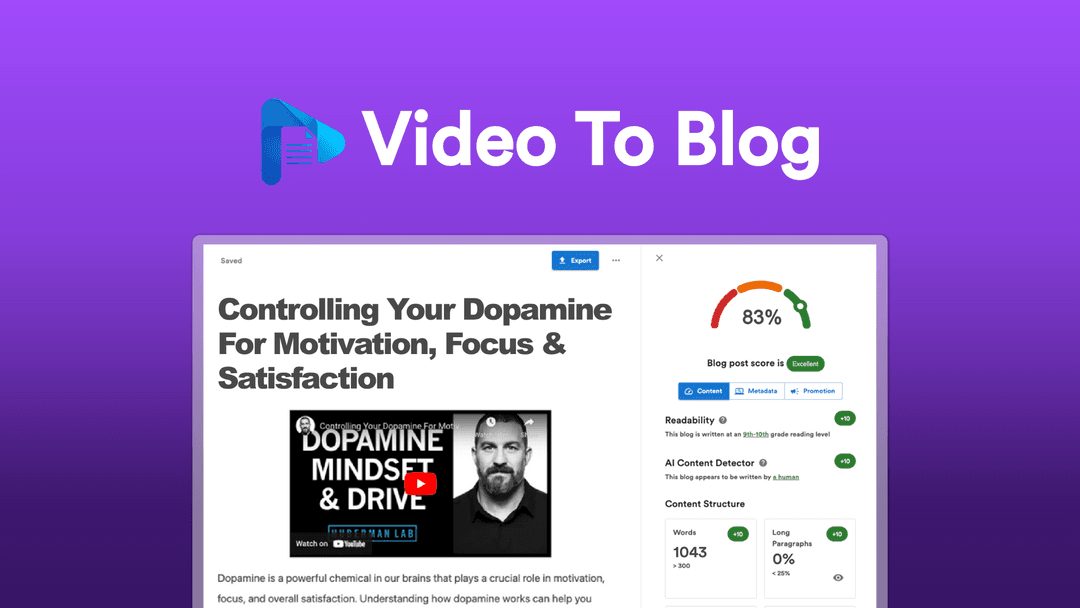
Convert YouTube videos into search-optimized blog articles in minutes. Video To Blog adds headlines, screenshots, and metadata automatically, then exports straight to WordPress, Blogger, or Medium.
Which Video To Blog plan do you need?
Prices in USD, excluding tax.
| License Tier 1 | License Tier 2 | License Tier 3 | License Tier 4 | License Tier 5 | |
|---|---|---|---|---|---|
| Includes | 10 Blog posts per month | 20 Blog posts per month | 40 Blog posts per month | 100 Blog posts per month | 200 Blog posts per month |
What is Video To Blog?
You already recorded the video. The transcript, the talking points, the structure — it is all sitting inside a single YouTube link, doing nothing once the upload is live. Video To Blog takes that link and hands back a formatted, search-ready article, so the work you did once keeps earning instead of scrolling out of the feed.
What Video To Blog actually does
Paste a YouTube URL and the AI runs the conversion end to end. What comes back is a structured draft you can publish, not a raw transcript you still have to clean up.
- Copy-paste a YouTube link and let the AI handle the rest - Generate articles formatted for SEO with crafted headlines and the video embedded at the top - Automatically add video screenshots to improve readability - Swap in stock or AI-generated images instead of screengrabs - Optimize automatically with metadata including meta title, description, slug, and tags - Track discoverability with an SEO score that responds to edits in real time - Export to WordPress, Blogger, and Medium - Download in HTML, PDF, Word, or markdown
The part that separates it from a plain transcription tool is the SEO scaffolding. It writes the headlines, generates the metadata, and gives every draft a score that shifts as you edit, so the article ships ready to rank rather than ready to rewrite.
How it fits in your stack
Video To Blog is not trying to replace your CMS. It feeds it. Finished articles export straight to WordPress, Blogger, and Medium, or download as HTML, Word, PDF, or markdown if you would rather paste them in by hand. For anyone already publishing on WordPress, the repurposing loop gets short: record once, convert, push it across, move on. There is no new platform to learn and nothing to migrate, because the output lands wherever you already work.
Who it's built for
This is for people whose best ideas already live on video. Think YouTubers who want their back catalogue working as searchable pages, consultants turning a webinar recording into a lead magnet, and solo marketers who cannot justify hiring a writer but cannot keep ignoring organic search either. If you film often and publish rarely, the distance between those two habits is exactly what this closes, and it closes it without adding hours to your week.
The deal
License Tier 1 runs $99 (regular $244) and covers 10 blog posts a month, which is enough to find out whether video-to-text actually moves your numbers before you climb to the bigger tiers. If repurposing has sat on your to-do list for a year, [grab it on AppSumo](https://www.grabltd.com/recommends/appsumo-video-to-blog/) while the deal is still live.
Video review
We have not reviewed Video To Blog on video yet.
Get notifiedBuyer reviews
No reviews yet. Bought Video To Blog? Add it to your workspace and share what it replaced.
Add to your workspaceVideo To Blog questions
Is this deal still available?
No. The Video To Blog lifetime deal ran on AppSumo and has since expired. The product may still offer paid plans at videotoblog.com, but the one-time lifetime price is no longer active.
What does Video To Blog do?
It converts YouTube videos (public or unlisted), uploaded video files, and audio recordings into SEO-optimized blog articles in minutes, automatically adding headlines, screenshots, and metadata.
Which publishing platforms does it export to?
Video To Blog exports directly to WordPress, Blogger, and Medium, making it easy to publish without manual copy-paste.
How accurate is the transcription?
The tool claims over 95% speech-to-text accuracy. It supports videos in multiple languages and can generate output in a language different from the original video.
What are the content limits?
It handles videos up to 3 hours long and generates blog posts up to approximately 2,500 words. Music-only or silent videos are not supported.
Can I add images to the generated posts?
Yes. You can automatically insert featured images, embedded video players, or AI-generated images, and you can also add visuals manually after generation.
What category of SEO did this tool fit into?
It was categorized under SEO content repurposing — turning existing video content into search-indexed written articles to extend organic reach without producing new content from scratch.
Are there active alternatives available now?
Yes. Tools like Castmagic, Otter.ai, and Lately.ai offer similar video-to-text or content repurposing workflows on subscription plans.
Often compared with
These are other tools in the same space, not deals on GrabLTD.
- Castmagic
- Otter.ai
- Lately.ai
- Repurpose.io
- Descript