

AI Tools · Lifetime deal
VideoMule
Create narrated, translated tutorials from screen recordings
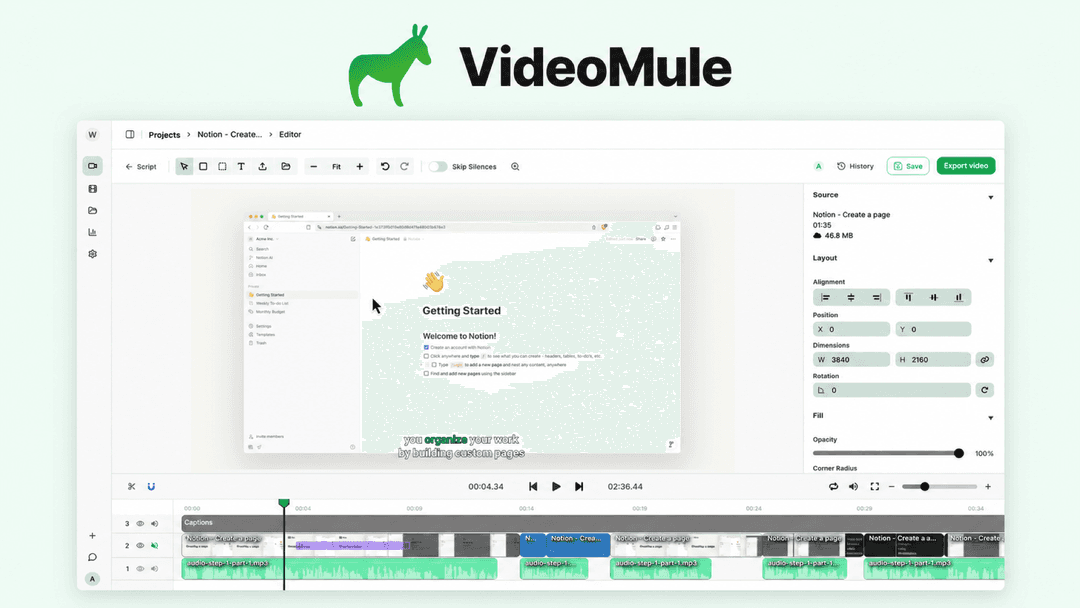
VideoMule at a glance
- Platform
- Chrome
- Note
- Lifetime access to VideoMule.
- Note
- All future plan updates.
- Upgrades
- Upgrade or downgrade between 5 license tiers.
- Note
- No codes and no stacking; choose one plan.
Which VideoMule plan do you need?
Prices in USD, excluding tax.
| License Tier 1 | License Tier 2 | License Tier 3 | License Tier 4 | License Tier 5 | |
|---|---|---|---|---|---|
| One-time price | $69 | $149 | $279 | $449 | $699 |
| Regular price (AppSumo) | |||||
| You save | $180 | $270 | $450 | $710 | $1,300 |
| Includes | 1 Seats; 15 Upload minutes per month; 30 Video analysis minutes (one time); 15 min Max video length; 5 AI avatar credits (one-time); 5 Cloud renders per month; 5 GB Storage; 0 Digital twin/Professional avatar trainings (one-time); 1 Image avatar trainings (one-time); 5 Translations (one-time) | 1 Seats; 30 Upload minutes per month; 60 Video analysis minutes (one time); 15 min Max video length; 12 AI avatar credits (one-time); 10 Cloud renders per month; 10 GB Storage; 1 Digital twin/Professional avatar trainings (one-time); 2 Image avatar trainings (one-time); 15 Translations (one-time) | 3 Seats; 60 Upload minutes per month; 120 Video analysis minutes (one time); 20 min Max video length; 25 AI avatar credits (one-time); 20 Cloud renders per month; 15 GB Storage; 2 Digital twin/Professional avatar trainings (one-time); 4 Image avatar trainings (one-time); 30 Translations (one-time) | 5 Seats; 90 Upload minutes per month; 240 Video analysis minutes (one time); 20 min Max video length; 45 AI avatar credits (one-time); 30 Cloud renders per month; 25 GB Storage; 3 Digital twin/Professional avatar trainings (one-time); 6 Image avatar trainings (one-time); 60 Translations (one-time) | 10 Seats; 120 Upload minutes per month; 400 Video analysis minutes (one time); 25 min Max video length; 70 AI avatar credits (one-time); 40 Cloud renders per month; 40 GB Storage; 4 Digital twin/Professional avatar trainings (one-time); 10 Image avatar trainings (one-time); 100 Translations (one-time) |
Before you buy: AppSumo's terms and extra costs
- Note. Lifetime access to VideoMule.
- Note. All future plan updates.
- Redeem. Activate the license within 60 days of purchase.
- Upgrades. Upgrade or downgrade between 5 license tiers.
- Note. No codes and no stacking; choose one plan.
What is VideoMule?
VideoMule turns screen recordings into narrated how-to and training videos. It creates AI scripts and synchronized voiceovers, adds captions and visual emphasis, and supports translated versions and AI presenters. Teams can record through a Chrome extension or upload an existing recording, then edit and export the result.
What VideoMule says it does
- Turns a raw screen recording into a tutorial with a script matched to on-screen steps and synchronized AI voiceover.
- Creates tutorial videos in minutes. (VideoMule's figure)
- Generates unlimited AI scripts from on-screen actions and audio. (VideoMule's figure)
- Offers 100+ AI voices in 35+ languages. (VideoMule's figure)
- Creates translated versions in 70+ languages with a new script, voiceover, and captions. (VideoMule's figure)
- Adds an AI presenter for introductions, closing messages, and transitions.
- Can clone the user's voice or likeness when an ElevenLabs key is connected.
- Turns workflows into polished tutorials without hiring a video team.
Why VideoMule
VideoMule handles the production work around raw screen recordings, including scripts, narration, captions, translation, and visual emphasis. This helps SaaS teams, customer success teams, technical writers, and educators turn workflows into tutorials for customer onboarding or team training.
How does VideoMule work?
Record
Record your screen with the Chrome extension or upload an existing screen recording.
Script and narrate
Generate an AI script from on-screen actions and audio, then synchronize the narration to the recording.
Edit and emphasize
Edit script lines and regenerate voiceover. Adjust video, audio, and captions on a multitrack timeline, then add zoom-ins and callouts.
Translate
Create a translated version with a new script, voiceover, and captions.
Present and export
Add a stock AI presenter or photo avatar. Digital twins require Tier 2 and above. Export in HD locally or in the cloud.
Then it handles:
- Create narrated how-to and training videos
- Turn screen recordings into scripts
- Add synchronized voiceover
- Edit captions on a multitrack timeline
- Emphasize actions with zoom and callouts
- Translate tutorials with new narration and captions
- Add stock AI presenters and custom avatars
- Export HD videos locally or in the cloud
Who is VideoMule for?
Built for
- SaaS teams creating product tutorials
- Customer success teams onboarding customers
- Technical writers documenting workflows
- Educators creating training videos
- Teams training people in another language
Not for
- Users who need digital twin or professional avatar training in License Tier 1
- Users who need premium voices, voice cloning, or dubbing without an ElevenLabs key
What is included in VideoMule?
Record and generate
- Screen capture Record with the Chrome extension or upload an existing screen recording.
- AI scripts Generate AI scripts from on-screen actions and audio.
- AI narration Create voiceover synchronized with the recorded action.
- Script editing Edit any script line and regenerate its voiceover.
Edit and emphasize
- Visual emphasis Add automatic zoom-ins and on-screen callouts to emphasize actions.
- Multitrack editing Fine-tune video, audio, and captions on a multitrack timeline.
- HD export Export finished tutorials in HD locally or in the cloud.
Translate and voice
- AI voice library Choose from 100+ AI voices across 35+ languages.
- Tutorial translation Create 70+ language versions with new scripts, voiceover, and captions.
- ElevenLabs connection Connect an ElevenLabs key for premium voices, voice cloning, and dubbing.
- Reusable recording Reuse one recording for customer onboarding or team training in another language.
Presenters and avatars
- Stock AI presenter Add a stock AI presenter for introductions, closing messages, or transitions.
- Photo avatar Train an avatar from your own photo.
- Digital twin Create a digital twin on Tier 2 and above.
Video review
We have not reviewed VideoMule on video yet.
Get notifiedBuyer reviews
No reviews yet. Bought VideoMule? Add it to your workspace and share what it replaced.
Add to your workspaceVideoMule questions
What does VideoMule do, and who is it for?
VideoMule converts screen recordings into narrated how-to and training videos. It creates AI scripts from on-screen actions and audio, adds synchronized voiceover, and provides captions, zoom effects, callouts, translations, and optional AI presenters. It is designed for SaaS teams, customer success teams, technical writers, and educators that need to turn workflows into tutorials.
Can I use an existing screen recording and customize the result?
Recordings can be captured with the Chrome extension or uploaded. Script lines can be edited and their voiceover regenerated at any time. Video, audio, and captions can be fine-tuned on a multitrack timeline. The same recording can produce translated versions in 70+ languages, each with a new script, voiceover, and captions. Finished videos export in HD; rendering can be local or use the tier’s included cloud renders.
What do the five license tiers cost?
License Tiers 1 through 5 cost 69 USD, 149 USD, 279 USD, 449 USD, and 699 USD, respectively. Their listed regular prices are 249 USD, 419 USD, 729 USD, 1159 USD, and 1999 USD.
What are the main limits on each tier?
Tier 1 includes 15 upload minutes monthly and a 15-minute maximum; Tier 2 includes 30 monthly and a 15-minute maximum; Tier 3 includes 60 monthly and a 20-minute maximum; Tier 4 includes 90 monthly and a 20-minute maximum; Tier 5 includes 120 monthly and a 25-minute maximum. Seats range from 1 to 10, storage from 5 GB to 40 GB, monthly cloud renders from 5 to 40, and one-time translations from 5 to 100. Analysis minutes and avatar allowances also vary.
What happens after purchase?
Each purchase includes lifetime access to VideoMule and all future plan updates. The license must be activated within 60 days of purchase. The license can be upgraded or downgraded between the five tiers. No codes are used, and plans cannot be stacked.
Do premium voice and avatar options require anything special?
Premium voices, voice cloning, and dubbing require connecting an ElevenLabs key. Stock AI presenters can be added for introductions, transitions, or closing messages. Photo-avatar training has a tier-specific allowance, while digital twin or professional avatar training is available in Tier 2 and above and also has tier-specific limits.