

AI Tools · Lifetime deal
Zavi AI
Dictate naturally. Edit and polish text in place.
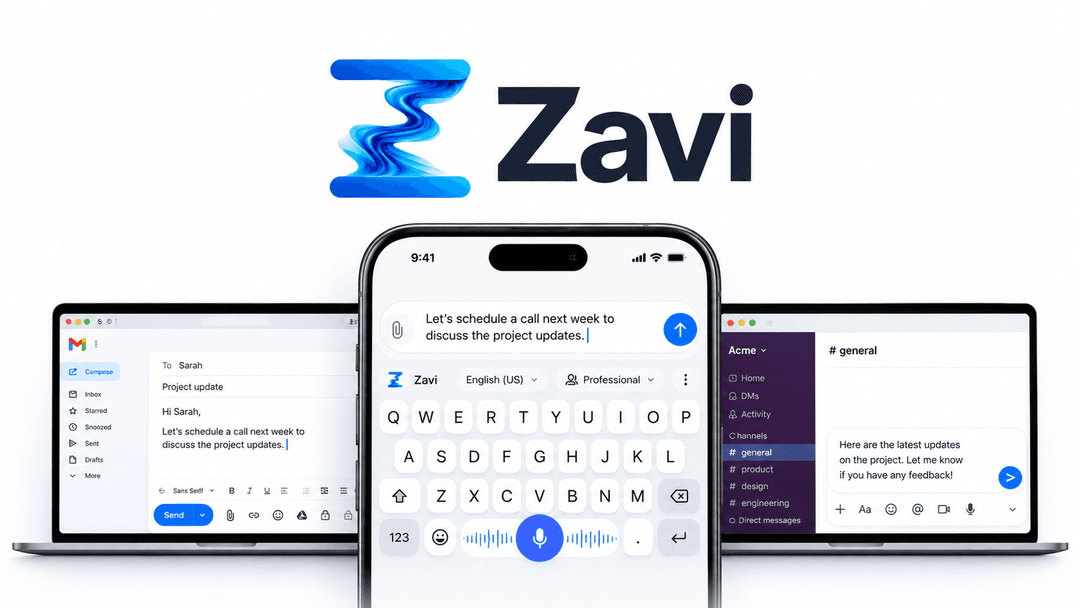
Zavi AI at a glance
- Platform
- Mac, Windows, iOS, Android
- Note
- Lifetime access to Zavi AI
- Note
- All future plan updates
- Note
- Activate the license within 60 days of purchase
- Upgrades
- Upgrade or downgrade between 4 license tiers
- Note
- No codes, no stacking—just choose the plan that is right for you
Which Zavi AI plan do you need?
Prices in USD, excluding tax.
| Tier 1 (Pro) | Tier 2 (Pro) | Tier 3 (Teams) | Tier 4 (Teams) | |
|---|---|---|---|---|
| One-time price | $39 | $119 | $239 | $439 |
| Regular price (AppSumo) | ||||
| You save | $909 | $2,029 | $5,749 | $10,349 |
| Includes | 200,000 Cloud words per month; 1 Team members | 600,000 Cloud words per month; 3 Team members | 1,400,000 Cloud words per month; 7 Team members | 3,000,000 Cloud words per month; 15 Team members |
Before you buy: AppSumo's terms and extra costs
- Note. Lifetime access to Zavi AI
- Note. All future plan updates
- Note. Activate the license within 60 days of purchase
- Upgrades. Upgrade or downgrade between 4 license tiers
- Note. No codes, no stacking—just choose the plan that is right for you
What is Zavi AI?
Zavi AI is a voice dictation and text-editing tool. It turns natural speech into polished text in any text field, translates between languages, applies brand voice and tone, and makes spoken edits to selected text in place.
What Zavi AI says it does
- Dictate into any text field and get clean, polished text without copy-paste.
- Remove filler words and mid-sentence corrections automatically.
- Dictate and translate across 100+ languages, including mixed-language sentences. (Zavi AI's figure)
- Keep messages consistent with your brand voice and shift output from casual to professional.
- Apply brand voice or tone changes without another dictation.
- Edit selected text in place without copy-paste, a new window, or a prompt box.
- A custom shortcut stops recording automatically after a few seconds of silence. (Zavi AI's figure)
- On-device mode processes audio locally, deletes it immediately, and never uses it to train AI.
- Zavi AI is rated 5/5 on iOS and Android. (Zavi AI's figure)
- Zavi AI is #7 Product of the Day. (Zavi AI's figure)
Why Zavi AI
Zavi solves the need to turn rambling speech into send-ready text without switching apps. It cleans dictation, translates it, applies brand voice, and carries out spoken revisions in place.
How does Zavi AI work?
Dictate in place
Use Zavi to dictate into the current text field in any app, including Gmail, Slack, Notion, and WhatsApp.
Clean the draft
Zavi removes filler words and mid-sentence corrections, fixes grammar, and adds punctuation.
Translate and style
Speak one language and write in another. Apply brand voice or shift output from casual to professional.
Edit by voice
Select text in any app, hold the Magic Wand hotkey, and say the change. The edit lands in place without copy-paste, a new window, or a prompt box.
Then it handles:
- Dictating natural speech
- Cleaning filler words
- Fixing grammar and punctuation
- Translating dictation
- Applying brand voice and tone
- Revising selected text by voice
- Summarizing selected text
Who is Zavi AI for?
Built for
- People who want to draft messages and documents by voice
- Writers who need multilingual dictation and translation
- Teams that need one consistent brand voice
- Users across Mac, Windows, iOS, and Android
- People who want to revise selected text without switching apps
Not for
- People needing Your Keys mode or Deepgram access below Tier 3
- Teams needing a shared brand voice below Tier 2
- Users who need to stack licenses
- Buyers unable to activate their license within 60 days
What is included in Zavi AI?
Dictation and cleanup
- Any text field Dictate in Gmail, Slack, Notion, WhatsApp, Google Docs, ChatGPT, LinkedIn, and more.
- Filler cleanup Remove filler words and mid-sentence corrections automatically.
- Grammar and punctuation Fix grammar and add punctuation to natural speech.
- Native apps Use native Mac, Windows, iOS, and Android apps.
Translation, voice, and tone
- Multilingual dictation Dictate and translate across 100+ languages.
- Mixed-language input Mix Hindi and English, then produce polished English.
- Brand voice Keep messages consistent with your brand voice.
- Shared brand voice Share one brand voice with a team in Tier 2 and above.
- Tone control Shift output from casual to professional without another dictation.
- Emoji placement Place the right emoji automatically in the right spot.
Voice editing
- Magic Wand editing Select text in any app and state the desired change.
- Common edits Make text shorter, more formal, translated, warmer, or summarized.
- In-place changes Apply changes without copy-paste, a new window, or a prompt box.
- Spoken hotkey Hold the Magic Wand hotkey to issue a spoken command.
- Hands-free shortcut Use a custom shortcut to stop after a few seconds of silence.
Privacy and provider keys
- On-device processing Process audio locally when on-device mode is enabled.
- Local audio handling In on-device mode, delete audio immediately and never train AI with it.
- Your Keys mode Keep audio and keys on-device without sending them to Zavi servers.
- Provider keys Connect OpenAI, Anthropic, Grok, ElevenLabs, OpenRouter, or Deepgram keys.
- Tier availability Your Keys mode is available in Tier 3 and above.
Video review
We have not reviewed Zavi AI on video yet.
Get notifiedBuyer reviews
No reviews yet. Bought Zavi AI? Add it to your workspace and share what it replaced.
Add to your workspaceZavi AI questions
What does Zavi AI do?
Zavi AI turns natural speech into polished text in any text field, including Gmail, Slack, Notion, WhatsApp, Google Docs, ChatGPT, and LinkedIn. It removes filler words, fixes grammar, adds punctuation, and supports translation across 100+ languages. Magic Wand also lets you edit selected text by voice, such as making it shorter, more formal, translated, or summarized.
Who is Zavi AI for and which devices does it support?
Zavi AI is for individual users and teams that want hands-free writing and consistent brand voice. It runs natively on Mac, Windows, iOS, and Android. Team features, including shared brand voice, are available in Tier 2 and above.
What are the plan limits and prices?
Tier 1 (Pro) is $39 for 200,000 Cloud words per month and 1 Team member. Tier 2 (Pro) is $119 for 600,000 Cloud words per month and 3 Team members. Tier 3 (Teams) is $239 for 1,400,000 Cloud words per month and 7 Team members. Tier 4 (Teams) is $439 for 3,000,000 Cloud words per month and 15 Team members.
What happens after purchase?
Purchases include lifetime access to Zavi AI and all future plan updates. The license must be activated within 60 days of purchase. You can upgrade or downgrade between the four license tiers. There are no codes to enter and plans cannot be stacked.
Can I use my own AI provider keys?
Tier 3 and above supports connecting your own OpenAI, Anthropic, Grok, ElevenLabs, or OpenRouter key, plus speech-to-text provider Deepgram. In Your Keys mode, audio and keys remain on your device, and nothing passes through Zavi’s servers.
Can Zavi AI process audio locally?
Yes. On-device mode processes audio locally and immediately deletes it. Recordings are not stored or used to train AI.