Productivity · Lifetime deal
Chaos Control
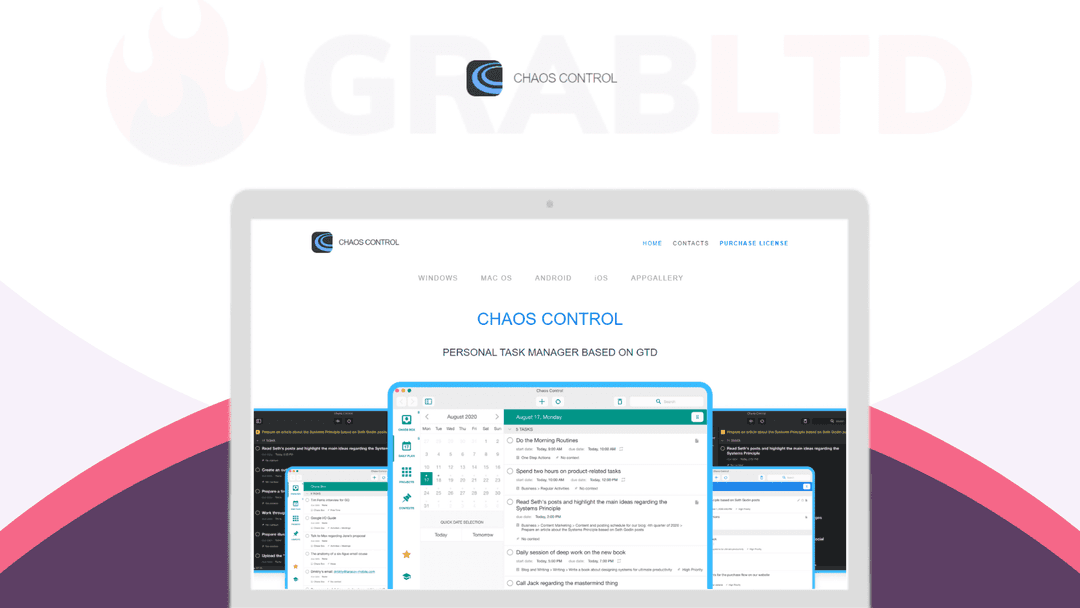
A GTD-based personal organizer that handles big project planning and everyday to-do lists in one app, synced across mobile and desktop. Lifetime access for $49.
Which Chaos Control plan do you need?
Prices in USD, excluding tax.
| Chaos Control | |
|---|---|
| Includes | 3 Licenses; Create unlimited number of projects, tasks, contexts and folders; Sync your data across iOS, Android, Windows and Mac; Gain full control of your schedule with features like Daily Plan, Chaos Box and Contexts; Plan complex activities and achieve goals with Projects and Categories (folders); Get all further updates and personal-use features for free (exclusive for AppSumo customers); Export any list to printable (and shareable PDF) |
What is Chaos Control?
Chaos Control is a personal organizer built on the Getting Things Done method, working from the idea that your head is for having ideas, not storing them. You capture a task the second it lands, sort it into the right project, and work from a short list that reflects what actually matters today instead of everything you've ever meant to do. It's the difference between a brain dump and a plan you can act on.
What Chaos Control actually does
The app pairs the GTD approach with a plain interface, so the same tool covers a product launch and a grocery run without feeling heavy. It leans on widgets to keep the parts you touch most within reach.
- Set personal and business goals, then break them into doable steps - Manage tasks and the time you spend on them - Plan business and personal activities side by side - Keep simple to-do lists, checklists and shopping lists - Catch loose ideas and thoughts to process later - Export any list to print or share it on the go
How you actually use it
The rhythm is the GTD one. Empty your head into the app as things occur to you, file each item under the goal or project it belongs to, then let the daily view surface the next concrete step. Heavyweight planning and a shopping list live in the same place, which is the part most single-purpose to-do apps miss, and nothing slips through the cracks between the two.
How it fits in your stack
Plenty of task apps lock you into one device. Chaos Control runs across all the major mobile and desktop platforms with sync between them, so the note you jot on a phone is waiting on your laptop when you sit down to work.
Who it's built for
The app is aimed at creative people with more ideas than hours: designers, writers, developers, startup founders, and entrepreneurs of every stripe. If you've ever lost a good idea because there was nowhere quick to put it, that's the gap this fills. It works as well for a freelancer juggling three clients as it does for someone planning one big trip.
The deal
Lifetime access is a one-time $49, with a 60-day redemption window and a 60-day money-back guarantee, so there's room to put it through a real project before you commit. If a single home for your goals, tasks and stray ideas sounds overdue, [pick up Chaos Control on DealMirror](https://grabltd.com/recommends/chaos-control/).
Video review
We have not reviewed Chaos Control on video yet.
Get notifiedBuyer reviews
No reviews yet. Bought Chaos Control? Add it to your workspace and share what it replaced.
Add to your workspaceChaos Control questions
Is the Chaos Control lifetime deal still available?
No. The Chaos Control lifetime deal has expired and is no longer available for purchase. Chaos Control remains available as a paid app on the App Store and Google Play, but the one-time lifetime deal price of $49 from DealMirror is gone.
What is Chaos Control?
Chaos Control is a personal task manager and organizer built around the Getting Things Done (GTD) methodology developed by David Allen. It provides a structured system for capturing tasks, organizing projects and contexts, planning daily actions, and tracking goals — all synced across mobile and desktop.
Who is Chaos Control best suited for?
Chaos Control is designed for GTD practitioners, freelancers, entrepreneurs, and knowledge workers who want a robust personal productivity system that connects daily tasks to longer-term goals, without the complexity of tools like OmniFocus.
What is the Chaos Box feature?
The Chaos Box is the central inbox of the system — a quick-capture area where you dump any task, idea, or thought so it is out of your head and safely stored. You process items from the Chaos Box into projects, contexts, or your daily plan.
How does Chaos Control handle projects and contexts?
Projects in Chaos Control represent big-picture outcomes you want to achieve, and each can contain sub-projects and sub-tasks. Contexts (such as @Calls, @Office, @Home) let you filter tasks by where or how you need to complete them — a core GTD concept.
Does Chaos Control sync across devices?
Yes. Chaos Control is available on iOS, Android, Mac, and Windows, with seamless sync across all platforms so your task list is consistent wherever you work.
How does Chaos Control compare to Todoist or OmniFocus?
Chaos Control sits between Todoist (simpler, broader appeal) and OmniFocus (highly complex, power-user focused). It is more GTD-structured than Todoist but less overwhelming to set up than OmniFocus. It links daily tasks to longer-term goals more explicitly than either.
What are good recurring alternatives to Chaos Control?
Todoist, Things 3, OmniFocus, and Tick Tick are all actively maintained GTD-compatible task managers with cross-platform sync available on recurring subscription or one-time purchase plans.
Often compared with
These are other tools in the same space, not deals on GrabLTD.
- Todoist
- Things 3
- OmniFocus
- TickTick
- Nirvana