

Productivity · Lifetime deal
IndyPDF Editor & Converter
Desktop PDF editor and converter with OCR, signing and redaction that keeps files on your device.
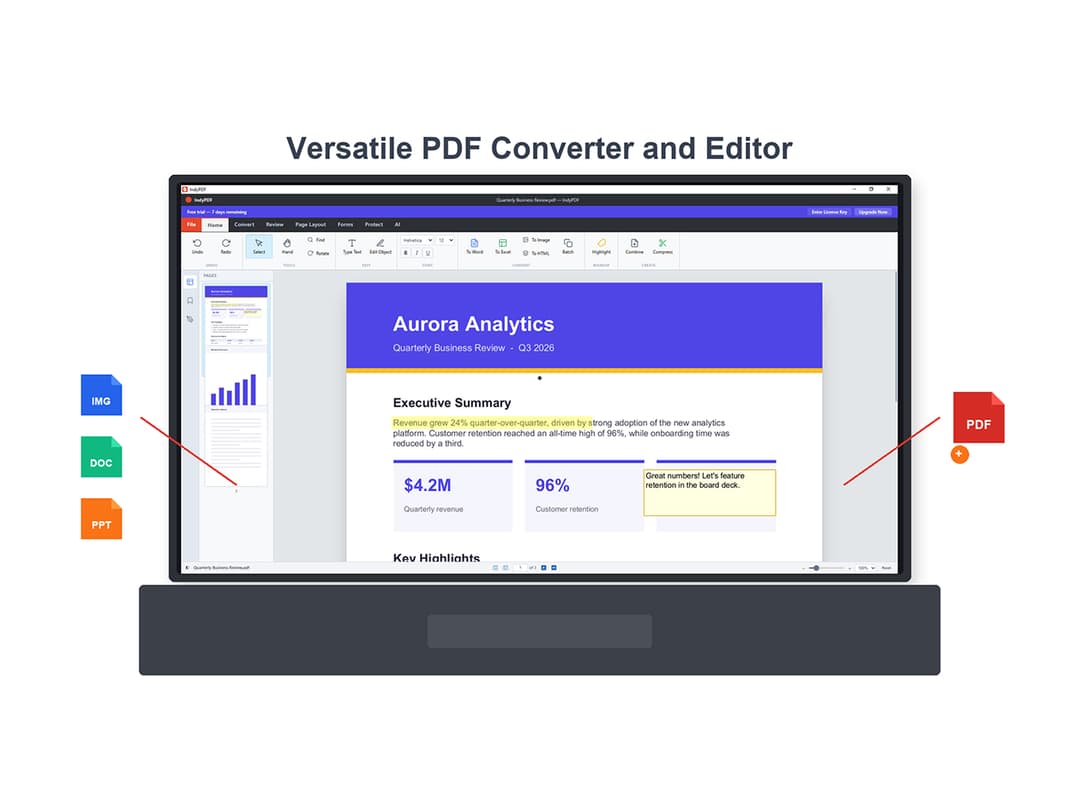
IndyPDF Editor & Converter at a glance
- Platform
- Windows, Mac
- Refund
- Not verified. The fetched StackSocial page was for a different product. Check the purchase page for the refund and redemption terms.
- Note
- Lifetime license sold through StackSocial; check the listing for how lifetime is defined.
Our take
Is IndyPDF Editor & Converter worth buying?
Based on the stored description, IndyPDF is a local PDF editor with conversion, OCR and security tools. The StackSocial URL we fetched showed a different product, AcePDF, so price, terms and platform details are unconfirmed. Check the purchase page before buying.
Good fit if
- You want to edit and convert PDFs without uploading them.
- You need OCR, redaction and signing in one app.
- You prefer a one-time license to a subscription.
Skip it if
- You need a browser or mobile PDF editor.
- You need confirmed pricing and terms before buying.
Which IndyPDF Editor & Converter plan do you need?
Prices in USD, excluding tax.
| Lifetime deal | |
|---|---|
| One-time price | $19 |
Before you buy: StackSocial's terms and extra costs
- Refund. Not verified. The fetched StackSocial page was for a different product. Check the purchase page for the refund and redemption terms.
- AI usage cost. The AI PDF Summarizer uses your own API key, per the stored description; your AI provider bills usage separately.
- Note. Lifetime license sold through StackSocial; check the listing for how lifetime is defined.
What is IndyPDF Editor & Converter?
IndyPDF is described as a Rust-built desktop PDF editor that keeps documents on your device. The stored description lists direct paragraph editing with text reflow, conversion to Word, Excel, PowerPoint, HTML and PNG, page tools, on-device OCR, signing, encryption and redaction. The deal is a lifetime license sold through StackSocial.
What IndyPDF Editor & Converter says it does
- Edit paragraphs directly with automatic text reflow
- Convert PDFs to Word, Excel, PowerPoint, HTML and PNG while preserving layout
- Run OCR on the device to make scanned PDFs searchable
- AES-256 encryption and permanent redaction
Why IndyPDF Editor & Converter
It aims to replace a mix of online PDF tools that upload your files, with one desktop app. The page we could fetch did not match this product, so treat the details as the vendor's stored description until you confirm them on the purchase page.
How does IndyPDF Editor & Converter work?
Redeem the code
Redeem your StackSocial code after purchase.
Install the app
Install the desktop app on your computer.
Open a PDF
Click into a paragraph to edit, or choose a conversion.
Organize and secure
Merge, split or rotate pages, then add encryption or redaction.
Sign and export
Sign with a saved signature or certificate and save the file.
Then it handles:
- Editing PDF text and images
- Converting PDFs to Office formats
- Merging, splitting and rotating pages
- OCR for scanned documents
- Signing with certificates
- Encryption and redaction
Who is IndyPDF Editor & Converter for?
Built for
- People who edit contracts and reports and want files kept local
- Office workers who convert PDFs to Word or Excel often
- Anyone replacing a PDF subscription with a one-time license
Not for
- Buyers who need a browser-only or mobile PDF tool
- Teams that need shared cloud document workflows
- Anyone who cannot confirm terms on the purchase page first
What is included in IndyPDF Editor & Converter?
Editing and conversion
- Paragraph editing with text reflow
- Font matching
- Format conversion Word, Excel, PowerPoint, HTML, PNG
- Batch conversion files or whole folders
Pages, OCR and security
- Page tools merge, split, rotate, extract
- On-device OCR
- Signing saved signatures, PFX, USB tokens
- Encryption and redaction AES-256
Video review
We have not reviewed IndyPDF Editor & Converter on video yet.
Get notifiedBuyer reviews
No reviews yet. Bought IndyPDF Editor & Converter? Add it to your workspace and share what it replaced.
Add to your workspaceIndyPDF Editor & Converter questions
What is IndyPDF?
A desktop PDF editor and converter with direct text editing, OCR, page tools, signing, encryption and redaction, according to the stored description.
Does it upload my files?
The description says documents stay on your machine. The AI summarizer runs off your own API key on the desktop app.
Which platforms does it run on?
The stored description calls it a desktop app. Confirm Windows and Mac support on the purchase page.
Can it do OCR?
Yes, per the description it runs OCR on the device to make scanned PDFs searchable and editable.
What is the refund policy?
We could not verify it. StackSocial listings often allow store credit for unredeemed codes, but check this listing before buying.
Often compared with
These are other tools in the same space, not deals on GrabLTD.
- Adobe Acrobat
- Foxit PDF Editor
- PDF Expert
- Nitro PDF
- Smallpdf