Design · Lifetime deal
Komentiq
Design feedback hub that pulls Figma comments into one view and turns them into tasks.
Komentiq at a glance
- Platform
- Web
- Support
- Support by email, listed on the DealMirror page.
- Note
- The DealMirror page currently marks this deal as expired.
Our take
Is Komentiq worth buying?
Based on the DealMirror listing, Komentiq is a single-plan feedback hub built around Figma and Linear. The page marks the deal as expired, so confirm it is still on sale. The vendor site is not named on the page, so there was nothing more to check.
Good fit if
- You review designs in Figma and lose feedback across tools.
- You send Figma work to clients who will not create accounts.
- You track tasks in Linear.
- You work on a handful of projects at a time.
Skip it if
- You do not use Figma.
- You need integrations beyond Figma and Linear.
- You need more than 10 projects.
Which Komentiq plan do you need?
Prices in USD, excluding tax.
| Creator Hub | |
|---|---|
| Projects | Up to 10 |
| Screens per project | Up to 25 |
| AI credits | 80 / month |
| Comments and annotations | Unlimited |
Before you buy: DealMirror's terms and extra costs
- Refund. 30-day money-back guarantee, 60 days for DealMirror Prime members.
- Redeem. Redeem your code within 60 days of purchase.
- Support. Support by email, listed on the DealMirror page.
- Note. The DealMirror page currently marks this deal as expired.
What is Komentiq?
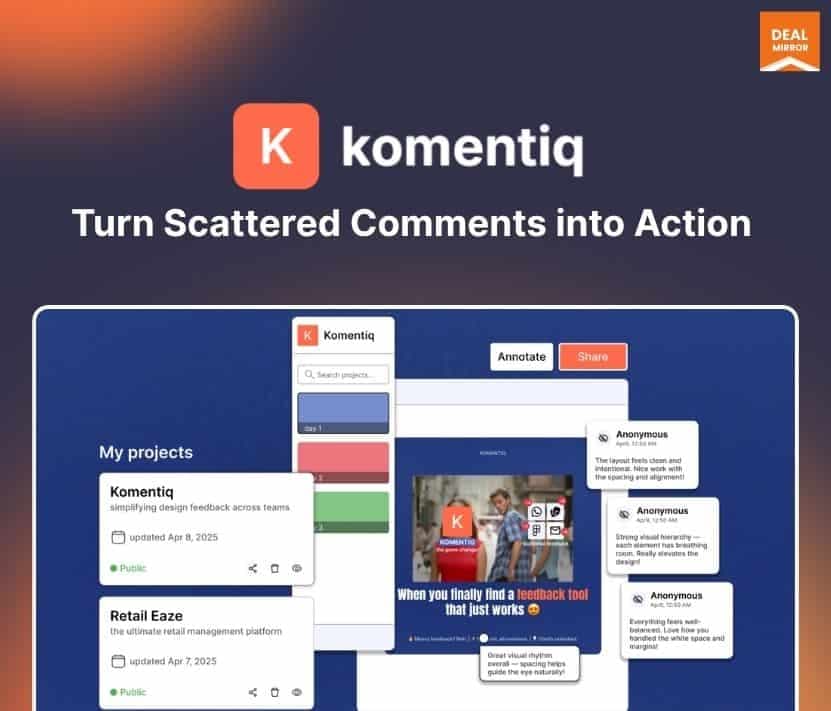
Komentiq collects design feedback from Figma, email, Slack and spreadsheets into one shared hub. It pulls in Figma comments, turns comments into tasks and sends them to Linear. Reviewers use share links and do not need to sign in. It suits design teams and product managers who lose notes across channels.
What Komentiq says it does
- Gathers feedback from Figma, email, Slack and spreadsheets into one hub
- Pulls Figma comments in automatically
- Turns comments into tasks and exports them to Linear
- Review links work without sign-in or a Figma account
Why Komentiq
Feedback on a design usually lands in several places, and action items get lost. Komentiq keeps it in one view and links each task to the original comment. It is a young product with one plan and a limited integration list, so check the integrations you need.
How does Komentiq work?
Redeem your code
Buy on DealMirror and redeem the code within 60 days.
Connect Figma
Link your Figma files so existing comments are pulled in.
Share review links
Send a link to reviewers, who can comment without signing in.
Convert to tasks
Turn comments into tasks and send them to Linear.
Then it handles:
- Collecting design feedback in one place
- Syncing Figma comments
- Annotating screens
- Converting comments into tasks
- Exporting tasks to Linear
- Client and stakeholder review links
Who is Komentiq for?
Built for
- Design teams that review work in Figma
- Product managers who track feedback across channels
- Agencies that collect client feedback without accounts
Not for
- Teams that do not use Figma for design
- Buyers who need many integrations beyond Figma and Linear
What is included in Komentiq?
Feedback hub
- Central feedback view
- Figma comment sync
- Unlimited comments and annotations
Tasks and sharing
- Comment to task conversion
- Linear export
- No-login review links
- AI credits 80 per month on the listed plan
Video review
We have not reviewed Komentiq on video yet.
Get notifiedBuyer reviews
No reviews yet. Bought Komentiq? Add it to your workspace and share what it replaced.
Add to your workspaceKomentiq questions
What does Komentiq do?
It centralizes design feedback from Figma, email, Slack and spreadsheets in one hub, and turns comments into tasks.
Who is it for?
Design teams, UX reviewers and product managers who collaborate on Figma files and want feedback in one place.
What are the plan limits?
The listed plan allows up to 10 projects, up to 25 screens per project, 80 AI credits per month and unlimited comments and annotations.
Which integrations does it have?
Figma for comment sync and Linear for task export. The page says more integrations are planned. An older description also mentions Notion export, which the page does not list.
Can reviewers comment without an account?
Yes. The page says share links need no sign-in or Figma account.
What is the refund policy?
DealMirror lists 30 days for regular buyers and 60 days for Prime members. Codes must be redeemed within 60 days of purchase.
Is the deal still available?
The DealMirror page currently shows the deal as expired. Check the listing before you plan a purchase.
Often compared with
These are other tools in the same space, not deals on GrabLTD.
- Ruttl
- BugHerd
- Pastel
- Userback
- Figma comments
Sources
Checked . Prices and terms on this page come from: