Email · Lifetime deal
Leave Dates
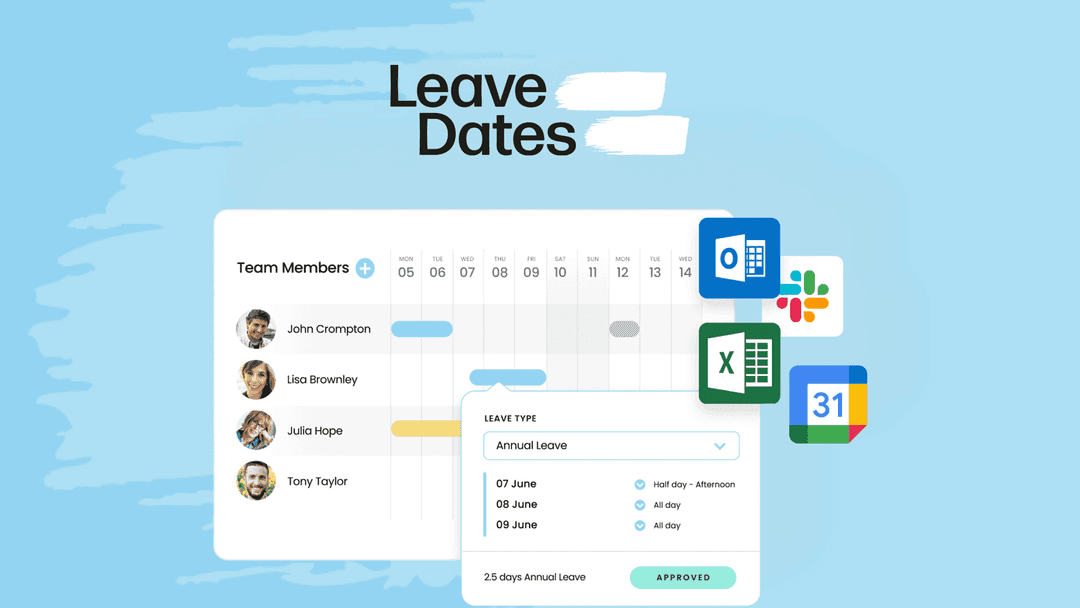
Track staff leave, approvals, allowances, and TOIL from one shared wall chart, with 150-country holiday calendars and Google Calendar, Outlook, and Slack sync built in.
Which Leave Dates plan do you need?
Prices in USD, excluding tax.
| License Tier 1 | License Tier 2 | License Tier 3 | License Tier 4 | License Tier 5 | |
|---|---|---|---|---|---|
| Includes | 5 Seats; Employees; Allowances; Carry over; Wall chart; Year chart; Approvers; Mobile apps; Departments; Leave types; Bank holidays; Schedules; Reports; Bulk uploads; Email summary reports; Allowance units; Pro rata allowances; Attachments; Comment on requests | 10 Seats; Employees; Allowances; Carry over; Wall chart; Year chart; Approvers; Mobile apps; Departments; Leave types; Bank holidays; Schedules; Reports; Bulk uploads; Email summary reports; Allowance units; Pro rata allowances; Attachments; Comment on requests | 15 Seats; Employees; Allowances; Carry over; Wall chart; Year chart; Approvers; Mobile apps; Departments; Leave types; Bank holidays; Schedules; Reports; Bulk uploads; Email summary reports; Allowance units; Pro rata allowances; Attachments; Comment on requests; Company calendar; Calendar sync; Time off in lieu; Limits; Export to excel; Overlaps; Handover; Multi-person requests; Slack | 20 Seats; Employees; Allowances; Carry over; Wall chart; Year chart; Approvers; Mobile apps; Departments; Leave types; Bank holidays; Schedules; Reports; Bulk uploads; Email summary reports; Allowance units; Pro rata allowances; Attachments; Comment on requests; Company calendar; Calendar sync; Time off in lieu; Limits; Export to excel; Overlaps; Handover; Multi-person requests; Slack | 25 Seats; Employees; Allowances; Carry over; Wall chart; Year chart; Approvers; Mobile apps; Departments; Leave types; Bank holidays; Schedules; Reports; Bulk uploads; Email summary reports; Allowance units; Pro rata allowances; Attachments; Comment on requests; Company calendar; Calendar sync; Time off in lieu; Limits; Export to excel; Overlaps; Handover; Multi-person requests; Slack |
What is Leave Dates?
Staff leave gets messy fast when it lives in spreadsheets, email threads, and three Slack DMs. Leave Dates puts every request, approval, and balance onto a shared wall chart your whole team sees in real time. Holiday calendars, sick days, TOIL, parental leave — one tracker, instant approvals, no more "how many days do I have left" pings in the manager DMs.
What Leave Dates actually does
The product covers the full leave lifecycle: request, approval, balance tracking, and reporting, with HR-specific touches the average calendar app skips. The shared wall chart is the centerpiece, with every absence visible to the team and managers spotting coverage gaps before they turn into Friday-afternoon scrambles.
- Submit leave requests by dragging dates on the shared calendar - Approve or decline instantly from the manager view, with automatic notifications to everyone involved - Build multi-person approval workflows and department-level permissions to match your company policy - Create custom leave types beyond the defaults: sick leave, parental leave, anything your policy requires - View full allowance summaries per employee, including carry-over and time off in lieu - Tailor allowances based on each employee's contractual terms - Give employees 24/7 visibility into their own balances and remaining days - Sync time off directly to Google Calendar or Outlook so absences show up where your team already lives - Connect to Slack for daily leave reports without switching tabs - Download reports or schedule daily summaries to your inbox - Run the iOS or Android mobile app for on-the-go requests and approvals - Integrate through Zapier or build custom workflows via the open API
Who it's built for
This is built for ops, HR, and people managers at companies that have outgrown the spreadsheet stage but aren't ready to spend a third of payroll on a full HRIS. Teams of 5 to 25 hit the sweet spot here, since managers can still approve directly while the manual approach starts leaking days. The 150-country holiday coverage makes it especially useful for distributed teams where someone is always on a local bank holiday you didn't know about. A small but underrated detail: pro rata allowances and TOIL tracking come standard, so you don't have to map them in a side spreadsheet. If you've ever had to settle "did Sarah take that day in lieu or not" from memory, you already know why that matters. This isn't trying to be Workday. There's no payroll, no performance reviews, no org chart. It does one thing, which means the people who'll get the most out of it are the ones whose current solution is also one thing, just messier: a multi-tab spreadsheet or someone keeping a running tally in a notebook.
The deal
License Tier 1 lands at $49 for 5 seats, which works out to under $10 per seat. Tier 2 doubles the headcount to 10 for $99. The bigger jump is Tier 3 at $199 (15 seats), the first tier with calendar sync, Slack daily reports, and time-off-in-lieu tracking. That's the line where Leave Dates stops being a tracker and starts being infrastructure your managers will actually live in. Tier 4 ($299, 20 seats) and Tier 5 ($349, 25 seats) keep the same feature set, just more capacity. Most small teams will land on Tier 1 or 2, but if you're planning to grow into the 15-seat band within the year, the Tier 3 upgrade pays for itself in calendar sync alone. Pick the tier that matches your current headcount with a little growth headroom, and [grab it on AppSumo](https://www.grabltd.com/recommends/appsumo-leave-dates/).
Video review
We have not reviewed Leave Dates on video yet.
Get notifiedBuyer reviews
No reviews yet. Bought Leave Dates? Add it to your workspace and share what it replaced.
Add to your workspaceLeave Dates questions
Is the Leave Dates lifetime deal still available?
No. This AppSumo deal is archived and is no longer available for purchase. Leave Dates continues to operate as a subscription SaaS at leavedates.com, but the lifetime deal is closed.
What does Leave Dates do?
Leave Dates is a staff leave management tool. It provides a shared wall chart where teams can submit leave requests, managers can approve or decline them, and everyone can see absences in real time. It tracks allowances, carry-overs, TOIL, sick leave, parental leave, and custom leave types.
What integrations does Leave Dates support?
Leave Dates integrates with Google Calendar, Microsoft Outlook, and Slack. It also supports Zapier for custom automations and provides an open API. Mobile apps are available for iOS and Android.
How many countries' public holidays does Leave Dates cover?
Leave Dates includes public holiday calendars for over 150 countries, making it well suited for distributed or international teams.
What team sizes is Leave Dates designed for?
Leave Dates works best for small to mid-sized teams, typically 5 to 25 people. It's designed for companies that have outgrown spreadsheet tracking but don't need a full HRIS system.
Does Leave Dates support TOIL (time off in lieu) tracking?
Yes. TOIL tracking is included, along with pro-rata allowance calculations, carry-over management, and per-employee contractual allowance customization.
What was the AppSumo deal pricing?
The deal was structured in five tiers: Tier 1 ($49, 5 seats), Tier 2 ($99, 10 seats), Tier 3 ($199, 15 seats) — the first tier to include calendar sync, Slack reports, and TOIL — Tier 4 ($299, 20 seats), and Tier 5 ($349, 25 seats). All were one-time lifetime payments.
What are good subscription alternatives to Leave Dates?
Current alternatives include Bamboo HR, Personio, Factorial, and dedicated leave management tools like Timetastic or Calamari. For small teams, tools like Teamup Calendar or BambooHR Essentials offer similar features on a subscription basis.
Often compared with
These are other tools in the same space, not deals on GrabLTD.
- Timetastic
- Calamari
- BambooHR
- Personio
- Factorial