Design · Lifetime deal
Paintit.ai
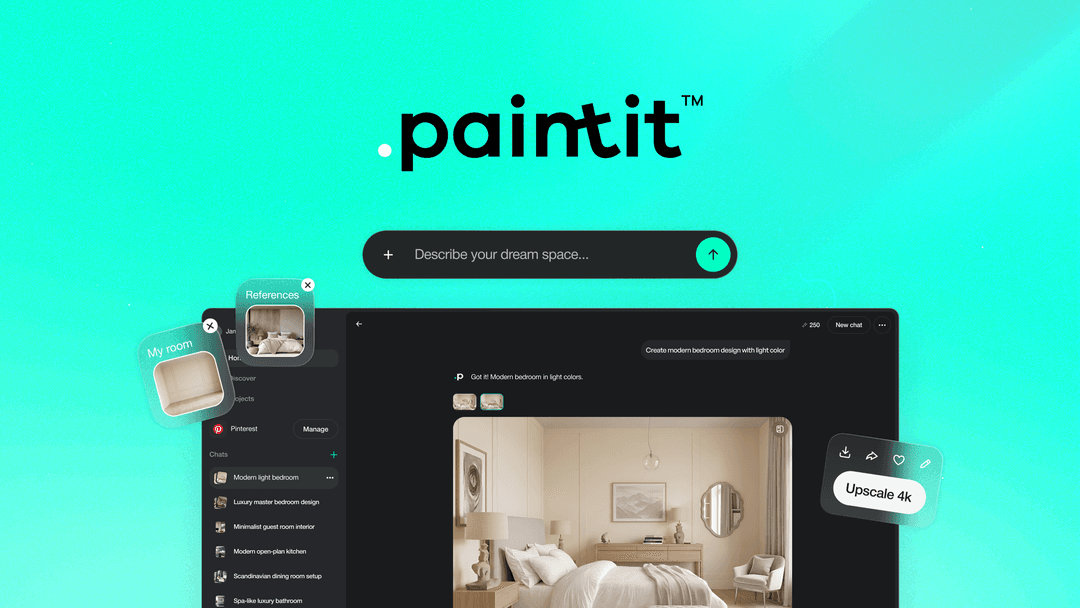
Turn a room photo or prompt into an editable interior design and 3D view.
Paintit.ai at a glance
- Platform
- Web
- Upgrades
- The page contradicts itself on tier changes: one line allows upgrades while the deal is live, another says upgrades or downgrades are not allowed.
- Note
- Commercial use: the FAQ ties it to the Max plan, but a July 2026 founder update says it is now included in the AppSumo lifetime deal.
Our take
Is Paintit.ai worth buying?
Based on the AppSumo listing, Paintit.ai is a single credit-based lifetime tier for AI room redesigns. The page shows it as sold out, and its commercial-use and upgrade terms contradict each other. Confirm both before relying on it for client work.
Good fit if
- You want quick interior mockups for clients or listings.
- You are fine with a monthly credit cap.
- You want contractor specs and shopping lists from a design.
Skip it if
- You need unlimited generations.
- You need written commercial-use terms before you buy.
- You need a deal that is available now.
Which Paintit.ai plan do you need?
Prices in USD, excluding tax.
| Lifetime deal | |
|---|---|
| Credits per month | 500 |
| Exports | 4K, no watermark |
| Private mode | Included |
Before you buy: AppSumo's terms and extra costs
- Refund. AppSumo lists refunds for up to 60 days.
- Redeem. Activate your license within 60 days of purchase.
- Upgrades. The page contradicts itself on tier changes: one line allows upgrades while the deal is live, another says upgrades or downgrades are not allowed.
- AI usage cost. Output uses credits. Future AI models may cost extra or need an add-on.
- Note. Commercial use: the FAQ ties it to the Max plan, but a July 2026 founder update says it is now included in the AppSumo lifetime deal.
What is Paintit.ai?
Paintit.ai turns a room photo or a text prompt into an editable interior design and a photorealistic 3D view. It includes repaint, furniture removal, full redesign and empty room scenarios, plus contractor-ready specs and shopping lists. The AppSumo lifetime tier includes 500 credits a month. The AppSumo page shows the deal as sold out.
What Paintit.ai says it does
- 500 credits per month, spent at 3, 10 or 20 per image by mode (Paintit.ai's figure)
- 4K exports with no watermark
- Photorealistic 3D views from a photo or prompt
- Contractor-ready specs and a furniture shopping list
Why Paintit.ai
It gives designers, agents and homeowners a quick way to show how a room could look without a 3D artist. Output is credit-based, so heavy use runs out of the monthly 500 credits, and the commercial-use terms on the page are inconsistent.
How does Paintit.ai work?
Redeem the code
Activate the license within 60 days of purchase.
Upload a photo or write a prompt
Use JPG, PNG, WebP or HEIC, or describe the room.
Pick a mode
Choose repaint, furniture removal, redesign or empty room setup.
Edit the design
Change colors, furniture, lighting and layout with AI suggestions.
Export and share
Export in 4K and share links or specs.
Then it handles:
- Redesigning a room from a photo
- Generating designs from text prompts
- Photorealistic 3D views
- Repainting and removing furniture
- Comparing saved design versions
- Importing Pinterest boards
- Contractor specs and shopping lists
Who is Paintit.ai for?
Built for
- Interior designers who want fast client visuals
- Real estate agents staging empty rooms
- Homeowners planning a renovation
Not for
- Buyers who need unlimited generations
- Anyone who needs to buy now, since the deal shows as sold out
- Teams that need clear commercial-use terms before using client work
What is included in Paintit.ai?
Design generation
- Photo and prompt to design
- Repaint, furniture removal, redesign
- Empty room setup
- AI chat guidance and prompts
Editing and output
- Editing of colors, furniture, lighting
- Saved versions to compare
- 4K exports, no watermark
- Private mode
Planning tools
- Furniture recommendations beta
- Contractor-ready specs
- Pinterest board import
- Shareable project links
Video review
We have not reviewed Paintit.ai on video yet.
Get notifiedBuyer reviews
No reviews yet. Bought Paintit.ai? Add it to your workspace and share what it replaced.
Add to your workspacePaintit.ai questions
What is Paintit.ai?
An AI tool that turns a room photo or text prompt into an editable interior design and a photorealistic 3D view.
How many images can I make?
The tier includes 500 credits a month. Each image costs 3, 10 or 20 credits depending on Basic, Balanced or Advanced mode.
Can I use results commercially?
The FAQ says commercial use needs the Max plan, but a founder update says commercial rights are now included in the lifetime deal. Confirm with the vendor.
What is the refund policy?
AppSumo lists refunds for up to 60 days.
Is the deal still available?
The page shows it as sold out, with a notify option for when it returns.
Can I upgrade later?
The page gives conflicting terms. Check before buying if you expect to change tiers.
Often compared with
These are other tools in the same space, not deals on GrabLTD.
- Interior AI
- RoomGPT
- Planner 5D
- Houzz
- Virtual Staging AI
Sources
Checked . Prices and terms on this page come from: