Productivity · Lifetime deal
Pixefy
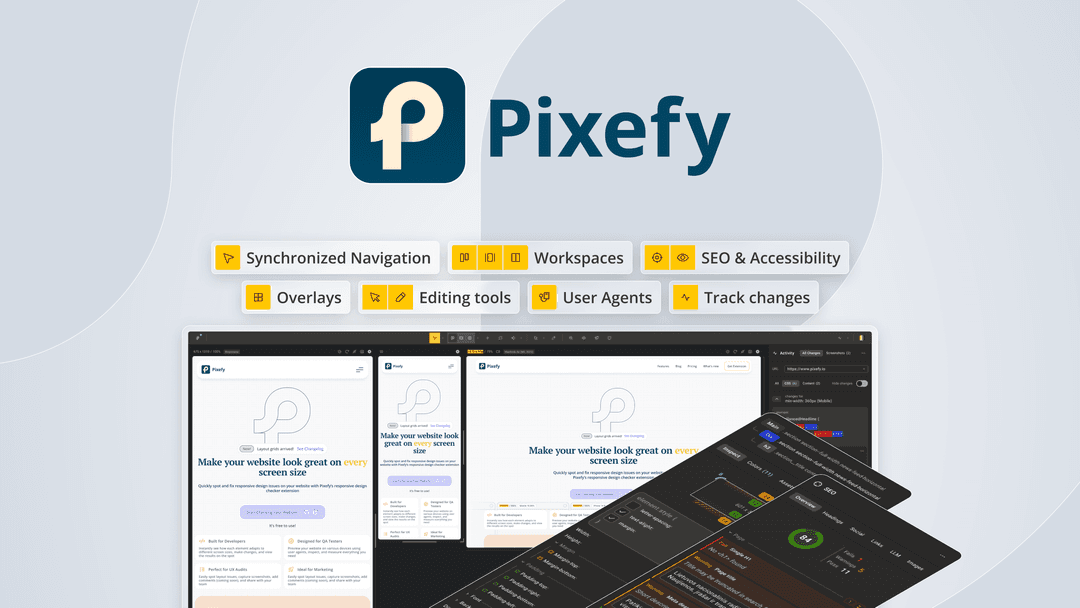
Browser extension that previews your site on 300+ devices at once.
Pixefy at a glance
- Platform
- Chrome, Firefox
- Upgrades
- Upgrades are allowed while the deal is live. Downgrades only within 60 days of purchase.
- Support
- Questions are expected to be answered within 24 hours; there is also a feedback portal and Discord.
Our take
Is Pixefy worth buying?
Based on the AppSumo listing, Pixefy is a three-tier lifetime extension for responsive testing, priced by user count. The page shows it as sold out. It simulates devices in the browser, so it does not replace testing on real hardware.
Good fit if
- You check responsive layouts often in Chrome or Firefox.
- You want SEO and accessibility checks in the same tool.
- You share review projects with a small team.
Skip it if
- You need real-device testing.
- You use Safari or Edge.
- You need a deal that is available now.
Which Pixefy plan do you need?
Prices in USD, excluding tax.
| License Tier 1 | License Tier 2 | License Tier 3 | |
|---|---|---|---|
| Users | 1 | 5 | 20 |
Before you buy: AppSumo's terms and extra costs
- Refund. AppSumo lists refunds within 60 days, plus its We Got Your Back guarantee.
- Redeem. Activate your license within 60 days of purchase.
- Upgrades. Upgrades are allowed while the deal is live. Downgrades only within 60 days of purchase.
- Support. Questions are expected to be answered within 24 hours; there is also a feedback portal and Discord.
- Platform. Browser extension for Chrome and Firefox.
What is Pixefy?
Pixefy is a browser extension for Chrome and Firefox that previews a page on 300+ device presets at once. It syncs clicks and scrolling, and adds element inspection, color and asset views, accessibility simulations, SEO checks and screenshots. The AppSumo lifetime deal has three tiers by user count. The AppSumo page shows the deal as sold out.
What Pixefy says it does
- 300+ device presets and 100+ user agents (Pixefy's figure)
- Synced clicks and scrolling across devices
- Screenshots with annotations
- Visual impairment and color vision deficiency simulation
Why Pixefy
It lets you check layouts across many screen sizes in the tab you already have open. It is a browser extension limited to Chrome and Firefox, and it simulates devices rather than running real ones.
How does Pixefy work?
Activate the license
Activate within 60 days of purchase.
Install the extension
Add it to Chrome or Firefox.
Open a page
Pick device presets to preview side by side.
Inspect and capture
Check SEO and accessibility, then take annotated screenshots.
Then it handles:
- Previewing a page on many device sizes
- Synced scrolling and clicking
- Inspecting elements and colors
- Downloading page assets
- Simulating color vision deficiency
- On-page SEO checks
- Annotated screenshots
Who is Pixefy for?
Built for
- Front-end developers checking responsive layouts
- Designers reviewing pages across screen sizes
- Agencies sharing review projects with teammates
Not for
- Anyone who needs testing on real devices
- Safari or Edge-only users
- Buyers who need the deal now, since it shows as sold out
What is included in Pixefy?
Device preview
- 300+ device presets vendor figure
- 100+ user agents
- Adaptive grids
- Synced interaction
Inspection
- Full inspect and X-ray view
- Colors view and asset downloads
- Page measurements widget
- On-page SEO
Review and accessibility
- Screenshots and annotations
- Color vision deficiency simulation
- Projects
Video review
We have not reviewed Pixefy on video yet.
Get notifiedBuyer reviews
No reviews yet. Bought Pixefy? Add it to your workspace and share what it replaced.
Add to your workspacePixefy questions
What is Pixefy?
A browser extension that previews your site on 300+ device presets at once, with inspection, SEO and accessibility tools.
What do the tiers differ on?
Tier 2 is listed at 5 users. The user selector shows 1, 5 and 20, which suggests Tier 1 is 1 user and Tier 3 is 20.
Which browsers work?
Chrome and Firefox.
What is the refund policy?
AppSumo lists refunds within 60 days.
Is the deal still available?
The page shows it as sold out, with an option to be notified if it returns.
Are updates included?
Yes. The listing says all future Pro (Tiers 1 to 3) updates are included.
Often compared with
These are other tools in the same space, not deals on GrabLTD.
- BrowserStack
- Responsively App
- LambdaTest
- Chrome DevTools
- Polypane
Sources
Checked . Prices and terms on this page come from: