AI Tools · Lifetime deal
Presentia Slides
AI tool that builds editable PowerPoint decks from a prompt or document, with images for every slide.
Presentia Slides at a glance
- Platform
- Web, PowerPoint
- Upgrades
- No codes, no stacking. Upgrade between tiers while the deal runs; downgrades are allowed within 60 days of purchase.
- Support
- The vendor says it expects to respond within 24 hours.
- Note
- Lifetime access with all future Pro Plan updates.
Our take
Is Presentia Slides worth buying?
Based on the AppSumo listing, the stored tier matches Tier 1 with 25 monthly credits and 300 one-time credits. It suits people who build decks occasionally and want editable PowerPoint output. Credits are charged per slide, and the page shows the deal as sold out.
Good fit if
- You build presentations regularly and want a fast first draft.
- You want editable .pptx output rather than a web-only deck.
- You can work within monthly credits.
Skip it if
- You generate large volumes of slides and need unlimited use.
- You cannot activate within 60 days of purchase.
- You want to combine multiple codes.
Which Presentia Slides plan do you need?
Prices in USD, excluding tax.
| Lifetime deal | |
|---|---|
| Monthly credits | 25 |
| One-time credits | 300 |
| Top-up discount | 25% |
| Commercial use | Included |
Before you buy: AppSumo's terms and extra costs
- Refund. 60-day money-back guarantee through AppSumo.
- Redeem. Activate your license within 60 days of purchase.
- Upgrades. No codes, no stacking. Upgrade between tiers while the deal runs; downgrades are allowed within 60 days of purchase.
- Usage cost. Slides are charged in credits: 1 credit per slide for standard visuals, 2 for premium visuals.
- Support. The vendor says it expects to respond within 24 hours.
- Note. Lifetime access with all future Pro Plan updates.
- Platform. Web editor that exports to PowerPoint.
What is Presentia Slides?
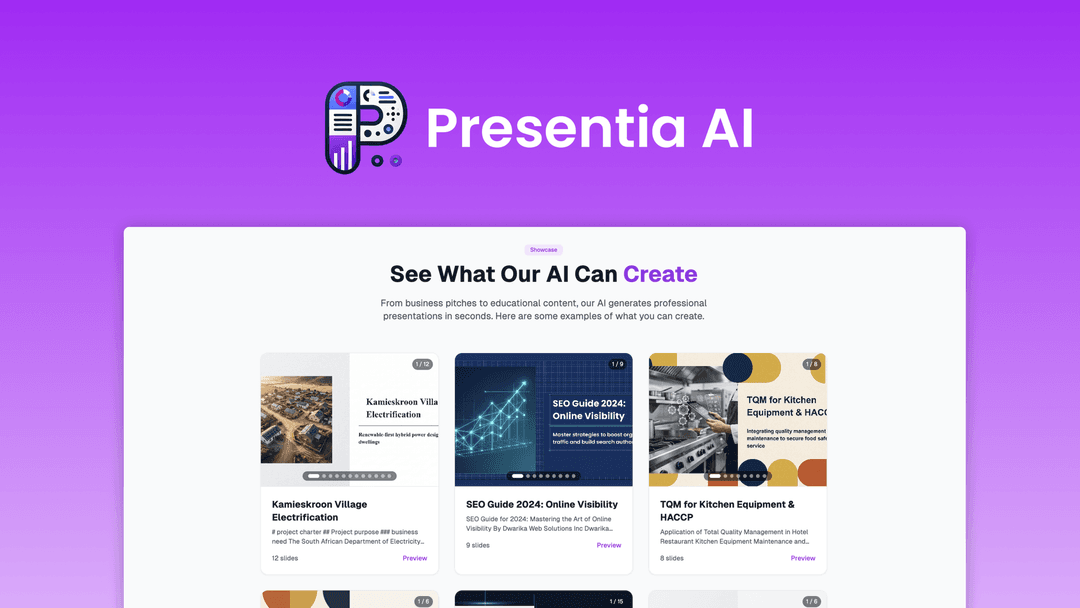
Presentia Slides turns a prompt or an uploaded document into a full PowerPoint deck with themes, layouts, copy and an AI image for each slide. You can paste text or upload PDF, DOCX, DOC or TXT files, then edit in the browser with AI commands that batch-change fonts, layouts and images. Decks download as editable .pptx files. The AppSumo listing sells three lifetime tiers with monthly credits.
What Presentia Slides says it does
- Exports fully editable PPTX files
- A context-aware AI image for each slide, with per-slide regeneration
- Up to 12 themes and support for multiple languages
- Builds decks from prompts, pasted text or uploaded documents
Why Presentia Slides
Building a deck from scratch is slow, and many AI tools lock output in a web viewer. Presentia exports real PowerPoint files you can keep editing. Slides cost credits, and the AppSumo page currently shows the deal as sold out.
How does Presentia Slides work?
Activate the license
Activate within 60 days of purchase.
Give it content
Describe a topic, paste text or upload a document.
Generate the deck
The tool applies a theme, copy and AI images.
Refine in the browser
Use AI commands to batch-edit fonts, layouts and images.
Download
Export a .pptx and keep editing in PowerPoint.
Then it handles:
- Decks from a prompt
- Decks from PDF, DOCX or TXT files
- AI images for each slide
- Batch edits to fonts and layouts
- Editable PPTX export
- Custom presentation themes
- Decks in multiple languages
Who is Presentia Slides for?
Built for
- Consultants and marketers who build decks often
- Teachers and students turning documents into slides
- People who want output they can keep editing in PowerPoint
Not for
- Buyers who need unlimited generation, since slides use credits
- Anyone who cannot activate within 60 days of purchase
- People wanting stacked codes, since stacking is not allowed
What is included in Presentia Slides?
Creating decks
- Prompt to deck
- Document to deck PDF, DOCX, DOC, TXT or pasted text
- AI image per slide regenerate any single slide image
- Themes up to 12
Editing and export
- AI batch editing fonts, layouts and images
- PPTX export fully editable
- Saved presentations
- Showcase gallery example decks
Video review
We have not reviewed Presentia Slides on video yet.
Get notifiedBuyer reviews
No reviews yet. Bought Presentia Slides? Add it to your workspace and share what it replaced.
Add to your workspacePresentia Slides questions
What is Presentia Slides?
An AI tool that creates full PowerPoint decks from a prompt or an uploaded document, with themes, copy and an AI image per slide.
Can I edit the result?
Yes. Edit in the browser with AI commands, then export a fully editable .pptx and continue in PowerPoint.
How do credits work?
Standard visuals cost 1 credit per slide and premium visuals cost 2. Tiers include monthly credits plus a one-time pool, and top-ups are discounted by tier.
How do the tiers differ?
Tier 1 has 25 monthly and 300 one-time credits, Tier 2 has 50 and 800, Tier 3 has 100 and 1,500. All include commercial use and saved presentations.
Is the deal still available?
The AppSumo page shows it as sold out with a notify-me option, so it may have ended.
What is the refund policy?
A 60-day money-back guarantee. Activate your license within 60 days. Codes cannot be stacked.
Often compared with
These are other tools in the same space, not deals on GrabLTD.
- Gamma
- Beautiful.ai
- Tome
- Canva
- Microsoft Copilot
Sources
Checked . Prices and terms on this page come from: