Productivity · Lifetime deal
SheetMagic
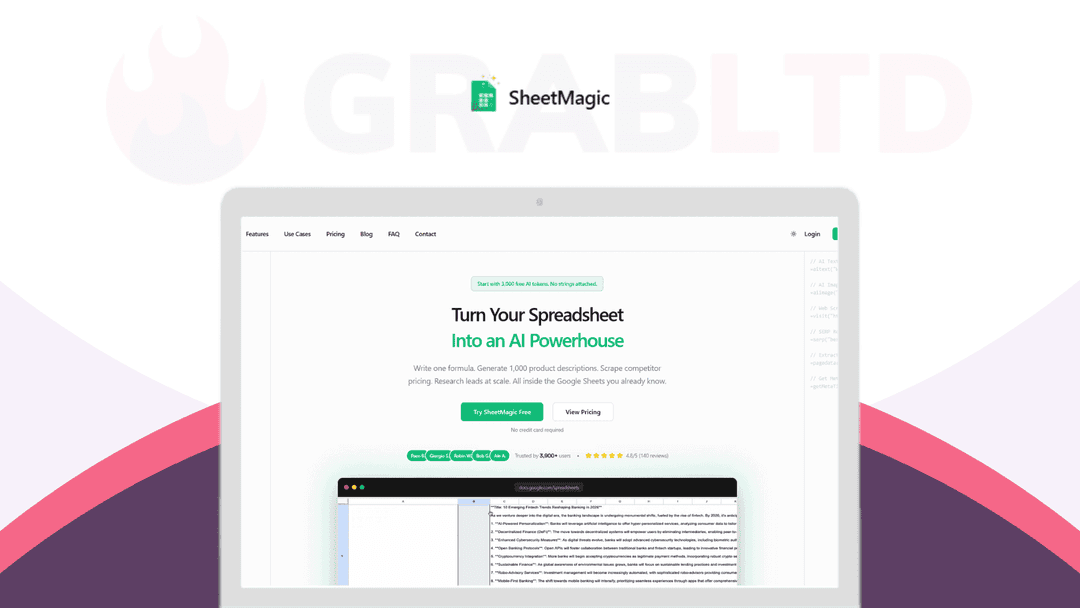
Google Sheets add-on for bulk AI content, research and web scraping with formulas.
SheetMagic at a glance
- Platform
- Google Sheets
- Note
- The deal page could not be confirmed on Dealify; check the seller's current terms, refund and redemption deadline.
Our take
Is SheetMagic worth buying?
Based on the stored listing and the vendor site, this is a Google Sheets add-on for bulk AI and scraping work. The Dealify page redirected to its catalog, so the deal may have ended. Confirm availability and terms before relying on this entry.
Good fit if
- You do bulk content or research work in Google Sheets.
- You want to use your own AI API keys.
- You want text, image and scraping tools in one add-on.
Skip it if
- You do not work in Google Sheets.
- You need unlimited credits.
Which SheetMagic plan do you need?
Prices in USD, excluding tax.
| Plan A – Lifetime Subscription | Plan B – Lifetime Subscription | Plan C – Lifetime Subscription | |
|---|---|---|---|
| Seats | 1 | 5 | 15 |
| Credits | 1,000 | 5,000 | 20,000 |
Before you buy: Dealify's terms and extra costs
- AI usage cost. Bring-your-own-key AI usage is billed by your AI provider.
- Platform. Google Sheets add-on.
- Note. The deal page could not be confirmed on Dealify; check the seller's current terms, refund and redemption deadline.
What is SheetMagic?
SheetMagic is a Google Sheets add-on that adds AI and web scraping through formulas. You write a formula, drag it down, and generate text, images, audio, video, lead research or scraped data in bulk. It supports models from OpenAI, Anthropic, Google and others, and you can use your own API keys. The listed deal has three tiers by seats and credits.
What SheetMagic says it does
- Generate AI outputs in bulk with simple formulas
- Bring your own API keys and pay providers directly with no markup (SheetMagic's figure)
- Text, image, audio and video AI plus web scraping functions
- Works in 100+ languages (SheetMagic's figure)
Why SheetMagic
It keeps AI writing, scraping and research inside a spreadsheet instead of switching between tools. Credits are limited by tier, and the deal page could not be confirmed, so check the current listing before buying.
How does SheetMagic work?
Redeem the code
Redeem your Dealify code within the seller's deadline.
Install the add-on
Install SheetMagic from the Google Workspace Marketplace.
Write a formula
Use an AI or scraping formula in a cell.
Fill it down
Drag the formula down rows to run it in bulk.
Then it handles:
- Bulk product descriptions and emails
- AI image and audio generation
- Scraping competitor pages
- Pulling search results for SEO research
- Lead research
- Using several AI models in one sheet
Who is SheetMagic for?
Built for
- Marketers writing content in bulk
- SEO and research teams working in spreadsheets
- Users who want to bring their own AI keys
Not for
- Anyone not using Google Sheets
- Buyers who need unlimited credits
- Teams larger than the seat limit of the tier
What is included in SheetMagic?
AI generation
- AI text formulas
- AI image, audio and video
- Multiple model providers OpenAI, Anthropic, Google, Perplexity
- Bring your own key no upcharge
Data and scraping
- Web scraping functions
- Search result pulls
- Metadata extraction
Video review
We have not reviewed SheetMagic on video yet.
Get notifiedBuyer reviews
No reviews yet. Bought SheetMagic? Add it to your workspace and share what it replaced.
Add to your workspaceSheetMagic questions
What is SheetMagic?
A Google Sheets add-on that adds AI and web scraping functions you use as formulas and fill down in bulk.
Which AI models does it use?
The stored listing names OpenAI, Anthropic, Google and Perplexity. The vendor site also lists Mistral and models available through OpenRouter.
Can I use my own API keys?
Yes. The listing says you can bring your own keys with zero upcharge.
How do the tiers differ?
The stored listing shows Plan A with 1 seat and 1,000 credits, Plan B with 5 seats and 5,000 credits, and Plan C with 15 seats and 20,000 credits.
Is this deal still available?
The Dealify page for SheetMagic redirected to the general catalog when checked, so availability is unconfirmed.
Is the regular product a subscription?
The vendor's own site lists monthly subscription plans and mentions a lifetime deal without details.
Often compared with
These are other tools in the same space, not deals on GrabLTD.
- GPT for Sheets
- Coefficient
- Rows
- Jasper
- Copy.ai
Sources
Checked . Prices and terms on this page come from: