Productivity · Lifetime deal
Superdense
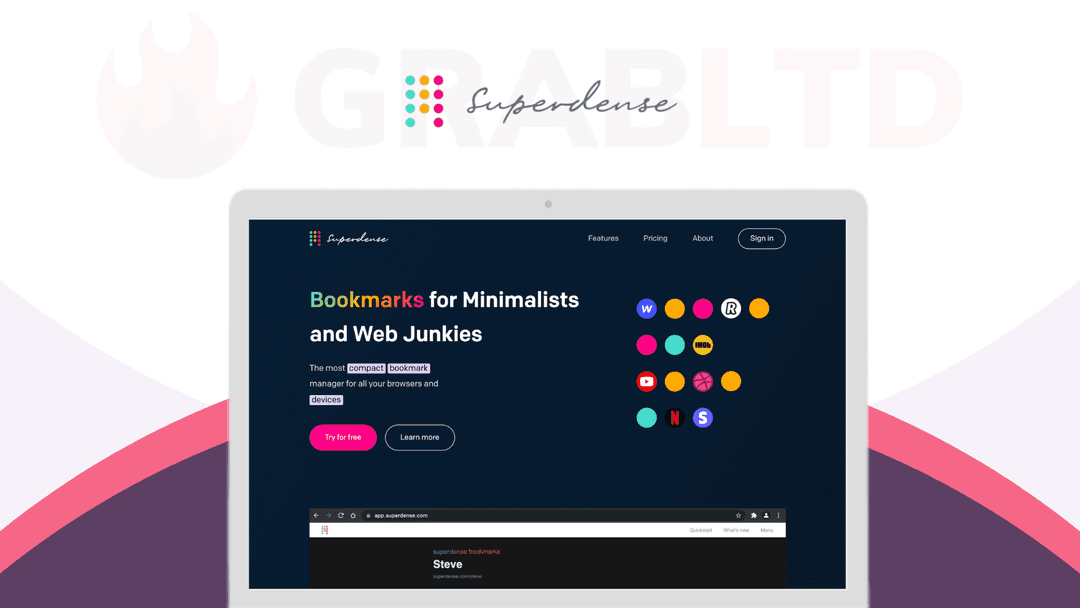
Superdense is a compact storehouse for your bookmarks, replacing the conventional way of finding (forgetting too) them for your use.
Which Superdense plan do you need?
Prices in USD, excluding tax.
| 1 Code | 2 Codes | 3 Codes | |
|---|---|---|---|
| Includes | 1 User; Future updates to Solo plan; Unlimited bookmarks; Unlimited Categories; Public Page Bio; Custom Themes; Team Management; Custom icon creation; Public profile sharing; Future Updates & Integrations of the respective plan are included; 60 days refund policy | 5 Team members; Future updates to Team plan; All 1 code features included | 25 Team members; Custom branding (coming soon); Custom domains (coming soon); Future updates to Company plan |
What is Superdense?
Having a myriad of apps on your phone or a gazillion bookmarks that you’d never visit after once can be frustrating.
Some “OG influencers” ride on that frustration by preaching less is always the best (You ain’t my mom, virtual being!!)
Keeping a tab on the numerous sites you have visited can help you pick up where you left off. That too, with a single click on the icon.
Ideally, visual bookmarks are a no-brainer compared to the ones you forget to see.
[Superdense](https://go.grabltd.com/superdense) is a compact storehouse for your bookmarks, replacing the conventional way of finding (forgetting too) them for your use.
https://player.vimeo.com/video/611496779?color&autopause=0&loop=0&muted=0&title=1&portrait=1&byline=1#t=
Instead of cramming your bookmarks on the bookmarks bar, Superdense gives you enormous space to save your bookmarks with easy icon identifiers, and less text/no text at all.
Create your [Superdense](https://go.grabltd.com/superdense) account, and you are off to the races to add and organize your stream of bookmarks.
On the homepage, you can tap ‘+’ to name categories of your bookmarks you would include. Oh! And emojis too.
Add bookmarks according to your liking and categorize them as much as you can.
At the bottom right of the page, tap the edit option to unravel how you can add, delete, drag and drop bookmarks wherever you please.

As a business owner, sharing links/resources with your team keeps them informed of where you are headed. Send email invitations to your team to grant access and your team gets a piece of your pie.
Your profile is yours to own and update your hobbies and interests. Seems like a cakewalk, right? It is!
Add your webpage in your profile and click update. And there, you have something for people to know about you.
Tools like this don’t often come to our attention. Even if they do, it’s highly doubtful that your pockets won’t burn before you spend it.
Purchasing Superdense at your expense can cost you a chunk of your monthly operating budgets.
Our lifetime deals can last you till the finish line and even beyond that, starting at $19.
And you can onboard your whole team (upto 100 team members) for less than $100/one-time today.
Start bookmarking like a Genie-us with [Superdense](https://go.grabltd.com/superdense)!
Get a lifetime deal to Superdense now!
Video review
We have not reviewed Superdense on video yet.
Get notifiedBuyer reviews
No reviews yet. Bought Superdense? Add it to your workspace and share what it replaced.
Add to your workspaceSuperdense questions
Is the Superdense lifetime deal still available?
No. The Superdense lifetime deal via SaaS Mantra has expired and is no longer purchasable. Superdense as a product continues to operate and has an active Chrome extension on the Chrome Web Store, but the one-time LTD pricing starting at $19 is no longer available.
What is Superdense?
Superdense is a cloud-based visual bookmark manager that replaces traditional browser bookmark bars with an icon-first, text-minimal interface. Bookmarks are organized into emoji-named categories and stored in the cloud so they sync across all your browsers and devices.
How is Superdense different from regular browser bookmarks?
Instead of showing long text URLs in a bookmarks bar, Superdense displays just favicons (with optional minimal labels), letting you fit far more bookmarks in a scannable visual grid. Drag-and-drop organization and category-level tab-group opening are supported via a Chrome extension.
Does Superdense work across multiple browsers and devices?
Yes. Because bookmarks are stored in the cloud (not the browser), they are accessible from any browser or device after logging in. A Chrome extension lets you save bookmarks in one click from the browser toolbar.
Can I share Superdense with a team?
Yes. You can invite team members via email and grant them access to shared bookmark collections. Business/team plans support up to 100 members and allow custom domain setup and branding removal.
What import and export options does Superdense offer?
Superdense supports importing and exporting bookmarks via CSV or HTML format, making it easy to migrate from browser bookmarks or other bookmark tools.
What are the best alternatives to Superdense?
Close alternatives include Raindrop.io (visual bookmark manager with collections and tagging, free and paid plans), Dewey (Chrome bookmark manager), Toby (browser tab/bookmark organizer), Pocket (save-for-later with tags), and Bookmark OS (full bookmark management with folder trees).
Often compared with
These are other tools in the same space, not deals on GrabLTD.
- Raindrop.io
- Toby
- Bookmark OS
- Dewey