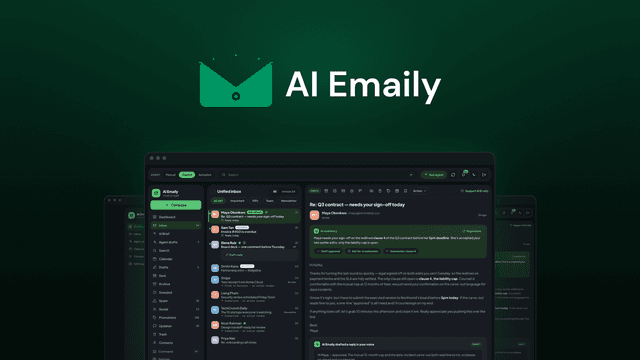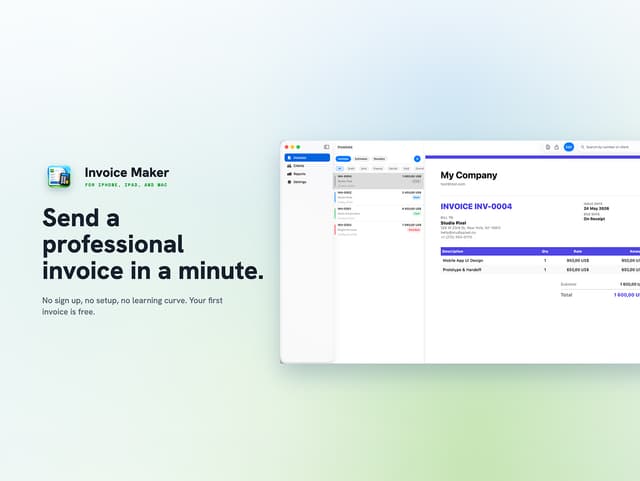

Choose the tool attached to your next dated obligation, not the one with the longer feature list. The live pages confirm distinct jobs: AI Emaily triages, summarizes and drafts replies from connected email accounts, while AI Invoice Maker turns billing details into numbered PDF invoices. Neither result substitutes for the other.
The product pages list $69 for AI Emaily and $19.99 for AI Invoice Maker, with a last-checked date of 1 October 2026. These are dated figures, not live quotes, so reopen each product page before checkout. This guide chooses a workflow, not a general product ranking. You can also compare both in the software directory.
Start with the dated obligation
An invoice has a tangible output: a numbered PDF sent by a due date. Inbox software deals with a moving queue: a reply promised to a client, messages needing triage or context buried across separate accounts. Write those down before product names enter the decision. For the invoice obligation, record the recipient, due date, amount and currency. For the inbox, record which account needs attention, what response is expected and which client context matters.
The blunt call is that a dated invoice outranks a general desire to tidy email. A PDF can close a billing obligation on a fixed date; inbox cleanup is usually continuous work. That does not make the invoice tool first in every case. If a client is waiting for a promised email tomorrow and no invoice is due this week, the email deadline is the one to solve. If both deadlines land on the same day, use the output with the clearer recipient, required inputs and consequence of missing it.
Match the required inputs and outputs
For AI Emaily, the required inputs are connected email accounts, thread history and saved client context. Its listed outputs are a unified, prioritized inbox, thread summaries and AI-drafted replies that use that context. Approval is the default. Nothing sends by itself unless you enable Autopilot, and a send has a 10-second undo. That workflow fits when you need to find the right message and shape a response. The page does not list numbered invoice PDFs as an output.
For AI Invoice Maker, the required inputs are client details and line-item billing information. The output is a numbered PDF invoice that you can export and share by email or message. The page lists automatic numbering, 9 PDF templates, tax rates and support for over 150 currencies. It can also maintain recurring invoices, a client directory and a saved products catalog, while its reports can be exported as CSV files. That workflow fits when the job ends with a bill. Incoming-thread triage, summaries and reply drafting are not in its stated feature set.
Run the output test before considering features. If you cannot name the file or message that must leave your desk, you do not yet have a purchase decision. If you can name the invoice PDF but not the billing inputs, AI Invoice Maker addresses the output while you confirm the data. If you can name the client thread but not an invoice line, AI Emaily addresses that queue instead.
Check account limits and access terms
For AI Emaily, the page lists $69. The listed payment basis was one-time. The access term was a lifetime deal. The entry tier includes 2 connected inboxes, 1 team seat, 3 context folders and 1 client profile. It also lists 1,000 one-time AI credits and 100 monthly AI credits per user. If your daily work crosses more mail accounts or needs shared access, check the higher tier instead of assuming the entry plan will absorb the workflow.
Other terms matter too. You have 60 days to activate the license, and the listed refund window is 60 days. One code per account is allowed, with no stacking. The page says future AI models may be discounted or may require an add-on, so treat the AI credit figures as part of the limit check rather than a promise of unlimited drafting.
For AI Invoice Maker, the page lists $19.99. Its listed payment basis was one-time. Its access term was also a lifetime deal. The offer is restricted to new users, while 1 account works across the supported devices. The app includes 9 PDF templates, support for over 150 currencies and included updates.
Device eligibility is a hard gate. The page supports iPhone and iPad on iOS 17 or later, Mac on macOS 14 or later and Apple Vision on visionOS 1.0 or later. It does not support Windows or Android. Redeem the code within 30 days. An unredeemed license can return for store credit within 30 days, but a redeemed sale is final. A lower price does not fix an ineligible device, an existing-user restriction or a missed redemption window.
Estimate migration work from the setup path
AI Emaily's listed setup path starts with activation, followed by connecting inboxes up to the tier limit. You then add client profiles and context folders before reviewing drafts. It connects Gmail, Outlook, iCloud, Fastmail, Proton through Bridge, Yahoo, Zoho and IMAP accounts. The migration work is therefore concrete: connect each account, recreate the context your old process kept elsewhere and decide which sends stay under approval.
Important cautions sit beside that workflow. The vendor was founded in 2026, and the page says there is no Zapier or CRM integration yet. The listed platforms are web, macOS, Windows and iOS, so check the platform you actually use. These points do not cancel the inbox function, but they matter if your process depends on an external client system or a particular device.
AI Invoice Maker's listed setup path starts with redeeming the code and installing the app on a supported Apple device. You add the client and line-item details, create the PDF, then share it. If invoices currently live in a spreadsheet, budget a transfer of the client, product and line-item data the app expects. The page includes recurring invoices and CSV reports, but it is still an invoicing tool rather than a full accounting workflow.
Make the call in deadline order
Start with the output that has the nearest fixed date. Choose AI Invoice Maker when an invoice PDF is due, its client and line-item data are available, and the device and new-user rules fit. Choose AI Emaily when a client response or inbox triage task has the nearer deadline, the account count fits the selected tier and you are comfortable supplying the context its drafts need.
When the deadlines tie, the blunt tie-breaker is the invoice. It has a defined file, recipient and finish line; an inbox task can expand as new mail arrives. That is an opinion, not a vendor claim, but it prevents a tidy feature comparison from replacing an operational decision.
Then apply the hard gates. For AI Emaily, check connected inboxes, team seats, client-profile capacity, AI credits, approval settings, missing Zapier or CRM integrations and the activation deadline. For AI Invoice Maker, check platform, operating-system version, new-user eligibility, redemption deadline and final-sale status after redemption. If the needed tool fails a hard gate, the correct purchase may be neither product.
Do not buy both just because both look useful. Buy for the earliest dated obligation, then run the same check again before the second purchase. The software directory can help you compare the current plan tables once the job is clear.
Keep the job boundaries visible
AI Emaily is the relevant choice for inbox handling: bringing accounts together, triaging mail, summarizing threads and drafting context-aware replies. It is not the page's invoice-creation tool, and its limited integrations deserve attention before it sits inside a larger client system.
AI Invoice Maker is the relevant choice for creating a numbered PDF invoice from billing details. It does not claim to manage the incoming inbox, and the page explicitly frames the product around invoicing rather than broader accounting.
Before checkout, check the live pages for the current price, eligibility and terms. The pages list $69 and $19.99 and were last checked on 1 October 2026, while the feature checks come from the live product descriptions. Choose the invoice maker when a dated PDF must exist. Choose the inbox tool when a delayed client response needs context. Let the job decide, not the smaller number.