

Design · Lifetime deal
DockFlow
Mac menu bar app that saves Dock layouts and switches them with a hotkey or Shortcuts.
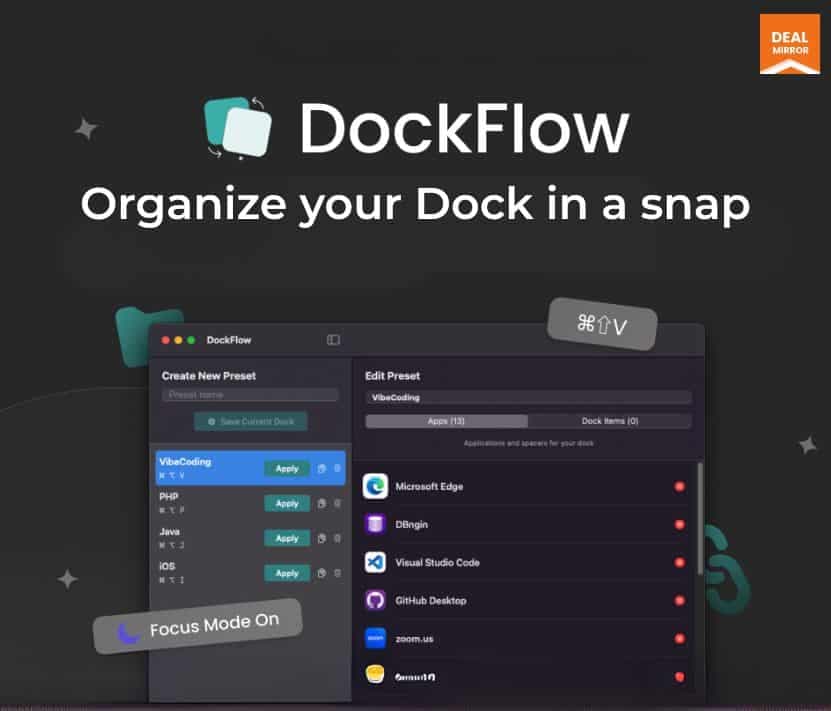
DockFlow at a glance
- Platform
- macOS
- Support
- Listed as fast support, by email.
Our take
Is DockFlow worth buying?
Based on the DealMirror listing, this is a single-Mac lifetime license for a small Dock-switching utility. It suits Mac users who change task contexts often. The page countdown reads zero, so confirm the deal is still open.
Good fit if
- You use a Mac and switch between very different kinds of work.
- You like to automate with Shortcuts or the terminal.
- You want a low-cost utility with a one-time license.
Skip it if
- You need it on more than one Mac.
- Your Mac runs an older macOS than 13.5.
Which DockFlow plan do you need?
Prices in USD, excluding tax.
| Mac | |
|---|---|
| One-time price | $10.99 |
| Regular price (DealMirror) | |
| You save | $39 |
| Macs | 1 |
| Saved Docks | Unlimited |
| Requires | macOS 13.5+ |
Before you buy: DealMirror's terms and extra costs
- Refund. 30-day refund for regular DealMirror buyers, 60 days for Prime members, per the DealMirror listing.
- Redeem. Redeem your code within 60 days of purchase.
- Platform. macOS 13.5 or later. License valid for one Mac.
- Support. Listed as fast support, by email.
What is DockFlow?
DockFlow is a macOS menu bar utility that saves separate Dock layouts and switches between them with a hotkey. You can add apps, folders, files and website links, insert spacers, and trigger switches through Apple Shortcuts or a command line tool. It uses the native Dock and needs no special permissions. The license covers one Mac running macOS 13.5 or later.
What DockFlow says it does
- Unlimited saved Dock layouts
- Switch with a hotkey, Apple Shortcuts or a CLI
- Uses the native macOS Dock and needs no special permissions
- Valid for one Mac, macOS 13.5 or later
Why DockFlow
One Dock for every kind of work gets cluttered. DockFlow lets you keep a Dock per task and swap them instantly. It is a single-Mac license and macOS only.
How does DockFlow work?
Redeem the code
Buy through DealMirror and redeem within 60 days.
Install the app
Install it on a Mac running macOS 13.5 or later.
Build Docks
Save layouts with apps, folders, files and links.
Set a hotkey
Assign a shortcut to each layout.
Automate (optional)
Trigger switches from Apple Shortcuts or the CLI.
Then it handles:
- Saving multiple Dock layouts
- Switching Docks with a hotkey
- Pinning folders, files and website links
- Grouping icons with spacers
- Automating with Apple Shortcuts
- Scripting switches from the terminal
Who is DockFlow for?
Built for
- Mac users who switch between coding, design and admin work
- Power users who automate with Shortcuts or scripts
- People who like a tidy Dock
Not for
- Windows or Linux users
- Macs older than macOS 13.5
- Buyers who need to use it on more than one Mac
What is included in DockFlow?
Dock layouts
- Unlimited saved Docks
- Apps, folders, files and website links
- Blank spacers
Switching and automation
- Custom hotkeys
- Apple Shortcuts integration
- CLI tools
- Optional app quitting on switch
Video review
We have not reviewed DockFlow on video yet.
Get notifiedBuyer reviews
No reviews yet. Bought DockFlow? Add it to your workspace and share what it replaced.
Add to your workspaceDockFlow questions
What is DockFlow?
A macOS menu bar app that saves several Dock layouts and switches between them with a hotkey, Shortcuts or a CLI.
How many Macs can I use it on?
The license is valid for one Mac.
Which macOS versions work?
macOS 13.5 or later.
Does it replace the Dock?
No. It uses the native macOS Dock and does not need special permissions.
What can a Dock contain?
Apps, folders, files and website links, plus blank spacers.
What is the refund policy?
DealMirror lists a 30-day refund for regular buyers and 60 days for Prime members. Redeem within 60 days.
Often compared with
These are other tools in the same space, not deals on GrabLTD.
- HiDock
- uBar
- Overflow
- Keystroke Pro
- Alfred
Sources
Checked . Prices and terms on this page come from: