Video & Audio · Lifetime deal
Nero Screen Recorder
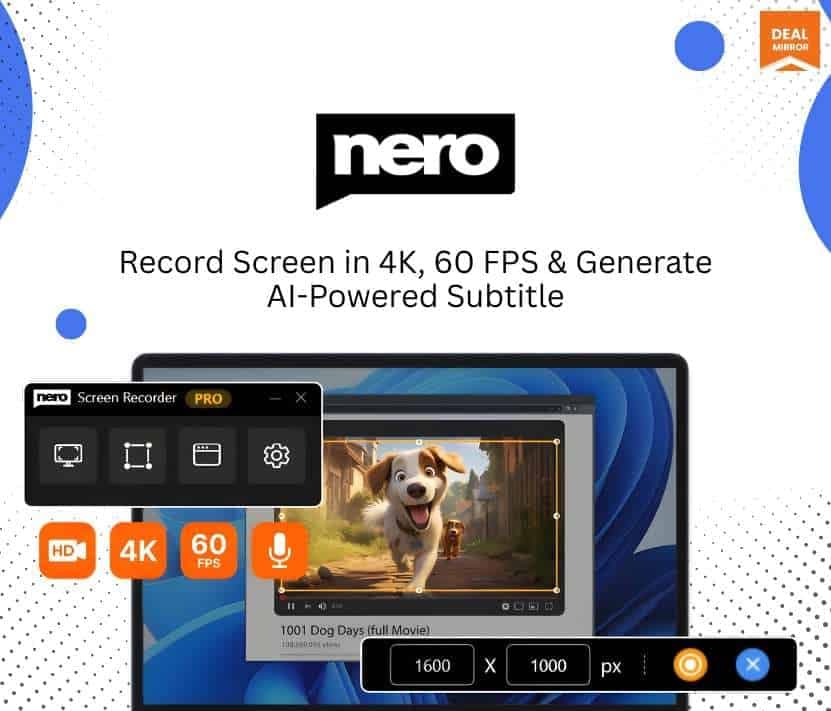
Windows screen recorder up to 4K 60 fps with AI subtitles and auto zoom, sold as one year of access.
Nero Screen Recorder at a glance
- Platform
- Windows
- Note
- This is one-year access, not lifetime. Plan for renewal after the year.
- Support
- Email support at the address Nero lists on the page.
Our take
Is Nero Screen Recorder worth buying?
Based on the DealMirror listing, this is one year of Pro access, not a lifetime deal, which matters for anyone comparing it with true lifetime offers. It suits Windows users who record tutorials and want AI subtitles. Budget for renewal or a replacement after the year.
Good fit if
- You record tutorials or gameplay on Windows.
- You want AI subtitles and auto zoom built in.
- You are fine with one year of access.
Skip it if
- You expect lifetime access.
- You use a Mac.
- You cannot send audio to a cloud service for subtitles.
Which Nero Screen Recorder plan do you need?
Prices in USD, excluding tax.
| Pro 2026 | |
|---|---|
| Access term | 1 year (not lifetime) |
| Max recording | 4K at 60 fps |
| Capture modes | Screen, window, custom area |
| AI subtitles | Speech-to-subtitle and translation |
| Platform | Windows |
Before you buy: DealMirror's terms and extra costs
- Refund. 30-day money-back guarantee through DealMirror. The page says Prime members get 60 days.
- Redeem. Redeem your code within 60 days of purchase.
- Note. This is one-year access, not lifetime. Plan for renewal after the year.
- Support. Email support at the address Nero lists on the page.
- Platform. Windows only.
- AI usage cost. AI subtitle features use temporary cloud processing at Nero.
What is Nero Screen Recorder?
Nero Screen Recorder is a Windows app that records your screen, a window or a custom area at up to 4K and 60 fps, with system audio, microphone and webcam. It adds AI speech-to-subtitle, subtitle translation, automatic and manual zoom, and basic trim. The DealMirror offer is one year of Pro access, not a lifetime license.
What Nero Screen Recorder says it does
- Records up to 4K (3840x2160) at 60 fps (Nero Screen Recorder's figure)
- Full screen, single window or custom-area capture
- AI speech-to-subtitle and subtitle translation on Pro
- Local processing, except AI subtitle features, which use temporary cloud processing
Why Nero Screen Recorder
It keeps screen recording simple for tutorials, gameplay and walkthroughs. The key catch is the term: this deal is one year of access, so it behaves like an annual plan, and subtitle features send audio or text to Nero's cloud.
How does Nero Screen Recorder work?
Redeem the code
Redeem the DealMirror code within 60 days of purchase.
Choose what to capture
Select full screen, a window or a custom area.
Add audio and webcam
Turn on system audio, microphone and webcam.
Record
Capture at your chosen resolution and frame rate.
Edit and export
Trim, add zoom or subtitles, then export.
Then it handles:
- Recording the full screen
- Recording one window
- Recording a custom area
- Capturing mic and system audio
- Adding webcam overlay
- Generating subtitles
- Zooming on clicks
Who is Nero Screen Recorder for?
Built for
- Educators and tutorial creators
- YouTubers and gamers
- Software trainers and business users
Not for
- Anyone who wants a lifetime license (this is one year of access)
- Mac users (Windows only)
- Users who need subtitles processed fully offline
What is included in Nero Screen Recorder?
Recording
- Three capture modes full screen, window, custom area
- 4K at 60 fps
- System audio and microphone
- Webcam overlay
Editing and AI
- Trim and cut
- AI speech-to-subtitle
- Subtitle translation Pro
- Auto and manual zoom
- Export in chosen resolution and format
Video review
We have not reviewed Nero Screen Recorder on video yet.
Get notifiedBuyer reviews
No reviews yet. Bought Nero Screen Recorder? Add it to your workspace and share what it replaced.
Add to your workspaceNero Screen Recorder questions
Is this a lifetime deal?
No. The listing sells one year of Pro access.
What can it record?
Full screen, a window or a custom area, up to 4K at 60 fps, with audio and webcam.
Does it upload my recordings?
The listing says processing is local, except AI subtitle features, which use temporary cloud processing.
Which platform does it run on?
Windows only.
What is the refund policy?
30 days through DealMirror, or 60 days for Prime members.
How long do I have to redeem?
60 days from purchase.
Often compared with
These are other tools in the same space, not deals on GrabLTD.
- OBS Studio
- Camtasia
- Bandicam
- Focusee
- ScreenFlow
Sources
Checked . Prices and terms on this page come from: