Storage & Files · Lifetime deal
Serveravatar
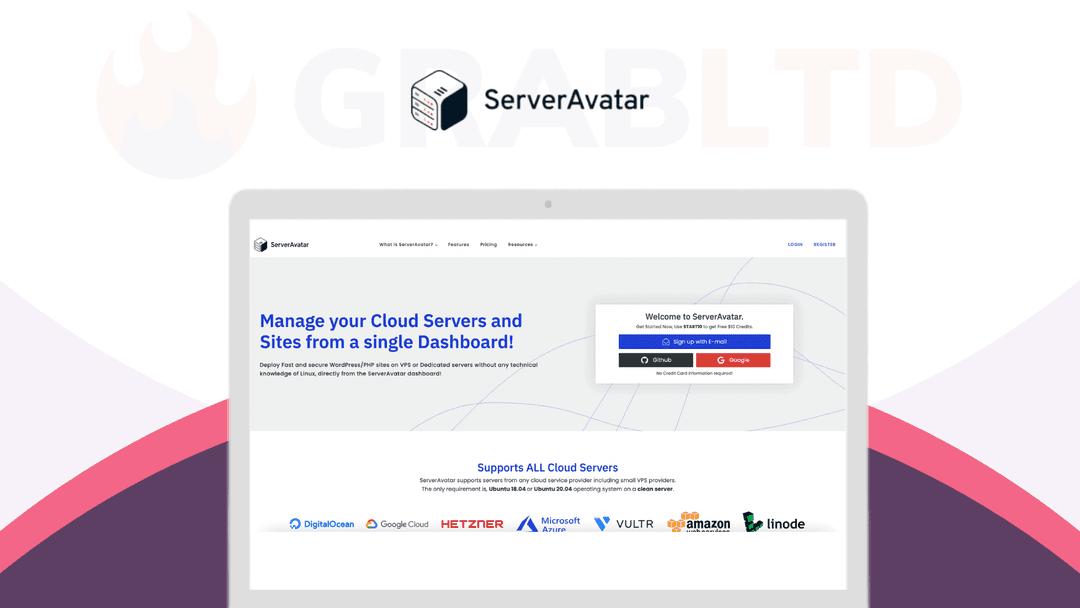
Use Serveravatar's user-friendly interface to start a hosting company on the cloud affordably using DigitalOcean, AWS, or Google, etc.
Which Serveravatar plan do you need?
Prices in USD, excluding tax.
| Plan A | |
|---|---|
| Includes | Unlimited Applications/Sites; WordPress Auto-Installer; Automatic SSL Certificates; Install Custom SSL Certificate; Secure PHPMyAdmin Access; MySQL Database Management; Set Custom PHP-CLI Version; Simple Firewall (On/Off); Multiple Application Domains; Server Health Monitor; Basic Log Viewer; System User Management; SSH Access Management; Multiple PHP Versions; Automatic/Manual Backups; Temporary Domains For Migration Or Testing; Server Health Monitor; Server Load Monitor; Cronjob Management; MySQL Query Monitor; Custom Server Resource Usage Alerts; Advanced Log Viewer; Custom PHP Settings; Service Management; Enable/Disable Applications/Sites; Application Uptime Monitoring; Remote Database Access; Advanced Firewall Management; Custom Webroot; WordPress With Remote Database; File Manager; Git Deployments (Coming Soon); Openlitespeed; High Priority Support |
What is Serveravatar?
Are you sick and tired of the slow and expensive shared hosting sites such as Godaddy, Hostgator that provide little to no support when you run into issues with your websites? Are you looking to move to inexpensive dedicated servers but don’t have the technical skills to set up one
Introducing [Serveravatar](https://grabltd.com/recommends/serveravatar/) !
Serveratar is a web-based system that helps you manage your Linux Servers from one dashboard. It will help you set up the servers and handle your websites by using Laravel, Code Ignitor, WordPress, or another PHP framework.
Create a server and connect it with [ServerAvatar](https://grabltd.com/recommends/serveravatar/) in a matter of minutes. ServerAvatar will configure your server with Optimized Apache or Nginx stack. It will also configure swap memory, Redis, Git, Composer, and other required packages to make sure your server is ready to host sites.

Multiple sites on a single VPS/VM/Server
You can host as many sites as you want on a single server. You can also have multiple sites with different frameworks and different domain names. And, It is also possible to have different sites on different PHP versions on a single server.
Live Server Resource Usage Information
While you are on the Server Panel, You will see live Server resource usage information to make sure your server is healthy while you are working on it. You can refresh the stats whenever you want to see the latest data directly from the server, in seconds!
Create Servers directly from ServerAvatar
You can integrate your Digitalocean, Vultr, or Lightsail account with your ServerAvatar account. After that, You won’t have to go to the Cloud Service Provider to create or delete a server. You can create a server as well as configure it automatically directly from the ServerAvatar Panel.
Custom PHP-CLI Version
It will take a few clicks and a minute to change the PHP-CLI version on your server. This feature is especially important if your application is sensitive to different PHP versions. You can run PHP from the command line with your desired version, managed directly from ServerAvatar.
Service Management
A server has a lot of services running, Like Apache, MySQl, different versions of PHP and many more. Sometimes you need to restart/stop/start them. You can do it directly from the Server Panel. You can also see the CPU and RAM usage of a specific service running on your server.
Basic and Advanced Log Viewer
Logs are important for Debugging. We have a simple log viewer that will help you see a lot of important log files on your server. You can “tail” a log file with a specific number of lines. And, You can also highlight or filter a specific word from a log file.
Easy System User Management
System users are unprivileged and have access to specific sites. You can create a specific site under a specific system user account. A system user can access only the sites assigned to them. You can also manage SFTP/SSH access as well as the SSH key for a specific system user.
Alternate For – GridPane,
Get a lifetime deal to Serveravatar now!
Video review
We have not reviewed Serveravatar on video yet.
Get notifiedBuyer reviews
No reviews yet. Bought Serveravatar? Add it to your workspace and share what it replaced.
Add to your workspaceServeravatar questions
Is the ServerAvatar lifetime deal still available?
No. The ServerAvatar deal sold via DigitalThink is archived and no longer available. ServerAvatar (serveravatar.io) continues as an active subscription service with plans starting around $2–3 per month per server.
What is ServerAvatar?
ServerAvatar is a web-based server management control panel that connects to your cloud VPS (DigitalOcean, AWS, Vultr, Hetzner, Google Cloud, Lightsail, etc.) and lets you deploy and manage websites, PHP apps, WordPress installations, and Laravel projects without needing Linux command-line expertise.
Do I still need a cloud server to use ServerAvatar?
Yes. ServerAvatar is a management layer, not a hosting provider. You supply the VPS or cloud instance from any provider; ServerAvatar configures the stack (Nginx or Apache, PHP, MySQL, Redis, Git) and manages it through its dashboard.
How many sites can I host on one server through ServerAvatar?
Unlimited. You can run multiple sites with different frameworks, domain names, and PHP versions on a single VPS managed by ServerAvatar.
Does ServerAvatar handle SSL certificates automatically?
Yes. ServerAvatar automates Let's Encrypt SSL provisioning and renewal for all hosted domains, alongside firewall management and Fail2Ban intrusion prevention.
Can I create servers directly from the ServerAvatar dashboard?
Yes. If you connect your DigitalOcean, Vultr, or AWS Lightsail account, you can provision new cloud servers directly from the ServerAvatar panel without logging into the cloud provider separately.
What are the main alternatives to ServerAvatar?
Active alternatives include GridPane, RunCloud, SpinupWP, Ploi, and Cloudways (managed hosting with similar ease-of-use).
Often compared with
These are other tools in the same space, not deals on GrabLTD.
- GridPane
- RunCloud
- SpinupWP
- Ploi
- Cloudways